
Free Antivirus Protection PC
Blue Application
Download Free Antivirus Protection on PC With GameLoop Emulator
Free Antivirus Protection sa PC
Ang Free Antivirus Protection, na nagmumula sa developer na Blue Application, ay tumatakbo sa Android systerm sa nakaraan.
Ngayon, maaari mong laruin ang Free Antivirus Protection sa PC gamit ang GameLoop nang maayos.
I-download ito sa GameLoop library o mga resulta ng paghahanap. Hindi na tumitingin sa baterya o nakakadismaya na mga tawag sa maling oras.
I-enjoy lang ang Free Antivirus Protection PC sa malaking screen nang libre!
Free Antivirus Protection Panimula
Download the FREE antivirus app. Free Antivirus Protection is lightweight, agile and free. Free Antivirus Protection combines a mobile-optimized antivirus scanner with a mobile security manager to safeguard you against viruses, sensitive apps and kill process and apps to clean memory.
Features and Benefits:
--Anti-Virus & Security Protection
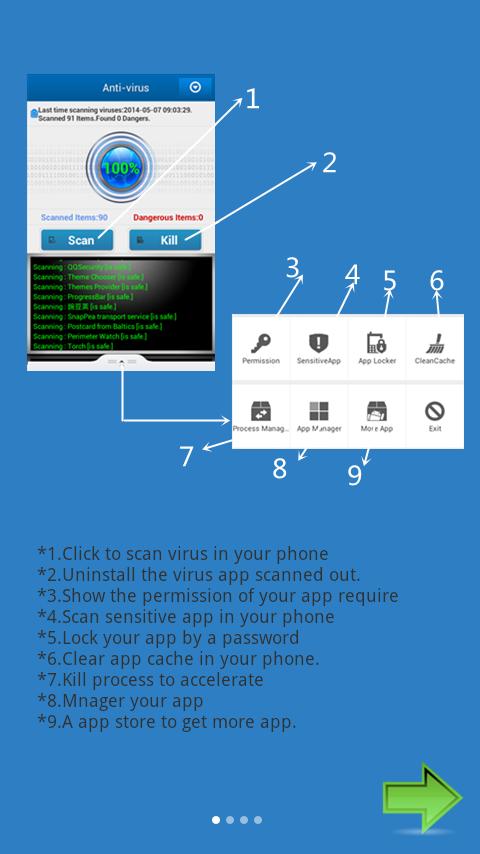
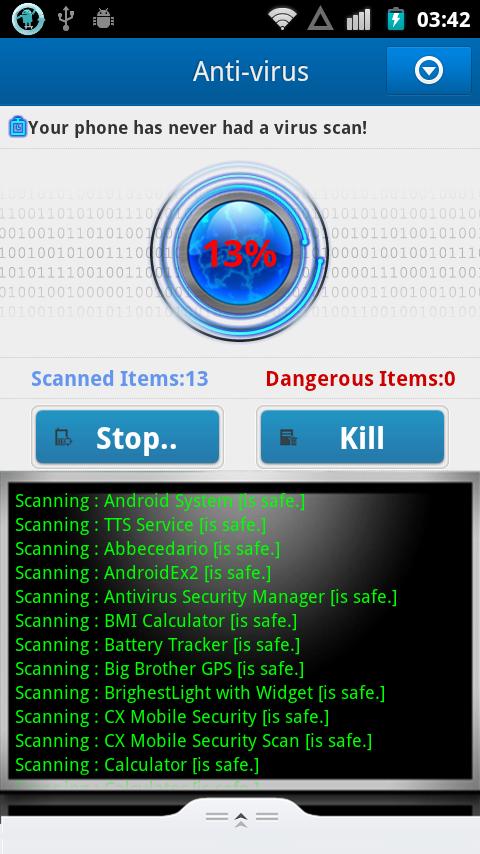
-Antivirus: blocks viruses, and uninstalls malicious apps to protect your phone.
-Scan and detect threats: scan every installed apps & check permissions.
-Lock apps as you wish and clean to free memory
-Simple to use and control for Android users
Maximum antivirus protection for Android smartphones, tablets.
? Protection against viruses and other threats: Protect your device against all types of viruses and all kinds of threats.
? Permanent virus protection: Automatically analyzes permissions when you install new applications or updates of the same without affecting the performance of your device.
? Permission checker: Checks and displays the access permissions of installed apps. Free Antivirus Protection identifies those apps on your device whose permissions could allow them to compromise your privacy or cost you money in outgoing calls/texts.
?Manage apps and process: uninstall users’ apps and kill useless process in the background to free memory
?App locker: lock any app you want with password to protect your privacy
? Clean cache to remove useless files and get more space
Free Antivirus Protection detects and removes all the latest malicious apps and viruses, and is the security app that protects your privacy and data from High Risk apps. Free Antivirus Protection does not adversely affect your smartphone / tablet or battery life and is very easy to use.
You may want to read information about antivirus from wiki.
Antivirus, anti-virus could be computer software used to prevent, detect and remove malicious computer viruses. Most software described as antivirus also works against other types of malware.
Preview
Information
Developer
Blue Application
Latest Version
43002
Last Updated
2014-11-06
Category
Tools
Available on
Google Play
Show More
How to play Free Antivirus Protection with GameLoop on PC
1. Download GameLoop from the official website, then run the exe file to install GameLoop
2. Open GameLoop and search for “Free Antivirus Protection” , find Free Antivirus Protection in the search results and click “Install”
3. Enjoy playing Free Antivirus Protection on GameLoop
Minimum requirements
OS
Windows 8.1 64-bit or Windows 10 64-bit
GPU
GTX 1050
CPU
i3-8300
Memory
8GB RAM
Storage
1GB available space
Recommended requirements
OS
Windows 8.1 64-bit or Windows 10 64-bit
GPU
GTX 1050
CPU
i3-9320
Memory
16GB RAM
Storage
1GB available space