
Heavy Crane Simulator Drive 3D PC
Car Sim Games
Download Heavy Crane Simulator Drive 3D on PC With GameLoop Emulator
Heavy Crane Simulator Drive 3D sa PC
Ang Heavy Crane Simulator Drive 3D, na nagmumula sa developer na Car Sim Games, ay tumatakbo sa Android systerm sa nakaraan.
Ngayon, maaari mong laruin ang Heavy Crane Simulator Drive 3D sa PC gamit ang GameLoop nang maayos.
I-download ito sa GameLoop library o mga resulta ng paghahanap. Hindi na tumitingin sa baterya o nakakadismaya na mga tawag sa maling oras.
I-enjoy lang ang Heavy Crane Simulator Drive 3D PC sa malaking screen nang libre!
Heavy Crane Simulator Drive 3D Panimula
If you are interested in construction equipment, Heavy Crane Simulator is the game for you.
With the impressive gigantic crane, you will complete your missions by carrying various loads.
An enjoyable game awaits you with amazing HD quality models.
Are you ready to be a crane operator?
All controls of the crane truck work properly in our game. Thanks to the hydraulic system, you will be able to control the crane easily! A comfortable playground is with you in the fairly large construction site.
How to play?
Our game consists of various missions and there are many different sections. When you first start the game, you will learn very easily which button does what with the learning mode.
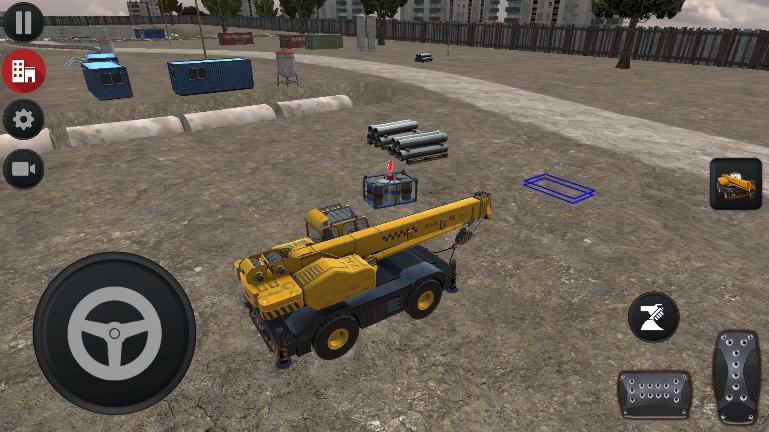
Drive the crane in our game and go to the area where the load you will carry. Then, approaching the cargo where the OK mark is on, raise the crane on the hydraulic legs.
Align the boom with the red dot on the cargo by controlling the winch boom with the buttons. If you have, a green button will appear in the middle of the buttons on the right of the screen. When you press this button, the cargo will be attached to the crane with a rope.
After the cargo or load is tied with a rope, take the load to the desired green area with the buttons. When you bring the load to the green zone, you will get rid of the ropes by pressing the red button that appears. Here is the task done. Other chapters will not be so easy.
We have no doubt that you will like our Heavy Crane Simulation game! :) Have fun, have fun playing games.
Preview

Tags
VehicleInformation
Developer
Car Sim Games
Latest Version
1.5
Last Updated
2022-10-15
Category
Simulation
Available on
Google Play
Show More
How to play Heavy Crane Simulator Drive 3D with GameLoop on PC
1. Download GameLoop from the official website, then run the exe file to install GameLoop
2. Open GameLoop and search for “Heavy Crane Simulator Drive 3D” , find Heavy Crane Simulator Drive 3D in the search results and click “Install”
3. Enjoy playing Heavy Crane Simulator Drive 3D on GameLoop
Minimum requirements
OS
Windows 8.1 64-bit or Windows 10 64-bit
GPU
GTX 1050
CPU
i3-8300
Memory
8GB RAM
Storage
1GB available space
Recommended requirements
OS
Windows 8.1 64-bit or Windows 10 64-bit
GPU
GTX 1050
CPU
i3-9320
Memory
16GB RAM
Storage
1GB available space