
Survey Note - GPS Camera for engineers & surveyors PC
Michael Kostner
Download Survey Note - GPS Camera for engineers & surveyors on PC With GameLoop Emulator
Survey Note - GPS Camera for engineers & surveyors sa PC
Ang Survey Note - GPS Camera for engineers & surveyors, na nagmumula sa developer na Michael Kostner, ay tumatakbo sa Android systerm sa nakaraan.
Ngayon, maaari mong laruin ang Survey Note - GPS Camera for engineers & surveyors sa PC gamit ang GameLoop nang maayos.
I-download ito sa GameLoop library o mga resulta ng paghahanap. Hindi na tumitingin sa baterya o nakakadismaya na mga tawag sa maling oras.
I-enjoy lang ang Survey Note - GPS Camera for engineers & surveyors PC sa malaking screen nang libre!
Survey Note - GPS Camera for engineers & surveyors Panimula
SurveyNote is a photo documentation app for civil engineers, land surveyors and other construction professionals. The app allows to take photos on site and simultaneously add information both to the file name and to the photo with use of a watermark. Supplementary information includes GPS coordinates (WGS84, UTM, British National Grid or Irish Grid), date, notes, chainage, custom logo and more. Furthermore, if enabled, a text file is produced, tabulating the taken notes.
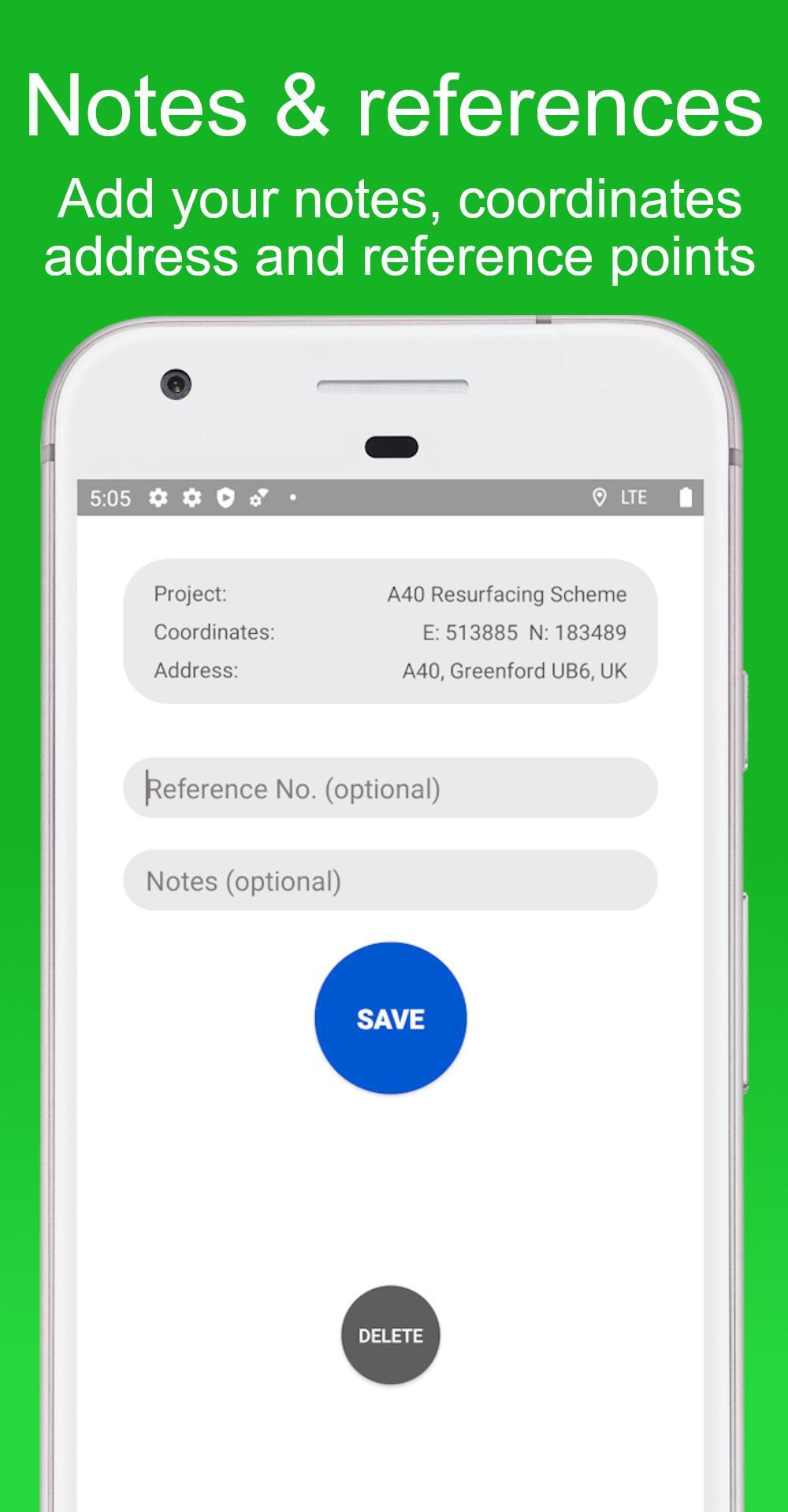
SurveyNote has been developed specifically for civil engineers and land surveyors to make capturing pictures and taking notes more efficiently, combining both processes in one single app. The project name, notes and more information e.g. reference no./chainage can be added directly in the app while taking pictures. Additional relevant data for civil engineers, e.g. GPS location as national grid reference coordinates, address, date and time will be added by SurveyNote.
Supplementary information include:
- Project name
- Taken notes
- WGS84 coordinates
- UTM coordinates
- British National Grid coordinates
- Irish Grid coordinates
- Date and time
- Address
- Customized company logo
- Reference No. / Chainage
All information can be added as a watermark on the taken photos. Additionally, all information can be added to the file name for a better overview when using the images onto a computer. If enabled, a text file will be created, tabulating all taken notes, and can be edited directly in the app while on site. A custom company logo can be added to the watermark.
The GPS location accuracy varies depending on the device, location and internet connection.
Keywords: Watermark, GPS Camera, GPS Camera App, survey note, timestamp, chainage, reference number, logo, file name, text file, civil engineering, civil engineer, land surveying, land surveyor, construction, on site, onsite, surveying, notes, taking notes, camera, gps, gps location, British National Grid, OS National Grid, British Grid, Ordnance Survey, Irish National Grid, Irish Grid, UTM, Universal Transverse Mercator, World Geodetic System 1984, WGS84, WGS 84, Grid Reference, United Kingdom, Great Britain, Scotland, Wales, England, Northern Ireland, Ireland, taking notes, GPS Camera, GPS Camera App, survey note, geotechnical engineering, highway engineering, transport engineering, road maintenance, construction engineering, cadastral survey, environmental engineering, structural engineering, construction surveying, engineering technician, institution of civil engineers, ICE, institution of highway engineers, IHE, measurement, GNSS, date stamp, geolocation, survey note.
Preview

Information
Developer
Michael Kostner
Latest Version
1.0.11
Last Updated
2020-12-07
Category
Photography
Available on
Google Play
Show More
How to play Survey Note - GPS Camera for engineers & surveyors with GameLoop on PC
1. Download GameLoop from the official website, then run the exe file to install GameLoop
2. Open GameLoop and search for “Survey Note - GPS Camera for engineers & surveyors” , find Survey Note - GPS Camera for engineers & surveyors in the search results and click “Install”
3. Enjoy playing Survey Note - GPS Camera for engineers & surveyors on GameLoop
Minimum requirements
OS
Windows 8.1 64-bit or Windows 10 64-bit
GPU
GTX 1050
CPU
i3-8300
Memory
8GB RAM
Storage
1GB available space
Recommended requirements
OS
Windows 8.1 64-bit or Windows 10 64-bit
GPU
GTX 1050
CPU
i3-9320
Memory
16GB RAM
Storage
1GB available space