EmoCam - Camera for Emotion Au PC
Pujana
Download EmoCam - Camera for Emotion Au on PC With GameLoop Emulator
EmoCam - Camera for Emotion Au sa PC
Ang EmoCam - Camera for Emotion Au, na nagmumula sa developer na Pujana, ay tumatakbo sa Android systerm sa nakaraan.
Ngayon, maaari mong laruin ang EmoCam - Camera for Emotion Au sa PC gamit ang GameLoop nang maayos.
I-download ito sa GameLoop library o mga resulta ng paghahanap. Hindi na tumitingin sa baterya o nakakadismaya na mga tawag sa maling oras.
I-enjoy lang ang EmoCam - Camera for Emotion Au PC sa malaking screen nang libre!
EmoCam - Camera for Emotion Au Panimula
Experience a smart AI camera that reads your emotion!
See how to use: https://p-library.com/a/emocam/
** This app in under testing and problem fixing **
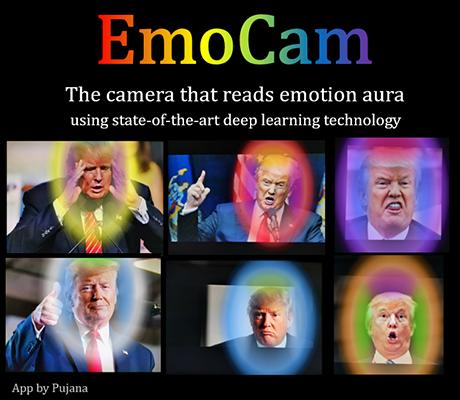
This tool can analyze your emotions based on facial expressions and visualize them as augmented reality aura. The state-of-the-art convolutional neural networks (deep learning models) are employed for face detection and facial expression classification. Moreover, a fuzzy-logic-inspired algorithm for generating color gradients, as well as a vector-quantization-based stabilizer for noise reduction, are invented to make smooth real-time colorization. Basically, this app was built on top a combination of powerful AI algorithms.
Emotion
Blue: Clam-Sadness
Green: Happy, Joyful
Magenta: Disgust
Orange: Confused, Surprised
Red: Angry, Upset
White: Neutral
Yellow: Anxiety, Stressed, Fear
The 3 Sections
Outer Color (1): Primary emotion, the most dominance emotion.
Color on top (2): Secondary emotion
Color on two sides (3): Tertiary
Preview

Tags
PhotographyInformation
Developer
Pujana
Latest Version
1.1.1
Last Updated
2020-10-25
Category
Photography
Available on
Google Play
Show More
How to play EmoCam - Camera for Emotion Au with GameLoop on PC
1. Download GameLoop from the official website, then run the exe file to install GameLoop
2. Open GameLoop and search for “EmoCam - Camera for Emotion Au” , find EmoCam - Camera for Emotion Au in the search results and click “Install”
3. Enjoy playing EmoCam - Camera for Emotion Au on GameLoop
Minimum requirements
OS
Windows 8.1 64-bit or Windows 10 64-bit
GPU
GTX 1050
CPU
i3-8300
Memory
8GB RAM
Storage
1GB available space
Recommended requirements
OS
Windows 8.1 64-bit or Windows 10 64-bit
GPU
GTX 1050
CPU
i3-9320
Memory
16GB RAM
Storage
1GB available space