Smart Screen off: Double tap PC
keytools inc
Download Smart Screen off: Double tap on PC With GameLoop Emulator
Smart Screen off: Double tap sa PC
Ang Smart Screen off: Double tap, na nagmumula sa developer na keytools inc, ay tumatakbo sa Android systerm sa nakaraan.
Ngayon, maaari mong laruin ang Smart Screen off: Double tap sa PC gamit ang GameLoop nang maayos.
I-download ito sa GameLoop library o mga resulta ng paghahanap. Hindi na tumitingin sa baterya o nakakadismaya na mga tawag sa maling oras.
I-enjoy lang ang Smart Screen off: Double tap PC sa malaking screen nang libre!
Smart Screen off: Double tap Panimula
The all-new Smart Screen Off Android app is the ultimate screen optimizer app. Smart Screen Off app is a fully customizable feature-driven app that assists the user in dealing with the screen display time easily and efficiently.
Smart Screen Off app is free to install and operate. Smart Screen Off app has an easy installation process and easy-to-use functionality. Smart Screen Off app imbibes professional and latest material design along with straightforward and user-friendly GUI.This app is a full-fledged Android app designed by professional Android designers and Android developers!
Highlights:
- Press power icon button to activate screen lock.
- Activate device administrator for privilege to turn off screen.
- Activate Smart Screen Off as device admin app.
- Press power icon button to deactivate Screen locks.
- Types of Settings: Double Tap settings, proximity sensor settings, advanced settings, Time value settings, Utilities and Permission.
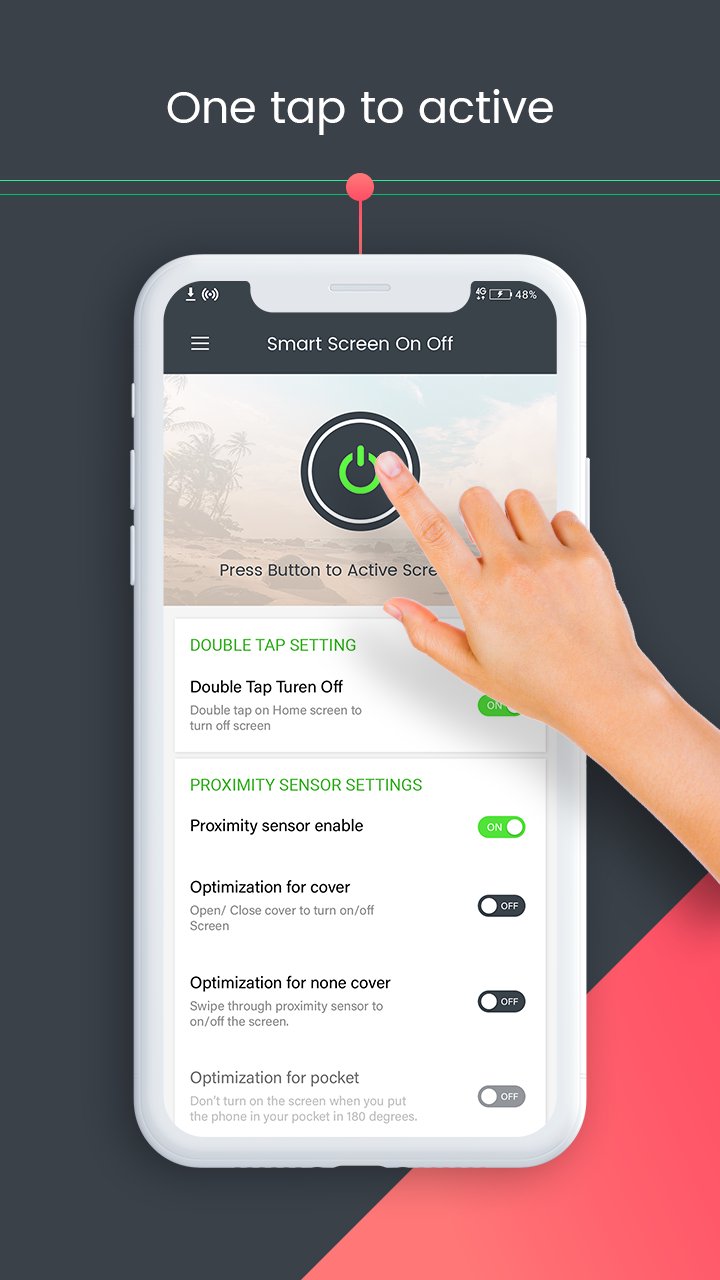
DOUBLE TAP SETTINGS
Toggle option is facilitated. Double tap on Home Screen to turn off screen.
PROXIMITY SENSOR SETTINGS
Proximity sensor enable. Screen off using proximity sensor.
Optimization for Cover. Open/Close cover to turn on/off screen.
Optimization for non-cover. Swipe through proximity server to turn on/off screen.
ADVANCED SETTINGS
Show floating popup. Screen turn faster. Set the floating popup opacity via slider.
Disable in landscape mode. Useful for taking photos or watching movies.
Play sound. Play sound when screen turn on/off automatically.
Vibrate. Vibrate when screen turn on/off automatically.
TIME VALUE SETTINGS
Turn On. Turn on screen with proximity server.
Turn Off. Turn off screen with proximity sensor.
Screen on timeout value. Time-based. Automatically screen on after selected seconds.
Screen off timeout value. Time-based. Put your hand on sensor to screen off after selected seconds.
UTILITIES
Optimization.
Hide Notification.
Schedule.
Language.
Enable sleeping time Set sleep time and wake up time.
PERMISSION
1. FOREGROUND_SERVICE_SPECIAL_USE – Used to run a foreground service to detect double tap on the home screen and turn off the screen instantly.
2. BIND_ACCESSIBILITY_SERVICE – Used only to detect whether the user is on the home screen to enable the double tap screen-off feature.
3. Device Administrator Permission – Required to lock the device screen when the user performs the double tap gesture.
Smart Screen Off is a lightweight application, will not drain the device memory and other resources. Smart Screen Off app is compatible with almost all screen resolutions of mobile and tablet devices. Once installed no further internet connection is required by the Smart Screen Off app. Smart Screen app serves its purpose effectively and is a reliable Android app.
Hurry Up!!!
Install the Smart Screen off: Double tap to off screen app NOW!!!
Preview
Tags
PersonalizationInformation
Developer
keytools inc
Latest Version
7.3
Last Updated
2026-01-21
Category
Personalization
Available on
Google Play
Show More
How to play Smart Screen off: Double tap with GameLoop on PC
1. Download GameLoop from the official website, then run the exe file to install GameLoop
2. Open GameLoop and search for “Smart Screen off: Double tap” , find Smart Screen off: Double tap in the search results and click “Install”
3. Enjoy playing Smart Screen off: Double tap on GameLoop
Minimum requirements
OS
Windows 8.1 64-bit or Windows 10 64-bit
GPU
GTX 1050
CPU
i3-8300
Memory
8GB RAM
Storage
1GB available space
Recommended requirements
OS
Windows 8.1 64-bit or Windows 10 64-bit
GPU
GTX 1050
CPU
i3-9320
Memory
16GB RAM
Storage
1GB available space