![物理キーボード配列変更 (+親指Ctrl) [英語配列]](https://static.gameloop.com/img/f66d3ea74f81d6ea95afbde7fe5f42f8.png?imageMogr2/thumbnail/172.8x172.8/format/webp)
物理キーボード配列変更 (+親指Ctrl) [英語配列] PC
ShiftRot
Download 物理キーボード配列変更 (+親指Ctrl) [英語配列] on PC With GameLoop Emulator
物理キーボード配列変更 (+親指Ctrl) [英語配列] sa PC
Ang 物理キーボード配列変更 (+親指Ctrl) [英語配列], na nagmumula sa developer na ShiftRot, ay tumatakbo sa Android systerm sa nakaraan.
Ngayon, maaari mong laruin ang 物理キーボード配列変更 (+親指Ctrl) [英語配列] sa PC gamit ang GameLoop nang maayos.
I-download ito sa GameLoop library o mga resulta ng paghahanap. Hindi na tumitingin sa baterya o nakakadismaya na mga tawag sa maling oras.
I-enjoy lang ang 物理キーボード配列変更 (+親指Ctrl) [英語配列] PC sa malaking screen nang libre!
物理キーボード配列変更 (+親指Ctrl) [英語配列] Panimula
Overview:
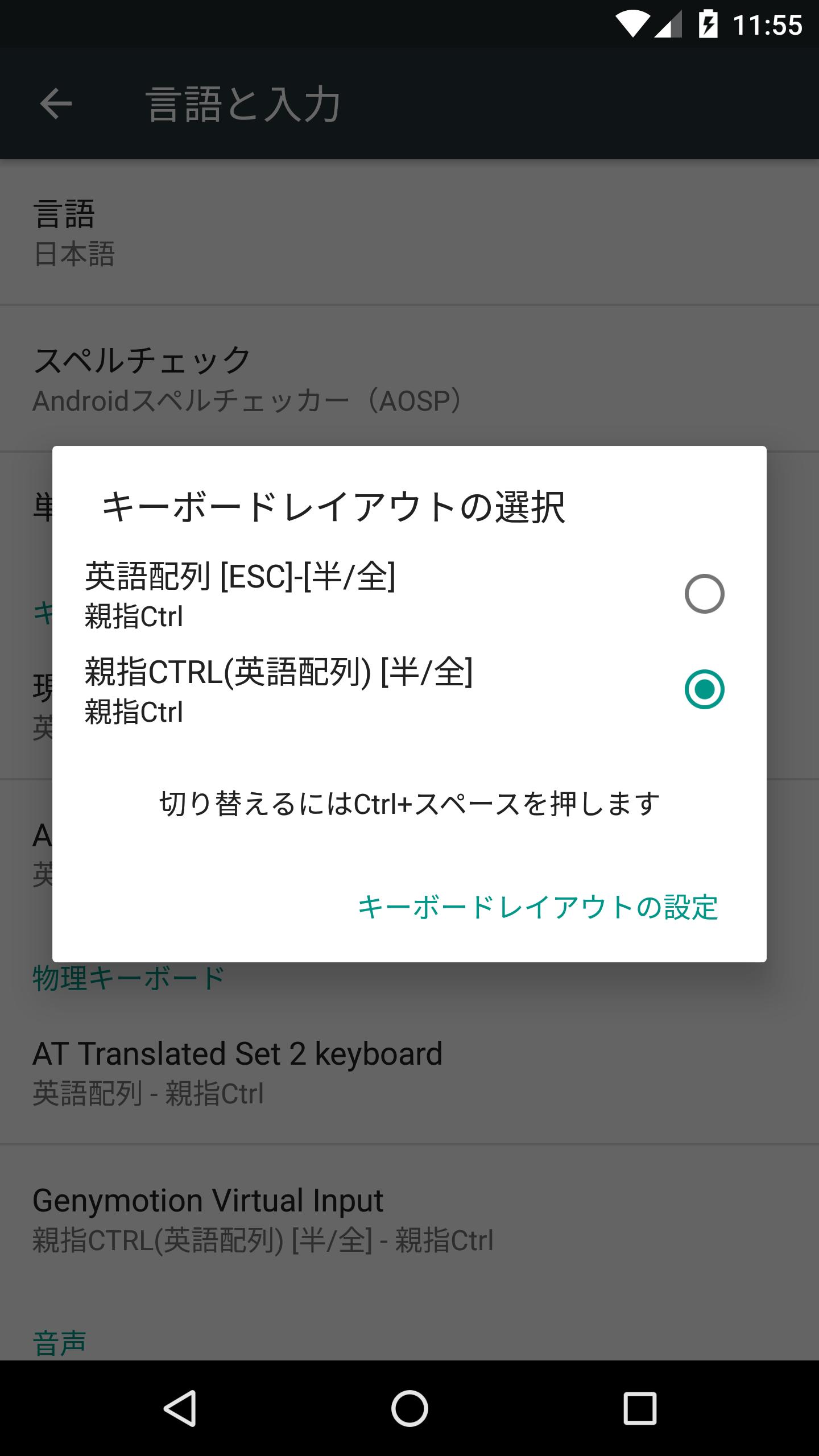
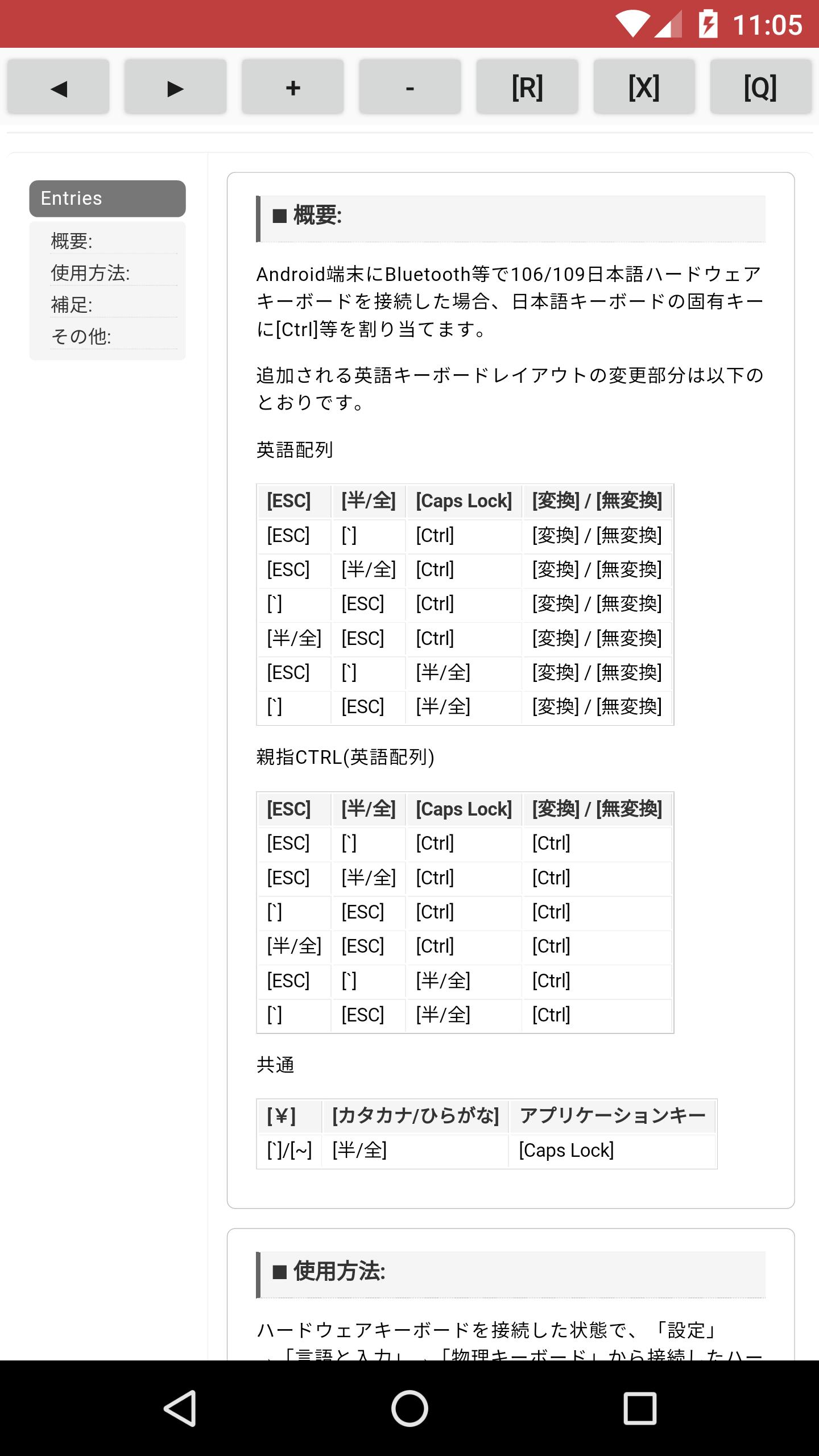
When using Japanese layout physical keyboards such as 106/109 or English layout (US) physical keyboards such as 101/104, replacing [CapsLock] and [Ctrl], or using Japanese layout physical keyboards in English layout Add a layout that replaces [Convert]/[Non-convert] with [Ctrl].
! ! ! Note! ! !
It cannot be used on devices where the manufacturer disables "Select keyboard layout" when tapping "Settings" → "Languages & input" → "Physical keyboard" when a physical keyboard is connected.
This limitation is due to the Android device manufacturer and cannot be handled by this application.
* It does not change the layout of the soft keyboard.
* The basic layout is "English layout". The Japanese layout keyboard layout is published as a separate application.
Preview
Tags
PersonalizationInformation
Developer
ShiftRot
Latest Version
1.8
Last Updated
2023-08-18
Category
Personalization
Available on
Google Play
Show More
How to play 物理キーボード配列変更 (+親指Ctrl) [英語配列] with GameLoop on PC
1. Download GameLoop from the official website, then run the exe file to install GameLoop
2. Open GameLoop and search for “物理キーボード配列変更 (+親指Ctrl) [英語配列]” , find 物理キーボード配列変更 (+親指Ctrl) [英語配列] in the search results and click “Install”
3. Enjoy playing 物理キーボード配列変更 (+親指Ctrl) [英語配列] on GameLoop
Minimum requirements
OS
Windows 8.1 64-bit or Windows 10 64-bit
GPU
GTX 1050
CPU
i3-8300
Memory
8GB RAM
Storage
1GB available space
Recommended requirements
OS
Windows 8.1 64-bit or Windows 10 64-bit
GPU
GTX 1050
CPU
i3-9320
Memory
16GB RAM
Storage
1GB available space