Yspeed: GPS Speedometer PC
dimsoft
Download Yspeed: GPS Speedometer on PC With GameLoop Emulator
Yspeed: GPS Speedometer sa PC
Ang Yspeed: GPS Speedometer, na nagmumula sa developer na dimsoft, ay tumatakbo sa Android systerm sa nakaraan.
Ngayon, maaari mong laruin ang Yspeed: GPS Speedometer sa PC gamit ang GameLoop nang maayos.
I-download ito sa GameLoop library o mga resulta ng paghahanap. Hindi na tumitingin sa baterya o nakakadismaya na mga tawag sa maling oras.
I-enjoy lang ang Yspeed: GPS Speedometer PC sa malaking screen nang libre!
Yspeed: GPS Speedometer Panimula
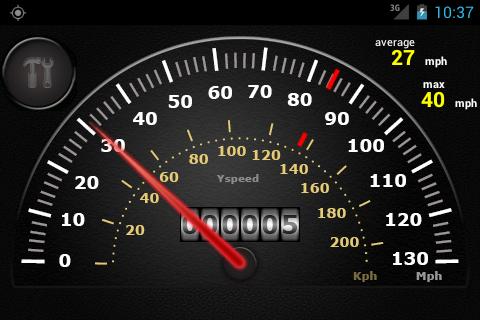
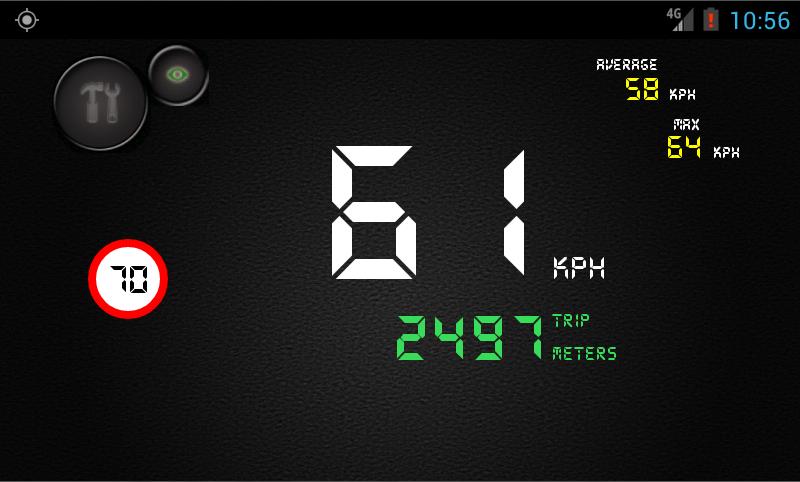
YSpeed is a speedometer which uses GPS sensor to show your current, average and max speed.
Try it if you are searching for a simple speedometer which looks like real car speedometer.
Features:
- Analog and digit mode
- Max and average speed.
- Speeding alert. The application will notify you with an alert sound when you go over speed limit.
- 8 predefined speed limits. You can choose them by pressing on miles/kilometers scale.
- The speedometer has two speed scales: miles and kilometers.
- Odometer units: miles, kilometers, meters.
- It has battery keeper which allows to be automatically turned off when battery is too low.
- It also supports old android versions (including Android 1.5).
Preview
Information
Developer
dimsoft
Latest Version
2.0
Last Updated
2017-08-24
Category
Maps-navigation
Available on
Google Play
Show More
How to play Yspeed: GPS Speedometer with GameLoop on PC
1. Download GameLoop from the official website, then run the exe file to install GameLoop
2. Open GameLoop and search for “Yspeed: GPS Speedometer” , find Yspeed: GPS Speedometer in the search results and click “Install”
3. Enjoy playing Yspeed: GPS Speedometer on GameLoop
Minimum requirements
OS
Windows 8.1 64-bit or Windows 10 64-bit
GPU
GTX 1050
CPU
i3-8300
Memory
8GB RAM
Storage
1GB available space
Recommended requirements
OS
Windows 8.1 64-bit or Windows 10 64-bit
GPU
GTX 1050
CPU
i3-9320
Memory
16GB RAM
Storage
1GB available space