Start MyPeugeot PC
Peugeot Automobiles
Download Start MyPeugeot on PC With GameLoop Emulator
Start MyPeugeot sa PC
Ang Start MyPeugeot, na nagmumula sa developer na Peugeot Automobiles, ay tumatakbo sa Android systerm sa nakaraan.
Ngayon, maaari mong laruin ang Start MyPeugeot sa PC gamit ang GameLoop nang maayos.
I-download ito sa GameLoop library o mga resulta ng paghahanap. Hindi na tumitingin sa baterya o nakakadismaya na mga tawag sa maling oras.
I-enjoy lang ang Start MyPeugeot PC sa malaking screen nang libre!
Start MyPeugeot Panimula
Available on the 108, New 208, 308, Partner Tepee and Partner, digital and easy to use, the Start MyPeugeot application helps you to get to know the controls on your new vehicle.
Install the Start MyPeugeot application on your smartphone, then view the information extracted from the handbook, the complete printed edition of which can be found in the vehicle's handbook pack(1).
A network connection (Wi-Fi, 3G, 4G,…) is required to download the Start MyPeugeot application from the Store.
As a safety measure, Start MyPeugeot should only be viewed when the vehicle is stationary.
The Start MyPeugeot application is also certified MirrorLink TM (2). For vehicles equipped with a Mirror Screen (3) touch screen, connect your smartphone to the USB port. You will then have access to the data from Start MyPeugeot in the vehicle's touch screen, when stationary.
As a safety measure, the Start MyPeugeot application in the touch screen should only be viewed when the vehicle is stationary.
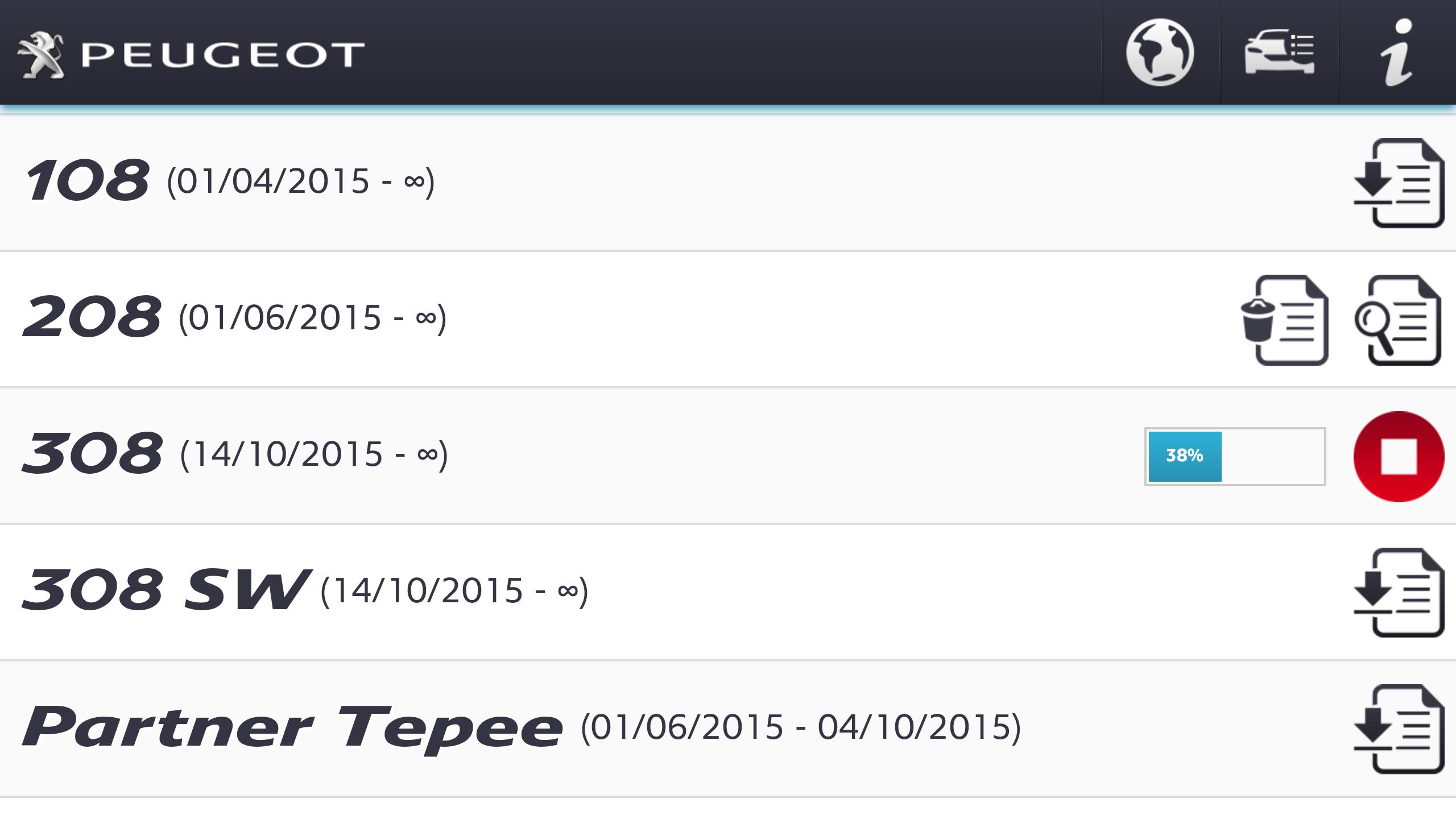
Open Start MyPeugeot then download the descriptions and illustrations for the desired vehicle(s). You can then view the information in the application with a network connection.
Start MyPeugeotis intuitive and simple in use.
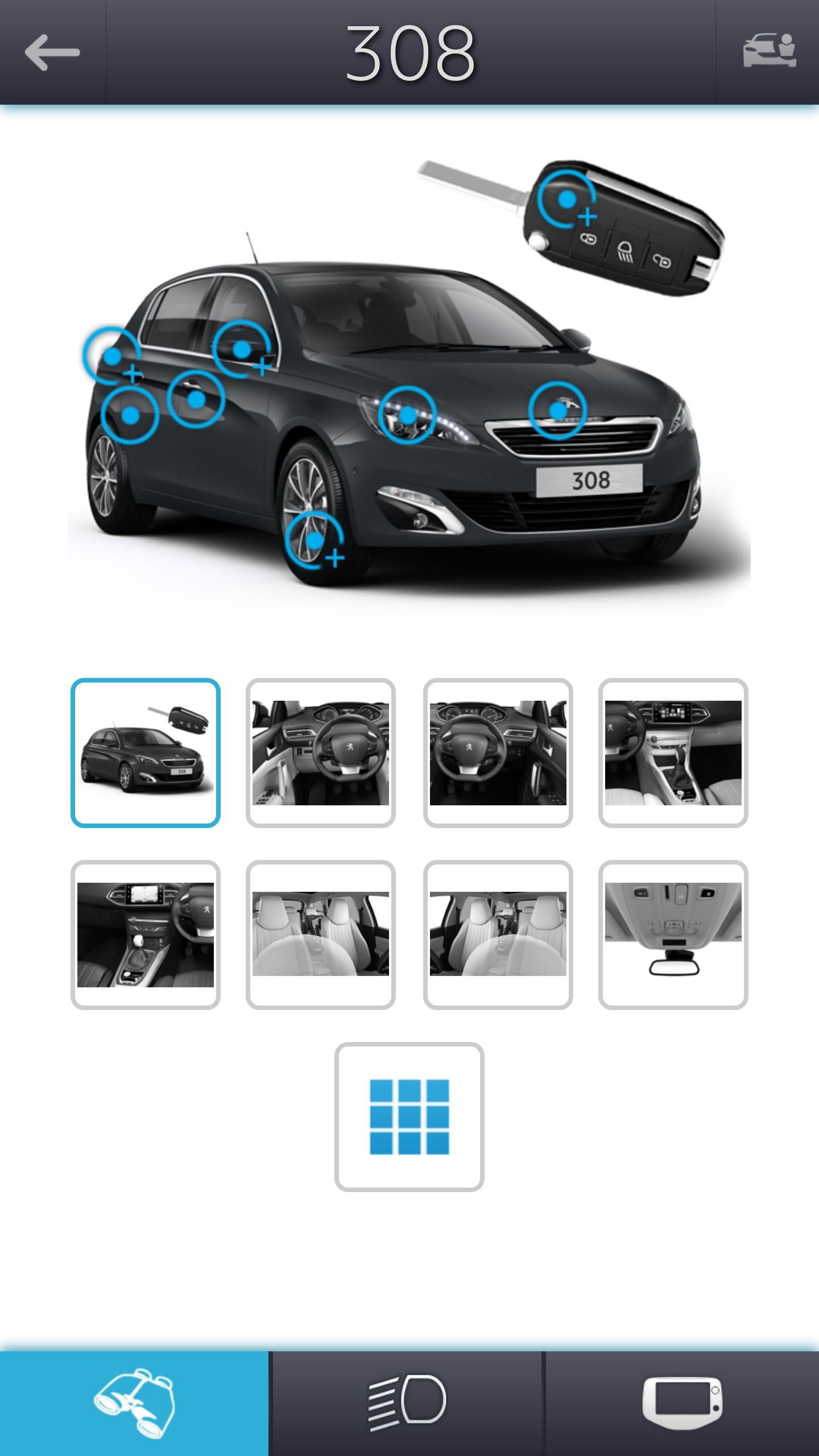
In the upper menu bar press :
• the "Planet" icon to choose the language, if different from that of the smartphone.
• the "Vehicle" icon to select a vehicle and view the extracts from the associated documents. Press again to create a list of vehicles, then download, delete or view the extracts from the associated documents.
• the "i" icon for access to the legal notice, including the Terms and Conditions.
In the navigation menu bar at the bottom of the screen, press :
• the "Binoculars" icon for access to a selection of images that include clickable targets or an illustrated list (in the form of a mosaic), then view the explanatory content.
• the "Headlamp on" icon for access to the warning and indicator lamps. Select a warning or indicator lamp, then view its name, significance and the initial advice to follow if it stays on.
• the "Screen" icon for information on the operation of the audio system, audio and telematic system or the touch screen. Depending on your vehicle's equipment, you will find useful information on adjusting the radio, the date, the time, pairing your telephone by Bluetooth®, ...
With Start MyPeugeot, make the most of your Peugeot.
(1) The information presented in the Start MyPeugeot application cannot in any circumstances be a substitute for the content or observation of the printed documents, which remain the reference documents, in particular the warranty and maintenance record and the version identified of the handbook.
(2) The MirrorLink TM Base certification, obtained for the Start MyPeugeot application from CCC (Car Connectivity Consortium), allows the screen of your smartphone to be replicated in your vehicle's touch screen. Your smartphone and the vehicle's touch screen must be compatible with MirrorLink TM version 1.1. and later.
(3) The Mirror Screen function is available as standard equipment or as an option depending on version. It allows some of the applications in the user's smartphone to be transferred to the vehicle's touch screen, provided that the smartphone is compatible. Only MirrorLink TM certified applications will work. The Mirror Screen function makes use of MirrorLink TM technology for MirrorLink TM compatible Android telephones, provided that a service plan including internet data is held. Automobiles Peugeot is not responsible for the content in smartphones, nor the possible effect of software updates on the performance of the Mirror Screen function.
Preview
Information
Developer
Peugeot Automobiles
Latest Version
2.0.4
Last Updated
2016-10-12
Category
Maps-navigation
Available on
Google Play
Show More
How to play Start MyPeugeot with GameLoop on PC
1. Download GameLoop from the official website, then run the exe file to install GameLoop
2. Open GameLoop and search for “Start MyPeugeot” , find Start MyPeugeot in the search results and click “Install”
3. Enjoy playing Start MyPeugeot on GameLoop
Minimum requirements
OS
Windows 8.1 64-bit or Windows 10 64-bit
GPU
GTX 1050
CPU
i3-8300
Memory
8GB RAM
Storage
1GB available space
Recommended requirements
OS
Windows 8.1 64-bit or Windows 10 64-bit
GPU
GTX 1050
CPU
i3-9320
Memory
16GB RAM
Storage
1GB available space