
FLY is FUN Aviation Navigation PC
Petr Kouril
Download FLY is FUN Aviation Navigation on PC With GameLoop Emulator
FLY is FUN Aviation Navigation sa PC
Ang FLY is FUN Aviation Navigation, na nagmumula sa developer na Petr Kouril, ay tumatakbo sa Android systerm sa nakaraan.
Ngayon, maaari mong laruin ang FLY is FUN Aviation Navigation sa PC gamit ang GameLoop nang maayos.
I-download ito sa GameLoop library o mga resulta ng paghahanap. Hindi na tumitingin sa baterya o nakakadismaya na mga tawag sa maling oras.
I-enjoy lang ang FLY is FUN Aviation Navigation PC sa malaking screen nang libre!
FLY is FUN Aviation Navigation Panimula
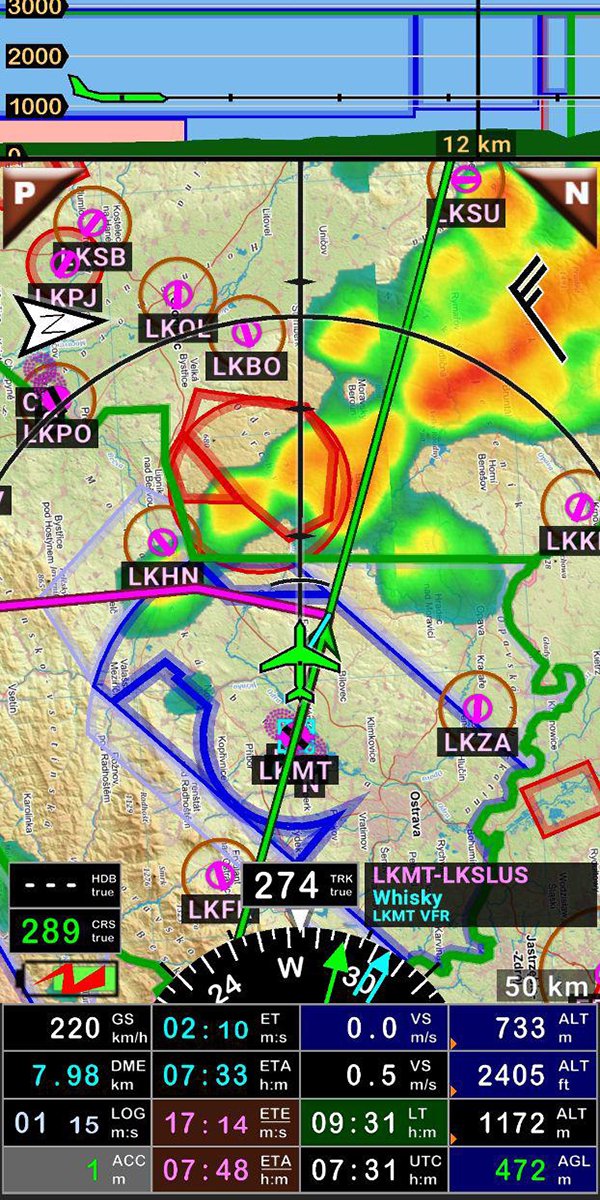
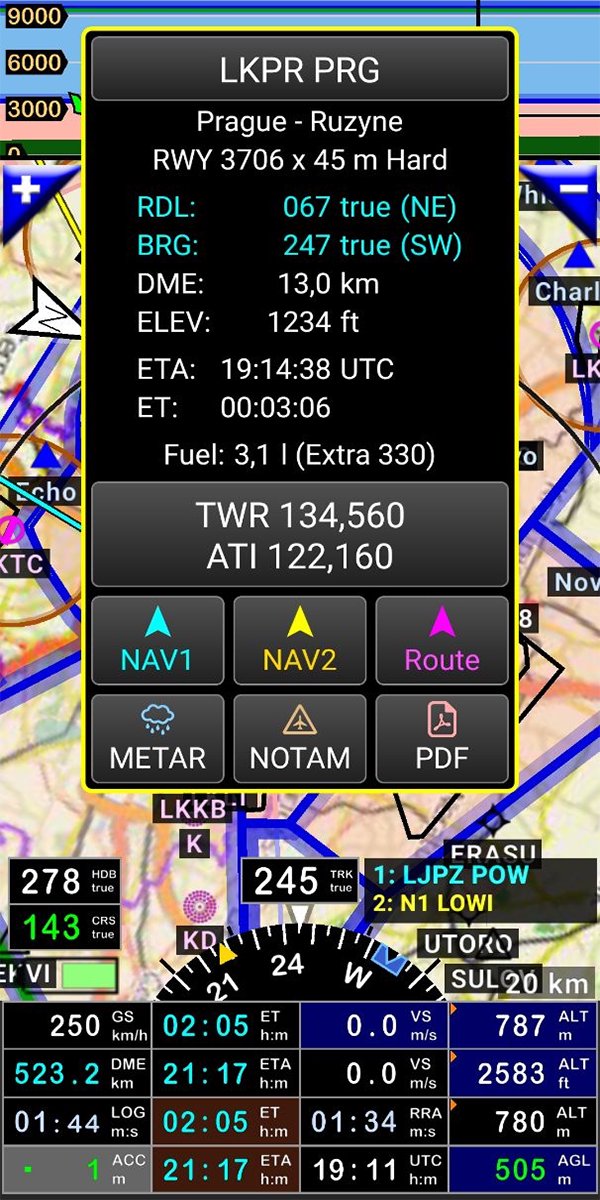
FLY is FUN is designed by pilots for pilots. FLY is FUN simplify flight preparation and improve situation awareness during flight, providing information on airspaces, reporting points, position on moving map, elevation, frequencies, railway, weather info … facilitate access to airfields related PDF document. Application also displays NOTAMs and data from rainfall radars.
FLY is FUN simulates ILS approach, VOR, NDB, DME, Marker beacons, RNAV navigation and Marker beacons warnings, without ILS/VOR/NDB/RNAV equipment on board.
You can test FLY is FUN for free during few days. At the end of the trial period, pilot is invited to subscribe and pay an annual fees. Doing it, he get the right of using the application "as it is" and contribute to development effort.
FLY is FUN allows:
- Creating and modifying routes using "drag and drop", "rubber band"
- Getting warnings, alarms and radio info before entering controlled or special use airspaces, approaching points
- Performing route planning, evaluating distance, time and fuel consumption (depending on wind and aircraft characteristics)
- Displaying route, bearing, trace on moving map
- Visualizing airspace
- Getting dynamic terrain map (colors depending of elevation above ground level)
- STRATUX support
- Creating and exporting Flight Plan
- Creating and exporting Flight log
- Creating, importing or exporting routes, waypoints, RWY, airspace (Garmin .gpx, .kml, txt, OpenAir)
- Recording the flight and playing it back with Google Earth
- Sunset / Sunrise
- Getting weather forecast along the route
- Rainfall radar
- Wind displaying
- Calculating distance between 2 points on the map
- VACs
- Notepad
…
All main screens (5 portrait and 5 landscape could easily be customized. Pilot can choose from around 100 values to display. Example:
- Altitude GPS or barometric
- Ground speed
- Bearing
- Vertical speed
- DME to next point / destination
- Estimated time to next point / destination
- Time since departure
- Stop watch
…
Displayed information could be customized too depending of users preferences (VFR, IFR or both) and zoom level. The more you zoom IN, the more detail, information, waypoints,.. you see
Logbook
The integrated logbook, allows recording:
- Duration since departure time
- Departure and arrival time
- Departure and arrival airport
- Flight track (it is possible to export it as .kml or .gpx and to replay it)
- Used aircraft
- Pilot(s) and copilots in charge
- Distance, average speed, maximum speed
…
Navigation data available from open source database are updated according AIRAC cycles.
Charts and elevation dta
Free charts and elevation data are available for most of countries and could be imported directly via the application store.
Other charts could be created and imported by the pilot itself or made on request available as commercial service.
Pilots could select the most appropriate charts: free open source charts as well as commercial charts as ICAO, Cartabossy, SkyVector, FAA sectional and terminal charts…
VACs and PDF files
VAC and AIP infos are available for more than 50 countries
User can easily attach your own PDF files.
Usage of external GPS connected via Bluetooth is possible
User guide: http://www.funair.cz/downloads/manuals/flyisfun.pdf
If you have any suggestion to improve this application or you find some bug please visit www.flyisfun.com
Use this application for VFR FLYING ONLY!!! We are not responsible for any use of this application.
Preview
Tags
Maps-&Information
Developer
Petr Kouril
Latest Version
36.60
Last Updated
2026-07-04
Category
Maps-navigation
Available on
Google Play
Show More
How to play FLY is FUN Aviation Navigation with GameLoop on PC
1. Download GameLoop from the official website, then run the exe file to install GameLoop
2. Open GameLoop and search for “FLY is FUN Aviation Navigation” , find FLY is FUN Aviation Navigation in the search results and click “Install”
3. Enjoy playing FLY is FUN Aviation Navigation on GameLoop
Minimum requirements
OS
Windows 8.1 64-bit or Windows 10 64-bit
GPU
GTX 1050
CPU
i3-8300
Memory
8GB RAM
Storage
1GB available space
Recommended requirements
OS
Windows 8.1 64-bit or Windows 10 64-bit
GPU
GTX 1050
CPU
i3-9320
Memory
16GB RAM
Storage
1GB available space