
Translate All Languages PC
Mobile Topup apps
Download Translate All Languages on PC With GameLoop Emulator
Translate All Languages sa PC
Ang Translate All Languages, na nagmumula sa developer na Mobile Topup apps, ay tumatakbo sa Android systerm sa nakaraan.
Ngayon, maaari mong laruin ang Translate All Languages sa PC gamit ang GameLoop nang maayos.
I-download ito sa GameLoop library o mga resulta ng paghahanap. Hindi na tumitingin sa baterya o nakakadismaya na mga tawag sa maling oras.
I-enjoy lang ang Translate All Languages PC sa malaking screen nang libre!
Translate All Languages Panimula
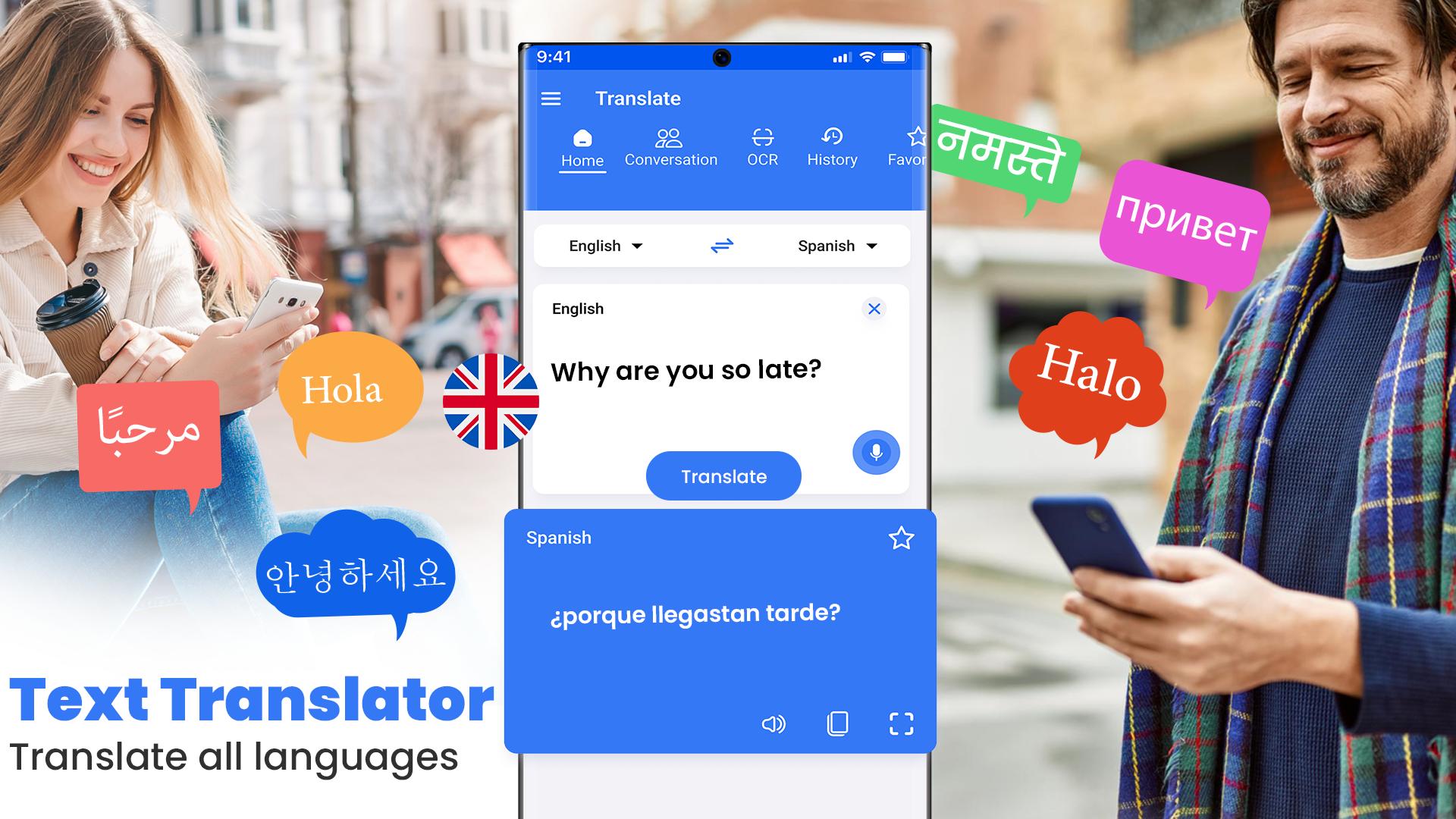
Break language barriers with Translate All Languages, the translation app for smooth communication. Whether you are traveling, studying, or working, this translator app helps you translate text, voices, and images quickly and easily.
Text Translation: Need to translate text? Just type and get instant results in any language. This language translator is perfect for documents, messages, and emails, making communication stress free.
Voice Translation: Speak naturally and let the voice translator handle the rest. With speak and translate and talk and translate features, you can communicate in real-time without any problem. The speech translator makes conversations smooth and easy.
Camera Translation: Use your camera to scan and translate any text. Point, click, and let the OCR translator do the work. Whether it’s a sign, menu, or document, the photo translator and picture translator features let you translate now without typing.
Expand Your Vocabulary: Learn new words and improve your writing with the AI Dictionary and spell check tools. This translation app helps you expand your language skills and ensure accuracy in every translation.
Key Features
⭐ Convert words and phrases into any language.
⭐ Speak and translate in real-time.
⭐ Hear your translations spoken aloud clearly.
⭐ Quickly copy and paste translations anywhere.
⭐ Share translations with others.
⭐ Detailed history of your translations.
⭐ Over 100 languages supported for translation.
⭐ Photo translator: Use OCR to translate text from images.
⭐ Voice translator: On the go speech translation for smooth conversations.
⭐ Camera translate: Snap and translate text on signs, menus, and documents.
⭐ Talk and translate: Communicate easily in real time conversations.
⭐ Translate any picture or sign board through a photo translate feature.
90+ Languages supported. Some of the famous ones are as follows:
👉🏻 English Translator
👉🏻 Spanish Translator
👉🏻 Arabic Translator
👉🏻 French Translator
👉🏻 Portuguese Translator
👉🏻 Hindi Translator
👉🏻 Japanese Translator
👉🏻 Russian Translator
Travel with Confidence: Traveling abroad? Use the translate app to navigate easily. The picture translator and camera translate features help you understand any language written on signs. Stay confident with all languages translator now.
Why Choose This Translator App?
It lets you speak and translate accurately in real time, scan and translate from photos and documents, and even handle popular requests like translate English to Spanish. It’s a fast and reliable language translator for everyday use.
If you're a student, traveler, or professional, this translation app is your trusted partner. Practice languages with the AI Dictionary or use the speech translator for better pronunciation. The translator app works for business and personal needs alike.
Say goodbye to language barriers with Translate All Languages. From quick translation text to advanced camera translation, this translator app is ready to assist you. Start using the all language translator today.
Join millions of users and simplify your life with Translate All Languages. The need of any sort of translation service i.e image translate or voice translation will be provided by this translation app.
Preview

Tags
BusinessBooks-&EducationProductivityToolsInformation
Developer
Mobile Topup apps
Latest Version
16.4.0
Last Updated
2025-04-28
Category
Business
Available on
Google Play
Show More
How to play Translate All Languages with GameLoop on PC
1. Download GameLoop from the official website, then run the exe file to install GameLoop
2. Open GameLoop and search for “Translate All Languages” , find Translate All Languages in the search results and click “Install”
3. Enjoy playing Translate All Languages on GameLoop
Minimum requirements
OS
Windows 8.1 64-bit or Windows 10 64-bit
GPU
GTX 1050
CPU
i3-8300
Memory
8GB RAM
Storage
1GB available space
Recommended requirements
OS
Windows 8.1 64-bit or Windows 10 64-bit
GPU
GTX 1050
CPU
i3-9320
Memory
16GB RAM
Storage
1GB available space