
Wi-Fi Manager for Wear OS para PC
appfour
Descarga Wi-Fi Manager for Wear OS en PC con GameLoop Emulator
Wi-Fi Manager for Wear OS en PC
Wi-Fi Manager for Wear OS, proveniente del desarrollador appfour, se ejecuta en el sistema Android en el pasado.
Ahora, puedes jugar Wi-Fi Manager for Wear OS en PC con GameLoop sin problemas.
Descárgalo en la biblioteca de GameLoop o en los resultados de búsqueda. No más mirar la batería o llamadas frustrantes en el momento equivocado nunca más.
Simplemente disfrute de Wi-Fi Manager for Wear OS PC en la pantalla grande de forma gratuita!
Wi-Fi Manager for Wear OS Introducción
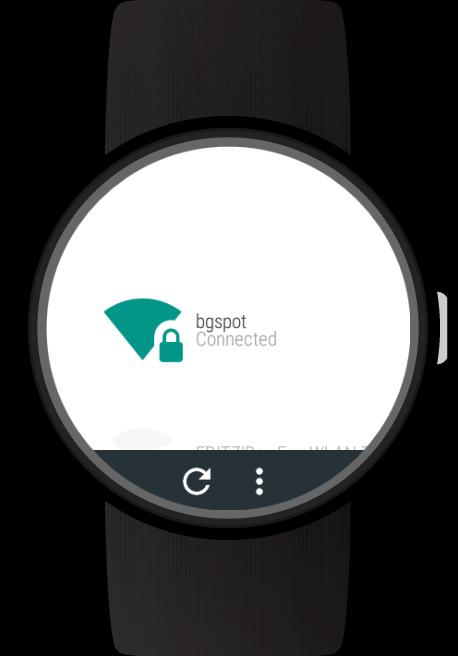
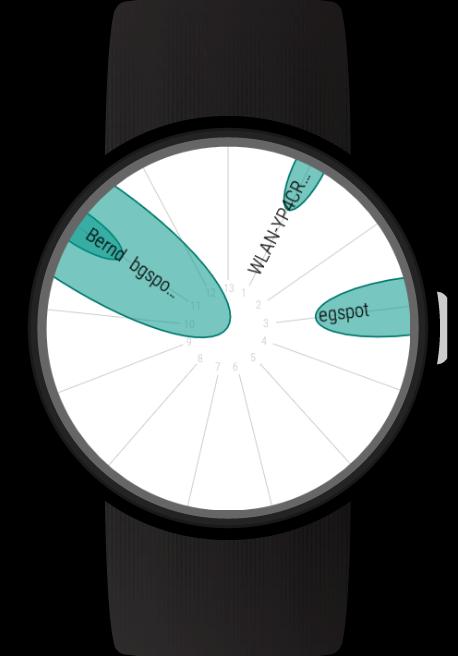
Add Wi-Fi connections and enter passwords directly on your Wear OS (Android Wear) smartwatch. View WiFi connection details. Use the Wi-Fi radar to get an overview of active networks. With the full version you can also sign in to public Wi-Fi hotspots and use static IP settings for Wi-Fi connections.
With this full featured Wi-Fi manager you will get the most out of your Android Wear smartwatch's Wi-Fi capabilities.
NOTE: All those features work without your phone. So if you left your phone at home and it is connected to the internet there, you can still connect your watch to a new Wi-Fi network allowing you to get notifications, use all apps on your watch, ...
Features:
- Scan for nearby Wi-Fi networks
- WiFi radar
- Connect to new networks
- Enter passwords directly on your Android Wear smartwatch without your phone
- Support for WPA, WEP and EAP security
- View connection details: Link speed, frequency, channel, IP address, signal level
- Forget network connections
- Connect to and disconnect networks
- Disable Wi-Fi
- Card with details for active Wi-Fi connection
- Card when sign in is required
Full version features:
- Sign in to public Wi-Fi hotspots which have a captive portal. Note: At this time this feature only works for Android Wear 1.x and you need the WIB app installed: https://play.google.com/store/apps/details?id=com.appfour.wearbrowser
- Specify static IP settings for networks
- Configurable cards and other settings
Supported smartwatches include all Wear OS (Android Wear) smartwatches with Wi-Fi support:
e.g.
- Sony SmartWatch 3
- Motorola Moto 360
- Fossil Q (Explorist, Marshal, Founder, Venture, Wander, ...)
- Ticwatch (E, S)
- Michael Kors (Bradshaw, Sophie, ...)
- Huawei Watch (2, Leo-BX9, Leo-DLXX, ...)
- LG Watch (Urbane, Sport, R, Style, …)
- ASUS ZenWatch (2, 3)
- TAG Heuer
...and many more
If your watch is not listed, please check if your Smartwatch runs Wear OS (former Android Wear).
Note: The square LG watch and Zenwatch 1 do not support WiFi and do not work with this app
Avance
Etiquetas
HerramientasInformación
Desarrollador
appfour
La última versión
1.0.210304
Última actualización
2021-03-04
Categoría
Herramientas
Disponible en
Google Play
Mostrar más
Cómo jugar Wi-Fi Manager for Wear OS con GameLoop en PC
1. Descargue GameLoop desde el sitio web oficial, luego ejecute el archivo exe para instalar GameLoop.
2. Abra GameLoop y busque "Wi-Fi Manager for Wear OS", busque Wi-Fi Manager for Wear OS en los resultados de búsqueda y haga clic en "Instalar".
3. Disfruta jugando Wi-Fi Manager for Wear OS en GameLoop.
Minimum requirements
OS
Windows 8.1 64-bit or Windows 10 64-bit
GPU
GTX 1050
CPU
i3-8300
Memory
8GB RAM
Storage
1GB available space
Recommended requirements
OS
Windows 8.1 64-bit or Windows 10 64-bit
GPU
GTX 1050
CPU
i3-9320
Memory
16GB RAM
Storage
1GB available space