
SetXperia para PC
inteks
Descarga SetXperia en PC con GameLoop Emulator
SetXperia en PC
SetXperia, proveniente del desarrollador inteks, se ejecuta en el sistema Android en el pasado.
Ahora, puedes jugar SetXperia en PC con GameLoop sin problemas.
Descárgalo en la biblioteca de GameLoop o en los resultados de búsqueda. No más mirar la batería o llamadas frustrantes en el momento equivocado nunca más.
Simplemente disfrute de SetXperia PC en la pantalla grande de forma gratuita!
SetXperia Introducción
now modified(and optimized) work with NEO Arc Play X10 X8 LG Optimus Speed Samsung Galaxy Motorola Milestone and maybe others ...
Need ***ROOT*** AND maybe ***Custom Kernel***
newest Version switches reliable in the A2DP profile when music is played via Bluetooth. to prevent drop outs and stutter in the music playback!
set voltages on
/proc/overclock/ mpu_opps
/sys/devices/system/cpu/cpu0/cpufreq/ vdd_levels
!!!HowItWorks !!!
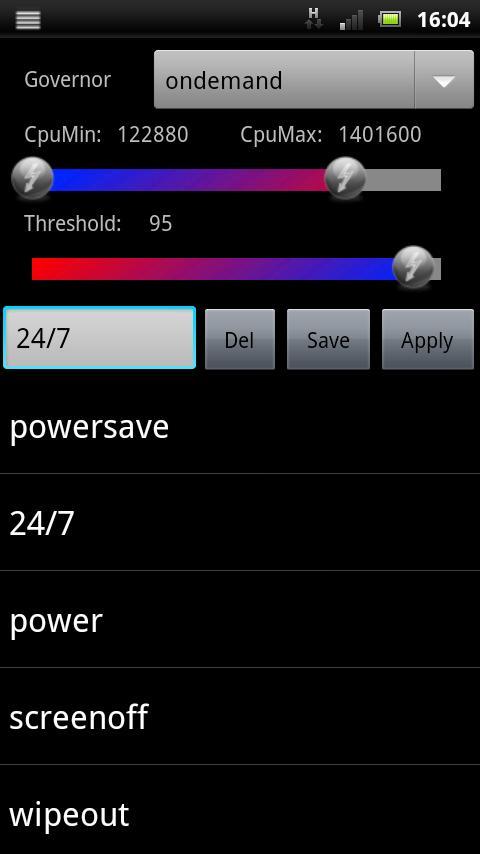
1. Create one or more Profiles
2. Select one of these Profiles as Powersaving profile, witch is automaticly set if battery drops below the selected limit.
3. Pull down the notification bar click the SetXperia Icon and select a Profile ON-THE-FLY i.e. powersaving while browsing or Overclocking while gaming i.e. FPSE ;)
Overclocking Undervolting Tool for Sony Ericsson Neo.
Save Akku Power and set CPU Scaling to minimum while Screen is Off.
Set Profile on Low Battery
Set Profile on Screen Off
With setvsel you can set Vsel OnDemand or Performance
it include a stability test to ensure you settings are stable
Includes System Tweaks like:
-Set sdCard readahead KB ("/sys/devices/virtual/bdi/179:0/read_ahead_kb")
-Set VM Min Free Memory ("vm.min_free_kbytes")
-Remount Storage with NoAtime on Boot
-Overclock
-Undervolting
-Systeminfo like cpuspy
-profiles like setCpu, NoFrills CPU Control
-voltages like IncrediControl
updated version 1.02:
-implemented "remount with noatime"
updated version 1.03:
-added systeminfo into menue
update version 1.08:
-option to save & restore settings to sdCard
update version 1.10:
-now shows all governors and all schedulers
-notification on "values not save" condition (when setxperia applies values at boot, it marks this vales "save" after 30sec. to prevent boot loops)
update version 1.18:
-new tool "moduleloader" can load kernelmodules like cifs.ko or usb-storage.ko on startup ;o)
update version 1.22:
-new Magnetic Field CarDock activator (use standart CarMode)
update version 1.23:
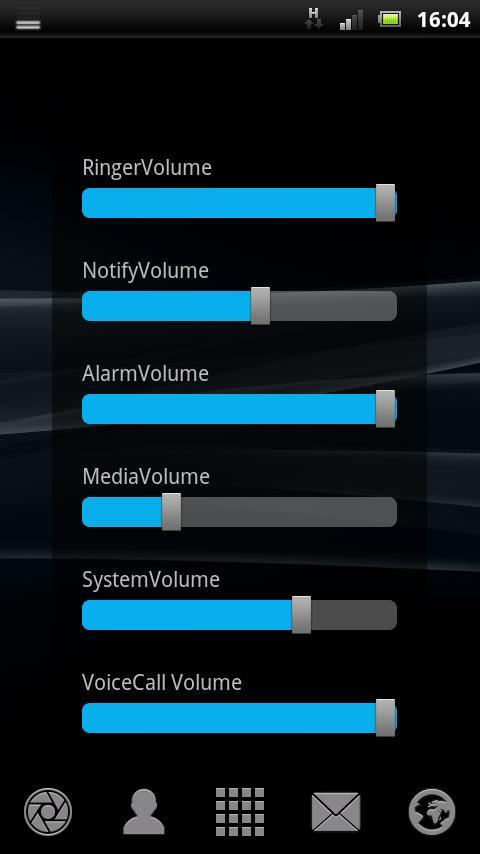
-added a Volumecontrol to longpress Searchbutton (i changed my keylayout to get a free hardwarebutton for FPSE ;o) )
update version 1.24:
-still shows batt% info (the notify is only updated on batt change)
-new design of CPU Icon (white bars on transparent background)
-profileeditor has now a rangebar for min/max cpu (this prevent from setting low max as min)
-a few perfomance tweaks and fixes
update version 1.26:
-this version remounts sdcard with 'noatime' (if selected in settings) when phone is disconnected from PC
update version 1.32:
-bugfix for phones with OMAP3 processors like Motorola Milestone, Milestone 2, Droid, Droid 2 Global, Droid X, A853/A854, XT701/XT702, XT711, XT720, XT800/XT800W, Defy, Flipout, Samsung Galaxy Beam, Galaxy A, Archos Tablet A70 A101
update version 1.36:
-added a "load current" button in voltage editor
-added hires icon for ICS
-put volumecontrol into a scrollview for small displays
update version 1.40:
-added the option to create swapfile (/sdcard or /cache) @ boot
update version 1.48:
-added the option to set swappiness for swapfile
update version 1.50:
-execute /sdcard/userinit.sh at boot
update version 1.52:
-added option to edit /sdcard/userinit.sh on board.
-added zram support
-added support for
/sys/devices/system/cpu/cpu0/cpufreq/UV_mV_table
for tegra voltage control
update version 1.57:
-you can use now zRam and Swap the same time (if your kernel support this) zRam get the higher priority!
update version 1.58:
the new version supports the following actions:
profilename is in -> intent.getStringExtra("profile");
this is to switch OC profiles from SmartQRTags but should also work from other apps i.e. Tasker
update version 1.61:
-added chargecontrol if "/sys/kernel/fast_charge" exist
update version 2.00:
-updated GUI
-bugfixes
Avance
Información
Desarrollador
inteks
La última versión
2.25
Última actualización
2017-02-03
Categoría
Herramientas
Disponible en
Google Play
Mostrar más
Cómo jugar SetXperia con GameLoop en PC
1. Descargue GameLoop desde el sitio web oficial, luego ejecute el archivo exe para instalar GameLoop.
2. Abra GameLoop y busque "SetXperia", busque SetXperia en los resultados de búsqueda y haga clic en "Instalar".
3. Disfruta jugando SetXperia en GameLoop.
Minimum requirements
OS
Windows 8.1 64-bit or Windows 10 64-bit
GPU
GTX 1050
CPU
i3-8300
Memory
8GB RAM
Storage
1GB available space
Recommended requirements
OS
Windows 8.1 64-bit or Windows 10 64-bit
GPU
GTX 1050
CPU
i3-9320
Memory
16GB RAM
Storage
1GB available space