
Calendar Status Bar para PC
Wagwan Apps
Descarga Calendar Status Bar en PC con GameLoop Emulator
Calendar Status Bar en PC
Calendar Status Bar, proveniente del desarrollador Wagwan Apps, se ejecuta en el sistema Android en el pasado.
Ahora, puedes jugar Calendar Status Bar en PC con GameLoop sin problemas.
Descárgalo en la biblioteca de GameLoop o en los resultados de búsqueda. No más mirar la batería o llamadas frustrantes en el momento equivocado nunca más.
Simplemente disfrute de Calendar Status Bar PC en la pantalla grande de forma gratuita!
Calendar Status Bar Introducción
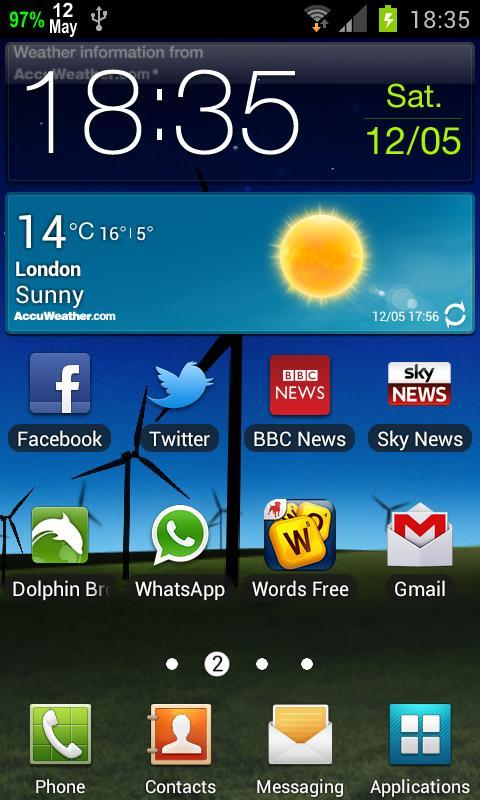
Displays the day of the Month and the month in your status bar
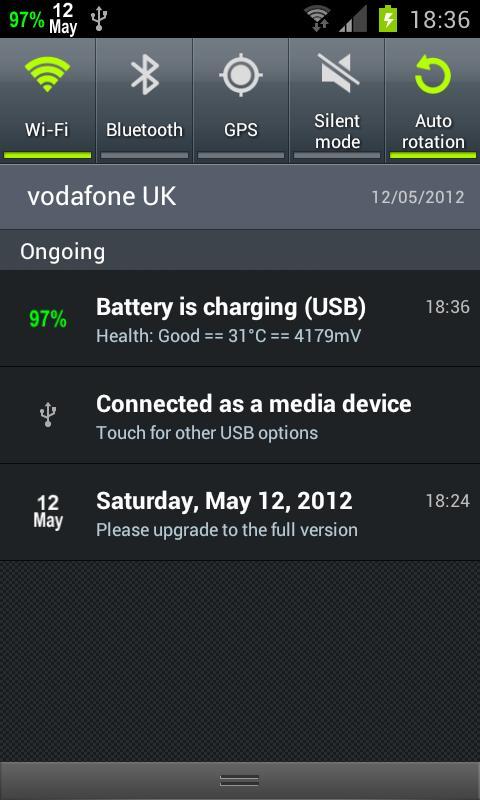
Calendar Day In Status Bar shows the current day and Month in the top status bar.
PLEASE CONTACT US IF YOU HAVE ANY PROBLEMS OR QUESTIONS
wagwanapps@gmail.com
Facebook - https://www.facebook.com/WagwanApps
Twitter - https://twitter.com/WagwanApps
Google+ - http://gplus.to/WagwanApps
YouTube : https://www.youtube.com/user/WagwanApps
To display the day of the week and date please see our other apps.
Features:
- Simple UI with easy to understand options. Remember Less is More.
- App auto start when phone is rebooted.
- NOW SUPPORTS INSTALL TO SD CARD
- Choose from a white or green. All options will work on any device but for better blending with different colours upgrade to the full version.
Colours supported are White,Green and Grey
For More colour options or if you like this app please upgrade to the full version.
Try them out.
- Display the full date, day of the year and week of the year in the notification drop down
- Very small app with a small footprint. Virtually no battery drain
- Supports Android tablets.
If you have a request please email us and we will do what we can to help
Limitations:
- In Android 3.0 or above, and Android 4.0 or above, the Android OS has "automatic shrinking and dimming" for status bar notifications to focus on the main activity. The icons do remain at thier full size and at full intensity in the notification area when selected.
Please contact us to report any issues or to request a feature.
Avance
Etiquetas
ProductividadInformación
Desarrollador
Wagwan Apps
La última versión
2.0.7
Última actualización
2023-08-18
Categoría
Productividad
Disponible en
Google Play
Mostrar más
Cómo jugar Calendar Status Bar con GameLoop en PC
1. Descargue GameLoop desde el sitio web oficial, luego ejecute el archivo exe para instalar GameLoop.
2. Abra GameLoop y busque "Calendar Status Bar", busque Calendar Status Bar en los resultados de búsqueda y haga clic en "Instalar".
3. Disfruta jugando Calendar Status Bar en GameLoop.
Minimum requirements
OS
Windows 8.1 64-bit or Windows 10 64-bit
GPU
GTX 1050
CPU
i3-8300
Memory
8GB RAM
Storage
1GB available space
Recommended requirements
OS
Windows 8.1 64-bit or Windows 10 64-bit
GPU
GTX 1050
CPU
i3-9320
Memory
16GB RAM
Storage
1GB available space