Rider para PC
Uengage
Descarga Rider en PC con GameLoop Emulator
Rider en PC
Rider, proveniente del desarrollador Uengage, se ejecuta en el sistema Android en el pasado.
Ahora, puedes jugar Rider en PC con GameLoop sin problemas.
Descárgalo en la biblioteca de GameLoop o en los resultados de búsqueda. No más mirar la batería o llamadas frustrantes en el momento equivocado nunca más.
Simplemente disfrute de Rider PC en la pantalla grande de forma gratuita!
Rider Introducción
The Rider App is a powerful and intuitive delivery management tool built for businesses that rely on real-time logistics and seamless rider coordination. Designed for speed, accuracy, and usability, the app enables merchants to efficiently manage orders, track tasks, and navigate with precision, all in one place.
Rider App ensures a smooth and professional delivery experience for every order.
Key Features:
1. Secure Login and Business Mapping
Riders can log in using secure credentials and are automatically mapped to their associated businesses. If linked to multiple businesses, the app prompts selection, ensuring personalized delivery flows based on business rules.
2. Real-Time Order Management
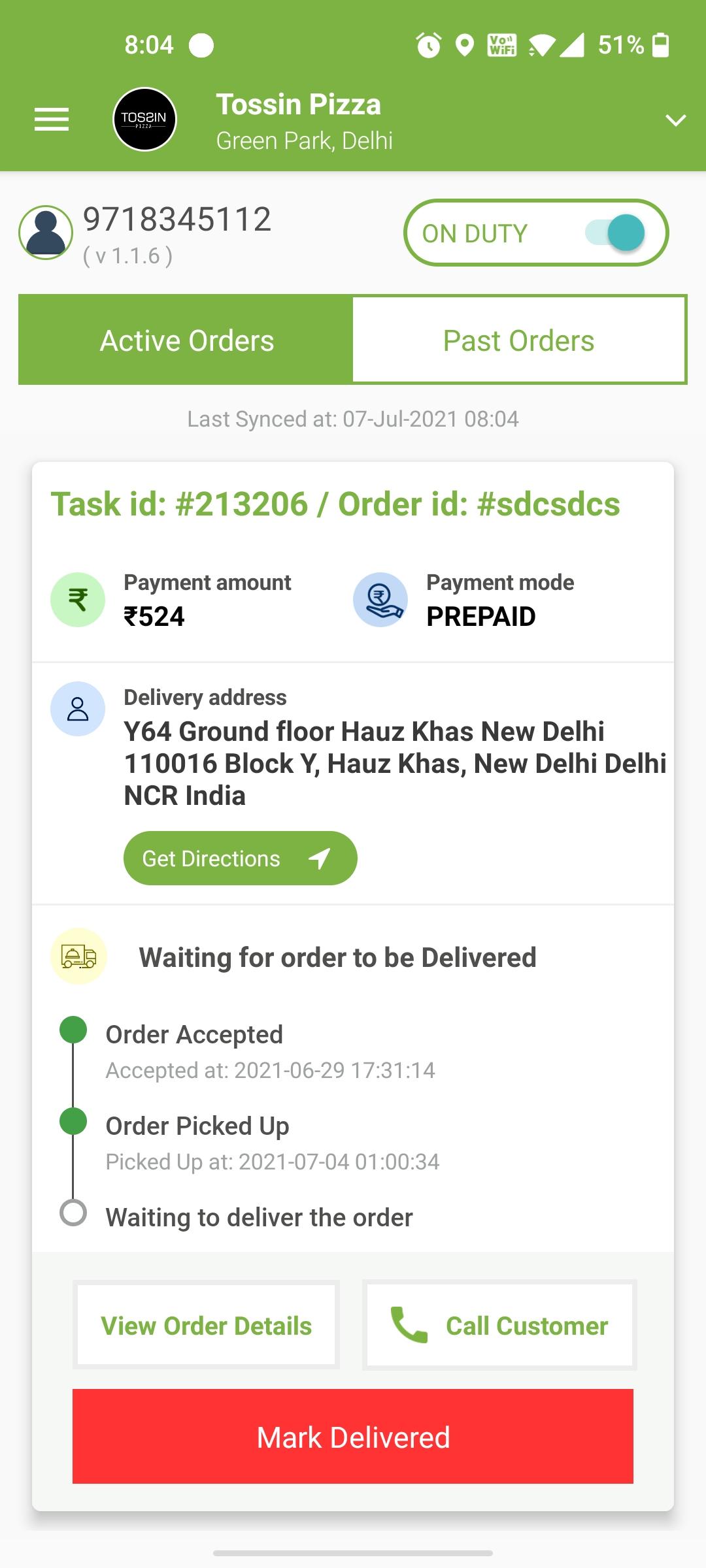
The Home Screen displays a categorized list of orders based on their status: Assigned, Picked, and Delivered. Orders refresh automatically at intervals or through push notifications, ensuring riders always have the latest updates.
3. Order Detail Interface
Each order provides a comprehensive view including customer name, location, navigation options, and action buttons. Riders can call the customer, view directions, or update order statuses with simple taps. OTP-based delivery verification is available for secure handoffs.
4. Attendance and Online Status
Businesses that require attendance tracking can enable in-app attendance features. Riders can clock in and out, toggle their online/offline status, and share background location data while on duty.
5. GPS and Navigation Support
Integrated with Google Maps (or other supported services), the app helps riders navigate efficiently to pickup and drop locations. Real-time location updates are sent to the backend, allowing live tracking by dispatch teams.
6. Push Notifications and Alerts
Riders receive important alerts instantly, including new assignments, urgent updates, or app actions. This helps reduce response time and improves overall service reliability.
7. Profile and Business Overview
Riders can view their profile, business name, app version, and have the option to log out. The profile also serves as a quick reference for identification during deliveries.
8. Intelligent Location Management with Activity Recognition API:
To optimize battery usage without compromising accuracy, the app uses Google’s ActivityRecognition API to detect rider motion.
When motion is detected (e.g., walking, cycling, driving), location services are automatically turned ON for real-time tracking.
When the rider is still, location tracking is paused, significantly conserving battery during idle periods.
Location Permission Usage Disclosure:
The Rider App uses foreground location tracking to support real-time delivery and navigation features essential to the rider’s tasks. When a rider marks themselves online, a foreground service is started with a persistent notification, enabling accurate, continuous location updates even when the app is running in the background. This allows merchants to track deliveries in real time and ensures timely service.
The Rider App uses foreground location tracking as the CORE FUNCTIONALITY for delivery operations. This foreground service is:
- EXPLICITLY STARTED by the rider when accepting deliveries or going online
- CLEARLY INDICATED by a persistent notification that shows tracking is active
- EASILY STOPPABLE at any time through the notification or by going offline
User Control of Location Services:
- Riders have complete control to start/stop location tracking
- Clear notification shows when tracking is active
- One-tap options to pause or stop tracking
- Location only used during active delivery sessions
Technical Highlights:
* Background location sharing with battery-efficient settings
* Auto-update prompts to ensure the latest features are in use
This app is designed for delivery partners affiliated with registered businesses using our platform. It is not intended for general public use. Each rider is assigned login credentials and mapped to a specific business.
Avance
Etiquetas
Food-&Maps-&Información
Desarrollador
Uengage
La última versión
2.1.8
Última actualización
2025-06-16
Categoría
Food-drink
Disponible en
Google Play
Mostrar más
Cómo jugar Rider con GameLoop en PC
1. Descargue GameLoop desde el sitio web oficial, luego ejecute el archivo exe para instalar GameLoop.
2. Abra GameLoop y busque "Rider", busque Rider en los resultados de búsqueda y haga clic en "Instalar".
3. Disfruta jugando Rider en GameLoop.
Minimum requirements
OS
Windows 8.1 64-bit or Windows 10 64-bit
GPU
GTX 1050
CPU
i3-8300
Memory
8GB RAM
Storage
1GB available space
Recommended requirements
OS
Windows 8.1 64-bit or Windows 10 64-bit
GPU
GTX 1050
CPU
i3-9320
Memory
16GB RAM
Storage
1GB available space