
Mskool para PC
VAPS TECHNOSOFT PVT LTD
Descarga Mskool en PC con GameLoop Emulator
Mskool en PC
Mskool, proveniente del desarrollador VAPS TECHNOSOFT PVT LTD, se ejecuta en el sistema Android en el pasado.
Ahora, puedes jugar Mskool en PC con GameLoop sin problemas.
Descárgalo en la biblioteca de GameLoop o en los resultados de búsqueda. No más mirar la batería o llamadas frustrantes en el momento equivocado nunca más.
Simplemente disfrute de Mskool PC en la pantalla grande de forma gratuita!
Mskool Introducción
The school has seen steady progress adding strength to the school and expanding in terms of buildings with teachers who were devoted and dedicated to giving their best to help the school move forward with quality Christian education. In retrospect, the humble beginning of the Institution in 1880 with few students and minimum facilities stands in stark contrast to its present stature and dignity, having a global perspective and meeting the demands of specialization in the methods of acquiring knowledge, with a view
to improving the standard and quality of life redefining the role of education.
Today, the institution is a brilliant canvas of many shades and hues. It is certainly not the monotonous regularity of a stagnant social tradition, for us, it is a continuous and
uninterrupted move towards a dynamic and vibrant vision, which keeps us alive with new ideas, new avenues, and new in-roads.
Application Information :
Student profiles can be created which contain all the details about the students such as Basic details, Parents-Teacher details, Photo, Address, Class, Contact number. Daily updates can be marked by teachers/staffs and the same as viewed by parents.
It is the source of the updates in academic performances, activity details, disciplinary actions and much more.
App Features :
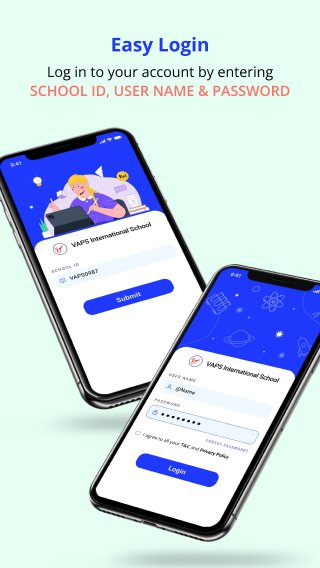
Login: Parents are required to the school mobile app by using their School Id, User Name or Password
Stay Updated: School mobile app allows parents to stay updated regarding school events or activities via student app, thus they can remain in touch.
Parents benefit via the School Student App:
1. Attendance: Real-time class attendance report & history display to the student portal.
2. Fees: Fees information like, paid, due, overdue payment details will display to the student portal and by parents, it will easily get the payment receipt. As well as parents can pay fees amount through an app.
3. Exam: Parents will receive our children’s school results at your fingertips. Our school application shows you class & semester wise results with marks/grades for each subject.
4.Time Table: Timetable is the most useful features to know about your child school life. main features to save your timetable and all tasks from homework to exams.
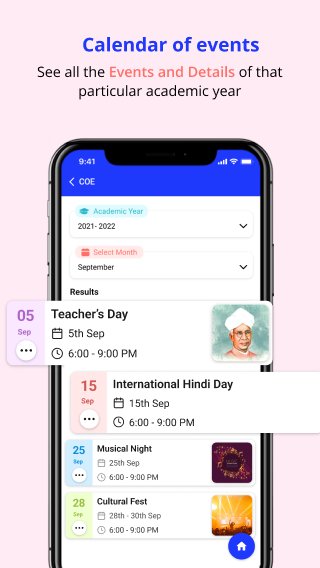
5. Events & Calendars: Parents will have instant and direct access to all events, which can be put up weeks and even months in advance & easy Sharing of school news and calendar.
6. Class Work & Assignment: Through school, mobile application parents are notified regarding the assigned homework/assignments through mobile notifications so that there is no communication gap and the parents may guide and they help our child in completing the tasks assigned for home.
7. Notice Board: Parents will see a real-time update through the school mobile app notice board. On notice board, schools will leave public message, announcement, events, or provide information related to school.
8. Feedback & Suggestion: Parent will easily communicate through school mobile to school administrator by giving feedback and ask further questing & suggestion related to school.
Avance
Etiquetas
EducaciónInformación
Desarrollador
VAPS TECHNOSOFT PVT LTD
La última versión
1.0.95
Última actualización
2025-10-21
Categoría
Educación
Disponible en
Google Play
Mostrar más
Cómo jugar Mskool con GameLoop en PC
1. Descargue GameLoop desde el sitio web oficial, luego ejecute el archivo exe para instalar GameLoop.
2. Abra GameLoop y busque "Mskool", busque Mskool en los resultados de búsqueda y haga clic en "Instalar".
3. Disfruta jugando Mskool en GameLoop.
Minimum requirements
OS
Windows 8.1 64-bit or Windows 10 64-bit
GPU
GTX 1050
CPU
i3-8300
Memory
8GB RAM
Storage
1GB available space
Recommended requirements
OS
Windows 8.1 64-bit or Windows 10 64-bit
GPU
GTX 1050
CPU
i3-9320
Memory
16GB RAM
Storage
1GB available space