
엠베스트 엘리하이 학부모 매니저 para PC
megastudyEdu.Co.,Ltd
Descarga 엠베스트 엘리하이 학부모 매니저 en PC con GameLoop Emulator
엠베스트 엘리하이 학부모 매니저 en PC
엠베스트 엘리하이 학부모 매니저, proveniente del desarrollador megastudyEdu.Co.,Ltd, se ejecuta en el sistema Android en el pasado.
Ahora, puedes jugar 엠베스트 엘리하이 학부모 매니저 en PC con GameLoop sin problemas.
Descárgalo en la biblioteca de GameLoop o en los resultados de búsqueda. No más mirar la batería o llamadas frustrantes en el momento equivocado nunca más.
Simplemente disfrute de 엠베스트 엘리하이 학부모 매니저 PC en la pantalla grande de forma gratuita!
엠베스트 엘리하이 학부모 매니저 Introducción
What is a Parent Manager?
1. This is an application exclusively for Mbest Ellihi parents who can conveniently manage their child's learning status through mobile devices.
2. With the push notification function, you can conveniently check your child's learning status and related information automatically.
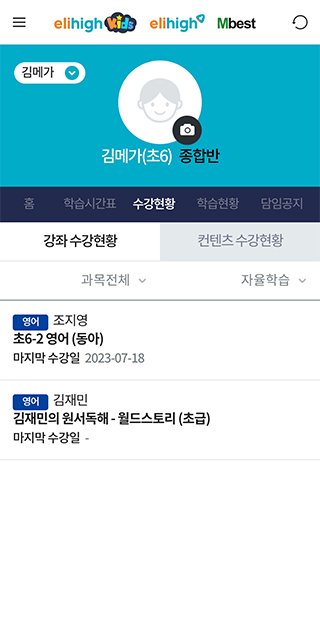
3. Equipped with essential functions for parents, such as child registration, course attendance status, monthly learning notice, monthly counseling status, and attendance list.
caution
Parent Manager service is available on 3G/4G (LTE) and Wi-Fi networks. Data charges may apply when connecting via 3G/4G (LTE) other than Wi-Fi.
If you have any other questions or inquiries, please contact Megastudy Customer Center.
Website: http://www.mbest.co.kr
Customer Center: 1544-2300
■ Select access rights
- Camera: Take a picture with the camera and set your profile picture.
- Album/Storage: You can upload/download files while using the service.
- Notification: You can receive information about the service.
※ The above access rights require permission when using certain functions, and you can use the app even if denied.
※ Since the consent method for the Android operating system has changed significantly since version 6.0, please use the software update function in your smartphone to check whether your smartphone's operating system can be upgraded to Android 6.0 or higher. Additionally, even if the operating system is upgraded, the access permissions agreed to in existing apps do not change, so to reset access permissions, you must delete and reinstall the already installed app.
Avance

Etiquetas
EducaciónInformación
Desarrollador
megastudyEdu.Co.,Ltd
La última versión
3.5.17
Última actualización
2025-12-15
Categoría
Educación
Disponible en
Google Play
Mostrar más
Cómo jugar 엠베스트 엘리하이 학부모 매니저 con GameLoop en PC
1. Descargue GameLoop desde el sitio web oficial, luego ejecute el archivo exe para instalar GameLoop.
2. Abra GameLoop y busque "엠베스트 엘리하이 학부모 매니저", busque 엠베스트 엘리하이 학부모 매니저 en los resultados de búsqueda y haga clic en "Instalar".
3. Disfruta jugando 엠베스트 엘리하이 학부모 매니저 en GameLoop.
Minimum requirements
OS
Windows 8.1 64-bit or Windows 10 64-bit
GPU
GTX 1050
CPU
i3-8300
Memory
8GB RAM
Storage
1GB available space
Recommended requirements
OS
Windows 8.1 64-bit or Windows 10 64-bit
GPU
GTX 1050
CPU
i3-9320
Memory
16GB RAM
Storage
1GB available space