
漢検対策ならコレ!協会公式過去問アプリ 漢検スタート para PC
Imagineer Co.,Ltd.
Descarga 漢検対策ならコレ!協会公式過去問アプリ 漢検スタート en PC con GameLoop Emulator
漢検対策ならコレ!協会公式過去問アプリ 漢検スタート en PC
漢検対策ならコレ!協会公式過去問アプリ 漢検スタート, proveniente del desarrollador Imagineer Co.,Ltd., se ejecuta en el sistema Android en el pasado.
Ahora, puedes jugar 漢検対策ならコレ!協会公式過去問アプリ 漢検スタート en PC con GameLoop sin problemas.
Descárgalo en la biblioteca de GameLoop o en los resultados de búsqueda. No más mirar la batería o llamadas frustrantes en el momento equivocado nunca más.
Simplemente disfrute de 漢検対策ならコレ!協会公式過去問アプリ 漢検スタート PC en la pantalla grande de forma gratuita!
漢検対策ならコレ!協会公式過去問アプリ 漢検スタート Introducción
>>>> Let's start the Kanji Kentei measures from the official app "Kanji Kentei Start"! <<<<<
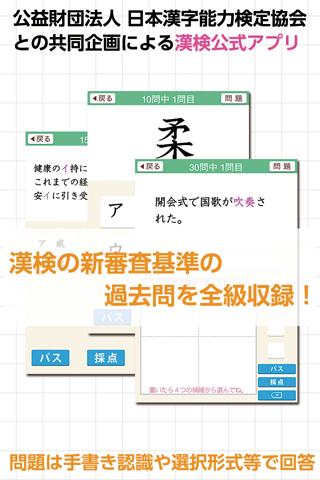
"Kanji Kentei Start" is a Kanji Kentei countermeasure app developed in collaboration with the Japan Kanji Aptitude Testing Foundation.
Diagnose your kanji ability with the free ability diagnosis function!
Aim for the Kanji Kentei with a drill and a mock test!
8,000 questions in 10th to 5th grade drill modes are provided free of charge!
== Notice ==
This application is being supported for Android OS 8.0, but it is not currently supported. When updating the OS, phenomena such as slow operation may occur.
[Feature 1]
All grades from 1st grade to 10th grade are recorded for the exam questions that were actually asked in the new examination criteria! Learning directly linked to the test is possible. The number of recorded questions is about 15,000.
[Feature 2]
Equipped with an ability diagnosis function that makes it easy to find the class that suits you. You can get an idea of which grade you should take the test from.
[Feature ③]
After training in "drill" mode, test your strength in "mock test" mode. Check for weaknesses on the radar chart! You can also compare your score with the average score of successful applicants!
[Feature ④]
Equipped with a full range of weakness overcoming functions. You can study not only the wrong questions but also the "pass" and "checked" questions.
[Feature ⑤]
For the purpose of "providing an environment where it is easy to learn Chinese characters", you can study about 8,000 questions of grades 10 to 5 (only in "drill" mode) for free. The "mock test" mode is also free for one time, so you can test your strength!
◆ Introduction of modes ◆
"Ability diagnosis" mode
Before you start full-scale study, you can check your aptitude level first. Questions are automatically selected and judged from each grade according to your answer.
"Drill" mode
You can study by class, such as "reading" and "number of strokes". Multiple answering methods such as handwriting recognition and selection are available. Problems that you are not good at can be recalled and learned later. Efficient learning is possible. (4th to 1st grades are charged)
"Mock test" mode
Test your strength with the test questions that were actually asked in the past. Not only can you visually check your strengths and weaknesses on the radar chart, but you can also compare the average score of successful applicants with your score. (All grades are charged. Only grades 5 to 10 are free for one time.)
This software uses the handwritten character recognition engine "Rakuhira (R)" of PUX Co., Ltd. Rakuhira is a registered trademark of PUX Co., Ltd.
"Kanji Kentei" and "Kanji Kentei" are registered trademarks.
Copyright (C) Japan Kanji Aptitude Testing Foundation All rights Reserved.
(C) Imagineer Co., Ltd.
Avance

Etiquetas
EducaciónInformación
Desarrollador
Imagineer Co.,Ltd.
La última versión
1.8.2
Última actualización
2025-07-15
Categoría
Educación
Disponible en
Google Play
Mostrar más
Cómo jugar 漢検対策ならコレ!協会公式過去問アプリ 漢検スタート con GameLoop en PC
1. Descargue GameLoop desde el sitio web oficial, luego ejecute el archivo exe para instalar GameLoop.
2. Abra GameLoop y busque "漢検対策ならコレ!協会公式過去問アプリ 漢検スタート", busque 漢検対策ならコレ!協会公式過去問アプリ 漢検スタート en los resultados de búsqueda y haga clic en "Instalar".
3. Disfruta jugando 漢検対策ならコレ!協会公式過去問アプリ 漢検スタート en GameLoop.
Minimum requirements
OS
Windows 8.1 64-bit or Windows 10 64-bit
GPU
GTX 1050
CPU
i3-8300
Memory
8GB RAM
Storage
1GB available space
Recommended requirements
OS
Windows 8.1 64-bit or Windows 10 64-bit
GPU
GTX 1050
CPU
i3-9320
Memory
16GB RAM
Storage
1GB available space