![Typing Control [ Undo edits & Move cursor ]](https://static.gameloop.com/img/18166a968defcaa9bca08e7c2cfdc965.png?imageMogr2/thumbnail/172.8x172.8/format/webp)
Typing Control [ Undo edits & Move cursor ] PC
Youssef Ouadban Tech
Download Typing Control [ Undo edits & Move cursor ] on PC With GameLoop Emulator
Typing Control [ Undo edits & Move cursor ] pada PC
Typing Control [ Undo edits & Move cursor ], datang daripada pembangun Youssef Ouadban Tech, sedang berjalan pada sistem Android pada masa lalu.
Kini, Anda boleh bermain Typing Control [ Undo edits & Move cursor ] pada PC dengan GameLoop dengan lancar.
Muat turunnya dalam pustaka GameLoop atau hasil carian. Tiada lagi melihat bateri atau panggilan yang mengecewakan pada masa yang salah lagi.
Hanya nikmati Typing Control [ Undo edits & Move cursor ] PC pada skrin besar secara percuma!
Typing Control [ Undo edits & Move cursor ] Pengenalan
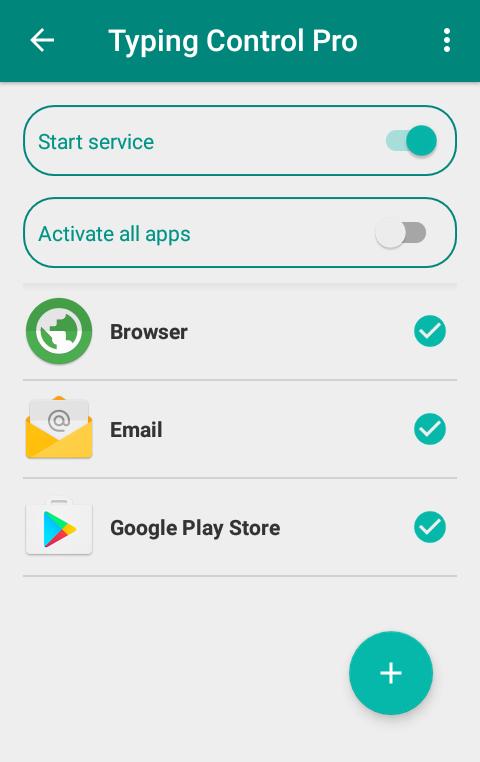
This app lets you use your volume keys to undo and redo text edits and also move the cursor in any text field.
Features:
✓ Long press on volume keys allows you to undo and redo text edits.
✓ Simple press on volume keys lets your move the cursor in any text field .
This app uses Accessibility services
This app helps users with physical disabilities and muscle fatigue, to easily and precisely move the cursor inside text fields using the volume keys.
Permissions
✓ This app requires the accessibility service permission in order to be able to move the cursor.
⇒ This app will be able to retrieve the active window content in order to read the cursor position and to move the cursor.
⇒ This app will be able to observe the actions related to the interface in order to detect the currently active app and then provide contextual functioning and per-app settings.
⇒ This app will be able to observe the user's typing in order to detect volume keys events.
[ Contact ]
E-Mail : contact@tafayor.com
Preview
Information
Developer
Youssef Ouadban Tech
Latest Version
1.5.2
Last Updated
2020-05-19
Category
Tools
Available on
Google Play
Show More
Cara bermain Typing Control [ Undo edits & Move cursor ] dengan GameLoop pada PC
1. Muat turun GameLoop dari laman web rasmi, kemudian jalankan fail exe untuk memasang GameLoop.
2. Buka GameLoop dan cari "Typing Control [ Undo edits & Move cursor ]", cari Typing Control [ Undo edits & Move cursor ] dalam hasil carian dan klik "Pasang".
3. Nikmati bermain Typing Control [ Undo edits & Move cursor ] di GameLoop.
Minimum requirements
OS
Windows 8.1 64-bit or Windows 10 64-bit
GPU
GTX 1050
CPU
i3-8300
Memory
8GB RAM
Storage
1GB available space
Recommended requirements
OS
Windows 8.1 64-bit or Windows 10 64-bit
GPU
GTX 1050
CPU
i3-9320
Memory
16GB RAM
Storage
1GB available space