Quick Measure PC
Stonekick
Download Quick Measure on PC With GameLoop Emulator
Quick Measure pada PC
Quick Measure, datang daripada pembangun Stonekick, sedang berjalan pada sistem Android pada masa lalu.
Kini, Anda boleh bermain Quick Measure pada PC dengan GameLoop dengan lancar.
Muat turunnya dalam pustaka GameLoop atau hasil carian. Tiada lagi melihat bateri atau panggilan yang mengecewakan pada masa yang salah lagi.
Hanya nikmati Quick Measure PC pada skrin besar secara percuma!
Quick Measure Pengenalan
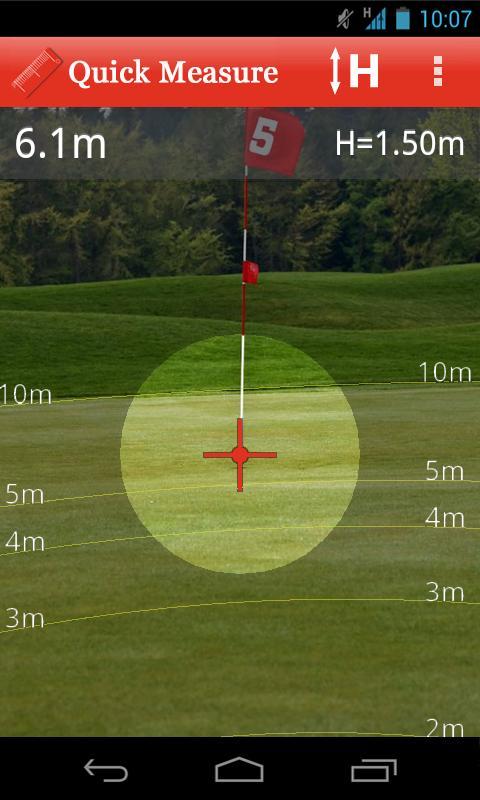
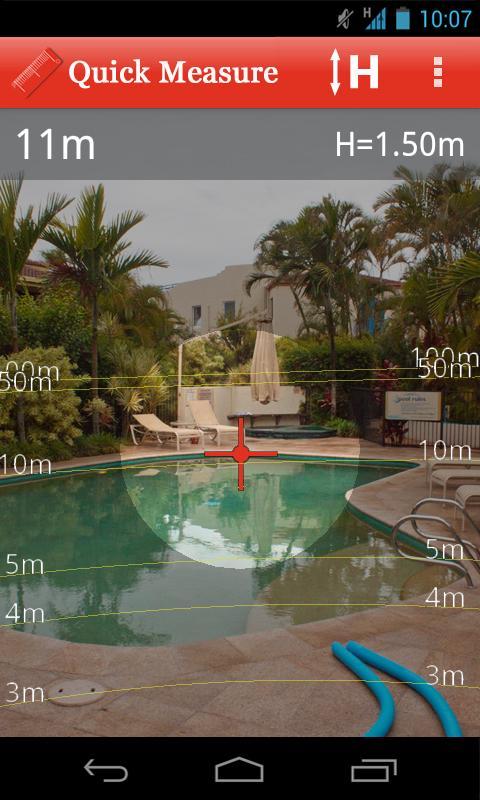
Quick Measure can be used to measure distances up to 100m. Use to check out the length of rooms in your home, design a new garden layout, or simply measure how far you can kick a ball!
It is simple to use: a target will be shown overlayed on your device’s camera. Aim this at the base of an object and the distance to it will be measured. The app also has an overlay with 1 to 5m, 10m, 50m, and 100m grid lines so that you can quickly see the approximate distance to surrounding objects. If you would rather see feet and inches than metres you can change this in the preferences menu.
The calculations within Quick Measure are based on trigonometry. To improve accuracy please see the “help” section with the app.
This app is supported by adverts, which is why it requires the “INTERNET” and “ACCESS NETWORK STATE” permissions.
Preview
Information
Developer
Stonekick
Latest Version
1.0.3
Last Updated
2015-09-21
Category
Tools
Available on
Google Play
Show More
Cara bermain Quick Measure dengan GameLoop pada PC
1. Muat turun GameLoop dari laman web rasmi, kemudian jalankan fail exe untuk memasang GameLoop.
2. Buka GameLoop dan cari "Quick Measure", cari Quick Measure dalam hasil carian dan klik "Pasang".
3. Nikmati bermain Quick Measure di GameLoop.
Minimum requirements
OS
Windows 8.1 64-bit or Windows 10 64-bit
GPU
GTX 1050
CPU
i3-8300
Memory
8GB RAM
Storage
1GB available space
Recommended requirements
OS
Windows 8.1 64-bit or Windows 10 64-bit
GPU
GTX 1050
CPU
i3-9320
Memory
16GB RAM
Storage
1GB available space