Sharingan Eyes Photo Editor - Ninja Camera Editor PC
App world Photo Editor
Download Sharingan Eyes Photo Editor - Ninja Camera Editor on PC With GameLoop Emulator
Sharingan Eyes Photo Editor - Ninja Camera Editor pada PC
Sharingan Eyes Photo Editor - Ninja Camera Editor, datang daripada pembangun App world Photo Editor, sedang berjalan pada sistem Android pada masa lalu.
Kini, Anda boleh bermain Sharingan Eyes Photo Editor - Ninja Camera Editor pada PC dengan GameLoop dengan lancar.
Muat turunnya dalam pustaka GameLoop atau hasil carian. Tiada lagi melihat bateri atau panggilan yang mengecewakan pada masa yang salah lagi.
Hanya nikmati Sharingan Eyes Photo Editor - Ninja Camera Editor PC pada skrin besar secara percuma!
Sharingan Eyes Photo Editor - Ninja Camera Editor Pengenalan
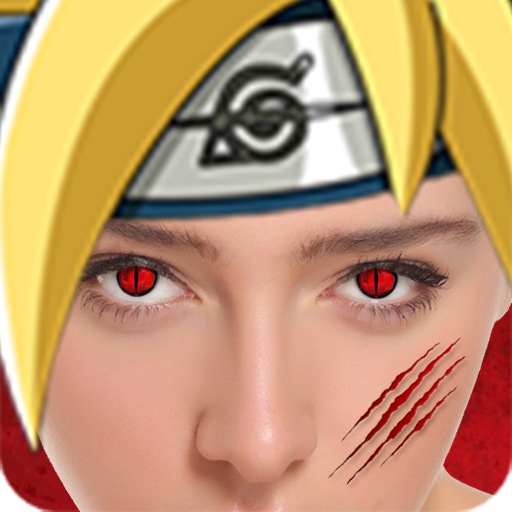
Sharingan Eyes Photo Editor - Ninja Camera Editor allows anime cosplay fans to edit their pictures with ease. Easily cosplay as a ninja from konoha with a variety of eye styles, hair styles, and rasengan effects.
"Sharingan Eyes Photo Editor - Ninja Camera Editor" in our "eye color changer" app are perfect for all anime fans out there! And for those who want to try something completely different in a face beauty app! Change eye color in pictures with Sharingan filter and explore different colored contacts. First, take a selfie, or choose a pic from your photo album and start the rinnegan eyes color editor. There are regular [red contacts] for a real Sharingan effect, and we also offer other styles of anime eyes. Electric blue, neon green, and yellow contacts – all here as special effects contacts! Sharingan Eyes Camera Editor is perfect as a contact lenses Halloween choice! But, you don't have to wait for that scary holiday to have the real sharingan eyes! Are you satisfied with your eye color? Do you feel like you need a change? If you want to try out different "contact lenses color" but are afraid of the outcome, feel free to explore our black and red photo editor – uchiha eyes lens photo editor with red eye effect!
- Do you like ninja from konoha and naroto eyes? This app is reference anime costume for cosplayer!. Change your eyes to sharingan like Sasuke uchiha or kakashi by use tool. NarutoEyes Photo Effect is packed with realistic sharingan eyes and also Narutohair from narutoamino.
If you are a fan of sharingan eyes and ''red contacts'', then this is the perfect eye color changer app for you! Download and install ''Sharingan Eyes Photo Editor - Ninja Camera Editor'' and look really spooky with fake contact lenses! Use this eyes color editor to make your selfie completely unrecognizable and awesome! Try out red eyes, yellow contacts, or even neon green eyes! Sharingan eyes photo editor effect will add a special note to your regular photos, and it will show you that photo editing is not that difficult! Make a great face changer photo and look like your favorite character with a magic eye color! If you always wanted to wear contact lenses but wasn't sure how it would look on you, here is the chance to find out! Install sharingan eyes camera editor and play with different ''eye color change'' possibilities! Sharingan Eyes – Eye Color Changer is an eye color editor you are going to love! Change eye color in pictures and have sharingan eyes!
Jutsu of Ninja! Beauty and power! Let's enjoy Sharingan (写輪眼) and Rinnegan (輪廻眼), the most powerful Doujutsus in Ninja World.
Features for this sharingan photo stickers editor:
- sharingan eyes camera lets you rotate, scale and adjust Sharingan lens editor to fit the size of your photo!
- Share the eye images on major social networks - scary contact lenses will amaze your friends!
- Don't forget to save the outcome as sharingan eyes wallpaper once you create your own Sharingan contact lenses!
- Color photo editor ninja with photo effects funny is completely FREE of charge!
- Eye colour changer supports horizontal orientation and works great on both mobile phones and tablet devices!
Ninja Camera Editor is a color contact lenses camera that can turn your regular eye color into any other you like! Just go through photo stickers offered and pick eye stickers just for you! Be magical and apply contact lenses filter right now!
Preview

Tags
PhotographyInformation
Developer
App world Photo Editor
Latest Version
4.6
Last Updated
2021-08-20
Category
Photography
Available on
Google Play
Show More
Cara bermain Sharingan Eyes Photo Editor - Ninja Camera Editor dengan GameLoop pada PC
1. Muat turun GameLoop dari laman web rasmi, kemudian jalankan fail exe untuk memasang GameLoop.
2. Buka GameLoop dan cari "Sharingan Eyes Photo Editor - Ninja Camera Editor", cari Sharingan Eyes Photo Editor - Ninja Camera Editor dalam hasil carian dan klik "Pasang".
3. Nikmati bermain Sharingan Eyes Photo Editor - Ninja Camera Editor di GameLoop.
Minimum requirements
OS
Windows 8.1 64-bit or Windows 10 64-bit
GPU
GTX 1050
CPU
i3-8300
Memory
8GB RAM
Storage
1GB available space
Recommended requirements
OS
Windows 8.1 64-bit or Windows 10 64-bit
GPU
GTX 1050
CPU
i3-9320
Memory
16GB RAM
Storage
1GB available space