
Sphero Draw N' Drive PC
Sphero Inc.
Download Sphero Draw N' Drive on PC With GameLoop Emulator
Sphero Draw N' Drive pada PC
Sphero Draw N' Drive, datang daripada pembangun Sphero Inc., sedang berjalan pada sistem Android pada masa lalu.
Kini, Anda boleh bermain Sphero Draw N' Drive pada PC dengan GameLoop dengan lancar.
Muat turunnya dalam pustaka GameLoop atau hasil carian. Tiada lagi melihat bateri atau panggilan yang mengecewakan pada masa yang salah lagi.
Hanya nikmati Sphero Draw N' Drive PC pada skrin besar secara percuma!
Sphero Draw N' Drive Pengenalan
**Now compatible with Ollie, the App Controlled Robot**
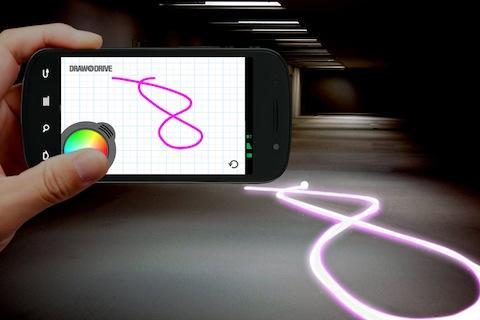
If you can draw it, Sphero and Ollie can drive it!
Use your finger to trace a path on the screen and Sphero or Ollie will follow it before your eyes. Just give your smartphone or tablet a shake to clear the slate. Even make Sphero or Ollie change colors as it rolls by using the integrated color wheel.
You need to own a Sphero Robotic Ball or Ollie - the app-controlled robot, to use this application. Visit gosphero.com to get Sphero and Ollie. Learn more from our tutorial videos, and become part of the Sphero and Ollie communities.
For exclusive content and the latest updates, become a fan of Sphero and Ollie on Facebook at facebook.com/gosphero and follow us on Twitter at @gosphero
Enjoy Draw N’ Drive!
*******************
FEATURES
*******************
-Draw any path for Sphero or Ollie to follow.
-Change Sphero or Ollie to thousands of colors as it rolls.
-Shake your device to erase your drawing and start over.
-Replay button so you can show your friends.
-Simple 1-finger gesture to adjust Sphero or Ollie’s heading.
Preview

Information
Developer
Sphero Inc.
Latest Version
1.5.3
Last Updated
2014-09-15
Category
Entertainment
Available on
Google Play
Show More
Cara bermain Sphero Draw N' Drive dengan GameLoop pada PC
1. Muat turun GameLoop dari laman web rasmi, kemudian jalankan fail exe untuk memasang GameLoop.
2. Buka GameLoop dan cari "Sphero Draw N' Drive", cari Sphero Draw N' Drive dalam hasil carian dan klik "Pasang".
3. Nikmati bermain Sphero Draw N' Drive di GameLoop.
Minimum requirements
OS
Windows 8.1 64-bit or Windows 10 64-bit
GPU
GTX 1050
CPU
i3-8300
Memory
8GB RAM
Storage
1GB available space
Recommended requirements
OS
Windows 8.1 64-bit or Windows 10 64-bit
GPU
GTX 1050
CPU
i3-9320
Memory
16GB RAM
Storage
1GB available space