
showfy – photo & video sharing para PC
MAGIX
Descarga showfy – photo & video sharing en PC con GameLoop Emulator
showfy – photo & video sharing en PC
showfy – photo & video sharing, proveniente del desarrollador MAGIX, se ejecuta en el sistema Android en el pasado.
Ahora, puedes jugar showfy – photo & video sharing en PC con GameLoop sin problemas.
Descárgalo en la biblioteca de GameLoop o en los resultados de búsqueda. No más mirar la batería o llamadas frustrantes en el momento equivocado nunca más.
Simplemente disfrute de showfy – photo & video sharing PC en la pantalla grande de forma gratuita!
showfy – photo & video sharing Introducción
The showfy media sharing service lets you upload photos and videos on the go and share them with friends – it's easy, private and safe.
EASY
Experience a new way to share media. First, create your own online video or photo album, also known as a showfy stream. Upload snapshots, even while you're on the go. Then simply invite the people you want to share your media with by entering their email address. No matter where you are, you always have access to your showfy streams. Display your photos and videos on your PC, smartphone, tablet or Smart TV.
PRIVATE
Showfy lets you decide who you want to share your media with. You can share your most memorable moments only with people that you personally know. The friends you share your media with are able to view and comment on your video and photo albums. This guarantees that only the people you choose are able to see your content.
SAFE
Sharing photos and videos is a great way to stay in touch with friends and family, and privacy is particularly important when doing this. Many social networks are receiving a lot of criticism for viewing the private messages of their users and selling their data to third parties for advertising purposes. Showfy offers a different, safer alternative to social media networks and apps. All your media is automatically encrypting and saved on the showfy server in Germany.
FREE
Great photos and videos need lots of space. As a showfy user, you get 2GB storage space for free for an unlimited amount of time.
If you'd like to save more media or have access to more features, you can upgrade at any time to "showfy Premium" and increase your storage space to 25GB.
App features:
• 2 GB free storage space
• Upload photos and videos
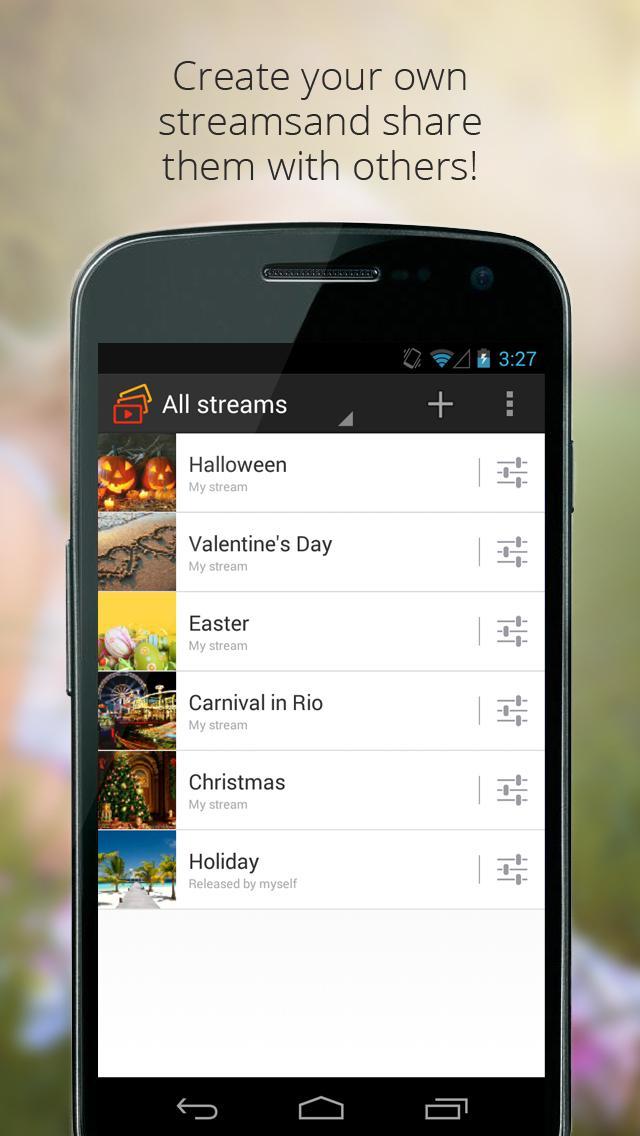
• Sort your media into convenient streams (online video and photo albums)
• Streams are clearly displayed as galleries
• Only the people you invite to view your streams can see the media contained within them
• Unblock streams and share them with others
• Comment on and like images & videos in streams
• Automatic synchronization for all your devices
• Wireless transfer to your TV with Google Chromecast
• Security: German servers and SSL encryption
It's this easy:
1. After uploading your media, select photos and videos in the showfy app to create an online album known as a showfy stream.
2. Add the email addresses of the people you want to share your media with and write them a short message letting them know about your new stream.
3. Now the friends you invited can check out the photos and videos in your stream on their devices. Even when they're on the go.
**********************************************
We're always trying to make the showfy app better and appreciate any and all feedback. If you have any ideas, requests or critique, simply get in touch with our support team: support-de@showfy.com
Avance

Información
Desarrollador
MAGIX
La última versión
1.1.3.306
Última actualización
2015-11-05
Categoría
Video-players-editors
Disponible en
Google Play
Mostrar más
Cómo jugar showfy – photo & video sharing con GameLoop en PC
1. Descargue GameLoop desde el sitio web oficial, luego ejecute el archivo exe para instalar GameLoop.
2. Abra GameLoop y busque "showfy – photo & video sharing", busque showfy – photo & video sharing en los resultados de búsqueda y haga clic en "Instalar".
3. Disfruta jugando showfy – photo & video sharing en GameLoop.
Minimum requirements
OS
Windows 8.1 64-bit or Windows 10 64-bit
GPU
GTX 1050
CPU
i3-8300
Memory
8GB RAM
Storage
1GB available space
Recommended requirements
OS
Windows 8.1 64-bit or Windows 10 64-bit
GPU
GTX 1050
CPU
i3-9320
Memory
16GB RAM
Storage
1GB available space