
iVRy Driver for SteamVR (PSVR Premium Edition)
Mediator Software
- MexicoMex$211.56Mex$211.56Ir a la tienda
- ArgentinaMex$67.07Mex$67.07Ir a la tienda
- TurkeyMex$115.1Mex$115.1Ir a la tienda
Descarga iVRy Driver for SteamVR (PSVR Premium Edition) en PC con GameLoop Emulator
iVRy Driver for SteamVR (PSVR Premium Edition), es un popular juego de Steam desarrollado por Mediator Software. Puede descargar iVRy Driver for SteamVR (PSVR Premium Edition) y los mejores juegos de Steam con GameLoop para jugar en la PC. Haga clic en el botón 'Obtener' para obtener las últimas mejores ofertas en GameDeal.
Obtén iVRy Driver for SteamVR (PSVR Premium Edition) juego de vapor
iVRy Driver for SteamVR (PSVR Premium Edition), es un popular juego de Steam desarrollado por Mediator Software. Puede descargar iVRy Driver for SteamVR (PSVR Premium Edition) y los mejores juegos de Steam con GameLoop para jugar en la PC. Haga clic en el botón 'Obtener' para obtener las últimas mejores ofertas en GameDeal.
iVRy Driver for SteamVR (PSVR Premium Edition) Funciones
SteamVR
To use the iVRy Driver for SteamVR, you MUST first install SteamVR from the Steam Store:
Before you start
IMPORTANT:
When using the iVRy Driver for SteamVR for the first time, it MUST be started from the "Launch" button, to ensure any additional services and drivers it requires get installed.When using the Sony PSVR for the first time, place the PSVR on a flat, level surface, facing forwards. The PSVR calibration process will start. Wait for LEDs to stop flashing before using PSVR. Do not move PSVR during calibration process.
PlayStation VR Connection Diagram
NOTE: The PSVR MUST be connected directly to an HDMI port on the computer, not via an adapter. Connecting a TV or monitor to the "TV out" port of the PSVR Processor Box IS NOT supported, the TV or monitor MUST be connected directly to the computer. The PSVR MUST NOT be the primary display. The PSVR display MUST be set to "Extend", not "Duplicate".
About the Game
What is the iVRy Driver for SteamVR (PSVR Premium Edition) DLC?
• It is the FULL version of the iVRy Driver for SteamVR with PSVR support.
What is iVRy (PSVR Edition)?
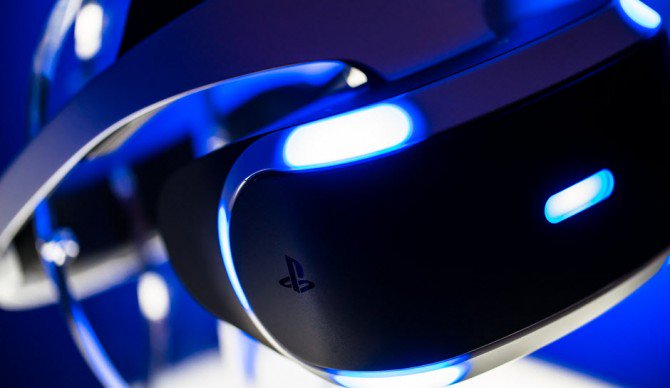
• iVRy is a Virtual Reality headset driver for SteamVR for your Sony PSVR headset.
What does that mean?
• Want to play PC VR* (Virtual Reality) titles without having to buy another VR headset?
• With iVRy and a Sony PSVR headset you can!
• Supports all PSVR display modes without additional tweaking.
• User configurable quality and performance options.
• Integrates with SteamVR, so no 'manager' / 'server' apps or additional configuration required.
• Includes SteamVR Dashboard overlay, to change driver settings in VR.
• Built-in support for NoloVR 6DOF tracking and motion controllers.
• Compatible with most HTC Vive and Oculus Rift** titles.
• Upgrade to "Premium" edition via Steam DLC to remove the limitations of the "Lite" edition.
* Valve OpenVR/SteamVR. Requires Valve Steam & SteamVR on Windows 7 or later.
** Oculus Rift titles require Valve SteamVR, Oculus Home & 3rd party 'LibreVR Revive' software.
Descarga iVRy Driver for SteamVR (PSVR Premium Edition) en PC con GameLoop Emulator
Obtén iVRy Driver for SteamVR (PSVR Premium Edition) juego de vapor
iVRy Driver for SteamVR (PSVR Premium Edition), es un popular juego de Steam desarrollado por Mediator Software. Puede descargar iVRy Driver for SteamVR (PSVR Premium Edition) y los mejores juegos de Steam con GameLoop para jugar en la PC. Haga clic en el botón 'Obtener' para obtener las últimas mejores ofertas en GameDeal.
iVRy Driver for SteamVR (PSVR Premium Edition) Funciones
SteamVR
To use the iVRy Driver for SteamVR, you MUST first install SteamVR from the Steam Store:
Before you start
IMPORTANT:
When using the iVRy Driver for SteamVR for the first time, it MUST be started from the "Launch" button, to ensure any additional services and drivers it requires get installed.When using the Sony PSVR for the first time, place the PSVR on a flat, level surface, facing forwards. The PSVR calibration process will start. Wait for LEDs to stop flashing before using PSVR. Do not move PSVR during calibration process.
PlayStation VR Connection Diagram
NOTE: The PSVR MUST be connected directly to an HDMI port on the computer, not via an adapter. Connecting a TV or monitor to the "TV out" port of the PSVR Processor Box IS NOT supported, the TV or monitor MUST be connected directly to the computer. The PSVR MUST NOT be the primary display. The PSVR display MUST be set to "Extend", not "Duplicate".
About the Game
What is the iVRy Driver for SteamVR (PSVR Premium Edition) DLC?
• It is the FULL version of the iVRy Driver for SteamVR with PSVR support.
What is iVRy (PSVR Edition)?
• iVRy is a Virtual Reality headset driver for SteamVR for your Sony PSVR headset.
What does that mean?
• Want to play PC VR* (Virtual Reality) titles without having to buy another VR headset?
• With iVRy and a Sony PSVR headset you can!
• Supports all PSVR display modes without additional tweaking.
• User configurable quality and performance options.
• Integrates with SteamVR, so no 'manager' / 'server' apps or additional configuration required.
• Includes SteamVR Dashboard overlay, to change driver settings in VR.
• Built-in support for NoloVR 6DOF tracking and motion controllers.
• Compatible with most HTC Vive and Oculus Rift** titles.
• Upgrade to "Premium" edition via Steam DLC to remove the limitations of the "Lite" edition.
* Valve OpenVR/SteamVR. Requires Valve Steam & SteamVR on Windows 7 or later.
** Oculus Rift titles require Valve SteamVR, Oculus Home & 3rd party 'LibreVR Revive' software.
Avance
Información
Desarrollador
Mediator Software
La última versión
1.0.0
Última actualización
2019-01-23
Categoría
Steam-game
Mostrar más
Reseñas
- Hungariansausage08
Oct 15, 2021
- gamedeal user
Nov 16, 2021
- gamedeal user
Nov 26, 2021
- gamedeal user
Dec 30, 2021
- thicc_wang
Dec 9, 2022
- gamedeal user
Dec 24, 2022
- Moggy
Aug 15, 2023
- Auryn
Sep 12, 2023
- gamedeal user
Feb 16, 2019
- gamedeal user
Mar 15, 2019
preguntas frecuentes
PC Games Cheaper On Gamedeal | Find The Best Deals of Games Here!
Finding the right place to get the best game deals can prove to be quite a hassle when comparing game prices on multiple sites. However, you can skip through all the trouble by letting Gamedeal handle the price comparisons and grab only the best deal prices for you!
We compare game prices on all the trusted storefronts and list game deals starting with the lowest price possible at the moment. Looking for something more specific? Search it on Gamedeal and find all the best deals and cd keys discount codes to make the most out of your bucks.
Not sure what you looking for? Browse through our massive library of games from different genres to find epic deals for your favorite games from the biggest retailers in the market. Can’t afford the game you are looking for? Make sure to wishlist it and stay up-to-date with all the price changes in the future.
Say Bye to Hefty Game Deals!
Gamedeal is your one-stop shop to find all the best deals from your favorite retailers including Steam, Epic Games, Gamestop, and many more under one roof. Looking for games that cost you nothing? We have got you covered with our free games list that includes free PC and Playstation games.
We help you stay on top of the news with upcoming Steam sales and Gamestop promo codes to ensure you get the game of your choice at the lowest price possible. From old-school classics to modern AAA titles, there is something for everyone to play here.