CPUCores :: Maximize Your FPS
Smorb Software
- MexicoMex$268.27Mex$268.27Ir a la tienda
- ArgentinaMex$9.19Mex$9.19Ir a la tienda
- TurkeyMex$15.39Mex$15.39Ir a la tienda
Descarga CPUCores :: Maximize Your FPS en PC con GameLoop Emulator
CPUCores :: Maximize Your FPS, es un popular juego de Steam desarrollado por Smorb Software. Puede descargar CPUCores :: Maximize Your FPS y los mejores juegos de Steam con GameLoop para jugar en la PC. Haga clic en el botón 'Obtener' para obtener las últimas mejores ofertas en GameDeal.
Obtén CPUCores :: Maximize Your FPS juego de vapor
CPUCores :: Maximize Your FPS, es un popular juego de Steam desarrollado por Smorb Software. Puede descargar CPUCores :: Maximize Your FPS y los mejores juegos de Steam con GameLoop para jugar en la PC. Haga clic en el botón 'Obtener' para obtener las últimas mejores ofertas en GameDeal.
CPUCores :: Maximize Your FPS Funciones
Just Updated
- 1 Click "START RANDOM GAME" functionality!
- Works extremely well with Battle Royale games!
- CPUCores fully supports VR-based games!
- Fully supports Steam-based games as well as non-Steam games and applications!
About the Software
CPUCores is a cutting-edge Windows based software built by gamers, specifically for gamers, with 1 thing in mind: INCREASE YOUR FPS! CPUCores does this by micromanaging your Windows OS and non-essential applications to delivery maximum CPU to your game!
1) DIRECT STEAM INTEGRATION
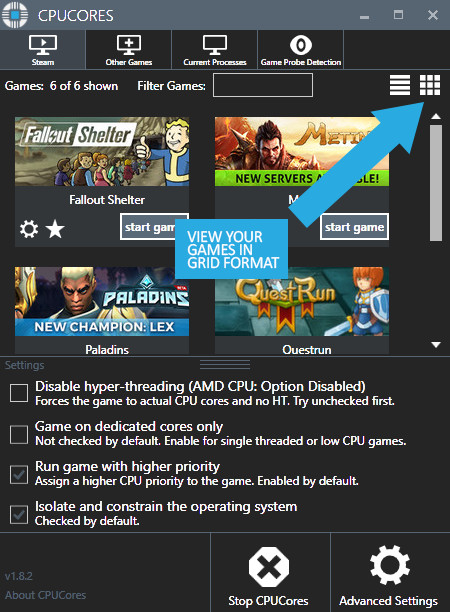
- CPUCores automatically detects all of your Steam games.
2) OS OPTIMIZATION
- To start, CPUCores will isolate your entire OS to your first core.
- Secondly, CPUCores examines and constrains key Windows services that are not essential and known to hog CPU resources.
- Third, CPUCores examines and isolate key Windows processes to ensure a perfect balance of CPU savings without starving key Windows processes.
3) GAME OPTIMIZATION
- CPUCores will isolate and dedicate processing cores to be exclusively used by your game.
- CPUCores will allow game-specific hyper-thread disabling/enabling.
4) BACKGROUND / NON-GAME OPTIMIZATIONS
- CPUCores examines what non-OS and non-game operations your PC is running. It will do things such as constrain non-game programs to your first processing core.
5) EXTRAS
- Ability to "START RANDOM GAME" with 1 button click!
- Fully supporting VR games!
- Support for non-Steam games
- Support for general, non-game applications like video editing, graphic design and more!
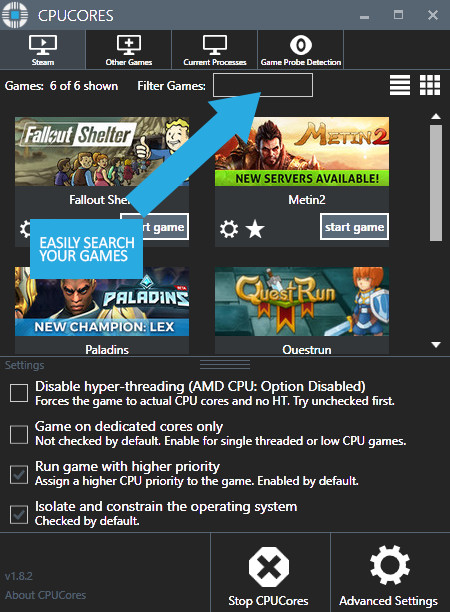
- Convenient game sorting options makes large Steam libraries manageable
- Incredible community surrounding the software!
- Direct contact with the developer for suggestions on feature updates!
The impact of how CPUCores will help with FPS depends on essentially 2 things:
#1 Your PC Hardware
#2 The game itself
Here are some benchmarks we've recently seen from our test system:
- ARMA III - 17.5% FPS Increase!
- Team Fortress 2 - 58% FPS Increase!
- TombRaider - 6.3% FPS Increase
- Left4Dead2 - 14% FPS Increase
The CPUCores application identifies dozens of Windows programs, background processes, and non-gaming applications, and immediately controls and isolates them to a subsection of your total CPU resources.
CPUCores will then free up a block of CPU resources and dedicated it specifically for a game. You can then launch a Steam game, or any game/program, directly via the CPUCores application. This enables CPUCores to control the processor usage for that game/program and ensure it has dedicated usage to processing cores. Your game no longer has to share resources with the OS / other applications.
SCREENSHOTS
Descarga CPUCores :: Maximize Your FPS en PC con GameLoop Emulator
Obtén CPUCores :: Maximize Your FPS juego de vapor
CPUCores :: Maximize Your FPS, es un popular juego de Steam desarrollado por Smorb Software. Puede descargar CPUCores :: Maximize Your FPS y los mejores juegos de Steam con GameLoop para jugar en la PC. Haga clic en el botón 'Obtener' para obtener las últimas mejores ofertas en GameDeal.
CPUCores :: Maximize Your FPS Funciones
Just Updated
- 1 Click "START RANDOM GAME" functionality!
- Works extremely well with Battle Royale games!
- CPUCores fully supports VR-based games!
- Fully supports Steam-based games as well as non-Steam games and applications!
About the Software
CPUCores is a cutting-edge Windows based software built by gamers, specifically for gamers, with 1 thing in mind: INCREASE YOUR FPS! CPUCores does this by micromanaging your Windows OS and non-essential applications to delivery maximum CPU to your game!
1) DIRECT STEAM INTEGRATION
- CPUCores automatically detects all of your Steam games.
2) OS OPTIMIZATION
- To start, CPUCores will isolate your entire OS to your first core.
- Secondly, CPUCores examines and constrains key Windows services that are not essential and known to hog CPU resources.
- Third, CPUCores examines and isolate key Windows processes to ensure a perfect balance of CPU savings without starving key Windows processes.
3) GAME OPTIMIZATION
- CPUCores will isolate and dedicate processing cores to be exclusively used by your game.
- CPUCores will allow game-specific hyper-thread disabling/enabling.
4) BACKGROUND / NON-GAME OPTIMIZATIONS
- CPUCores examines what non-OS and non-game operations your PC is running. It will do things such as constrain non-game programs to your first processing core.
5) EXTRAS
- Ability to "START RANDOM GAME" with 1 button click!
- Fully supporting VR games!
- Support for non-Steam games
- Support for general, non-game applications like video editing, graphic design and more!
- Convenient game sorting options makes large Steam libraries manageable
- Incredible community surrounding the software!
- Direct contact with the developer for suggestions on feature updates!
The impact of how CPUCores will help with FPS depends on essentially 2 things:
#1 Your PC Hardware
#2 The game itself
Here are some benchmarks we've recently seen from our test system:
- ARMA III - 17.5% FPS Increase!
- Team Fortress 2 - 58% FPS Increase!
- TombRaider - 6.3% FPS Increase
- Left4Dead2 - 14% FPS Increase
The CPUCores application identifies dozens of Windows programs, background processes, and non-gaming applications, and immediately controls and isolates them to a subsection of your total CPU resources.
CPUCores will then free up a block of CPU resources and dedicated it specifically for a game. You can then launch a Steam game, or any game/program, directly via the CPUCores application. This enables CPUCores to control the processor usage for that game/program and ensure it has dedicated usage to processing cores. Your game no longer has to share resources with the OS / other applications.
SCREENSHOTS
Avance
Información
Desarrollador
Smorb Software
La última versión
1.0.0
Última actualización
2015-07-06
Categoría
Steam-game
Mostrar más
Reseñas
- gamedeal user
Oct 2, 2021
- gamedeal user
Mar 20, 2021
- gamedeal user
Oct 1, 2019
- gamedeal user
Jun 9, 2020
- gamedeal user
Jun 27, 2016
- gamedeal user
Nov 19, 2020
- gamedeal user
Jan 7, 2020
- gamedeal user
Apr 11, 2017
- gamedeal user
Dec 18, 2017
- gamedeal user
May 22, 2020
preguntas frecuentes
PC Games Cheaper On Gamedeal | Find The Best Deals of Games Here!
Finding the right place to get the best game deals can prove to be quite a hassle when comparing game prices on multiple sites. However, you can skip through all the trouble by letting Gamedeal handle the price comparisons and grab only the best deal prices for you!
We compare game prices on all the trusted storefronts and list game deals starting with the lowest price possible at the moment. Looking for something more specific? Search it on Gamedeal and find all the best deals and cd keys discount codes to make the most out of your bucks.
Not sure what you looking for? Browse through our massive library of games from different genres to find epic deals for your favorite games from the biggest retailers in the market. Can’t afford the game you are looking for? Make sure to wishlist it and stay up-to-date with all the price changes in the future.
Say Bye to Hefty Game Deals!
Gamedeal is your one-stop shop to find all the best deals from your favorite retailers including Steam, Epic Games, Gamestop, and many more under one roof. Looking for games that cost you nothing? We have got you covered with our free games list that includes free PC and Playstation games.
We help you stay on top of the news with upcoming Steam sales and Gamestop promo codes to ensure you get the game of your choice at the lowest price possible. From old-school classics to modern AAA titles, there is something for everyone to play here.