AI Photo Editor: BG Remover para PC
Solution Photo Apps
Descarga AI Photo Editor: BG Remover en PC con GameLoop Emulator
AI Photo Editor: BG Remover en PC
AI Photo Editor: BG Remover, proveniente del desarrollador Solution Photo Apps, se ejecuta en el sistema Android en el pasado.
Ahora, puedes jugar AI Photo Editor: BG Remover en PC con GameLoop sin problemas.
Descárgalo en la biblioteca de GameLoop o en los resultados de búsqueda. No más mirar la batería o llamadas frustrantes en el momento equivocado nunca más.
Simplemente disfrute de AI Photo Editor: BG Remover PC en la pantalla grande de forma gratuita!
AI Photo Editor: BG Remover Introducción
Transform your photos into professional artwork with AI Photo Editor: BG Remover — your ultimate, all-in-one AI-powered picture editor and collage maker!
Powered by smart AI detection, you can cut out backgrounds with single-tap precision, erase unwanted objects, blur portrait backgrounds like a DSLR camera, apply 100+ stunning filters, and create eye-catching photo collages in seconds.
Whether you need product cutouts, transparent PNGs, aesthetic Instagram posts, or social media stories, this app gives you studio-quality editing tools right at your fingertips. No professional editing skills required!
✨ KEY AI & EDITING FEATURES ✨
🪄 AI Background Remover & Cutout
One-Tap Instant AI Cutout: Automatically detect, separate, and erase backgrounds with high accuracy.
Manual Refine & Touch-Up Brush: Smoothly restore or erase specific details with adjustable brush precision.
Edge Smoothing: Get ultra-clean, natural outlines around hair, clothing, and intricate objects.
Save Transparent PNGs: Export cutouts instantly for e-commerce products, logos, stickers, and thumbnails.
🖼️ Photo Collage Maker & Grid Editor
100+ Grid Layouts: Choose from a wide variety of photo collage templates designed for every occasion.
Custom Spacing & Rounded Corners: Adjust border thickness and corner radii for modern layouts.
Pre-Set Social Ratios: Ready-to-use aspect ratios for Instagram (1:1, 4:5), TikTok/Stories (9:16), Facebook (16:9), and YouTube (3:4).
Stylized Borders & Backgrounds: Personalize your collage with solid colors, blur backgrounds, and custom patterns.
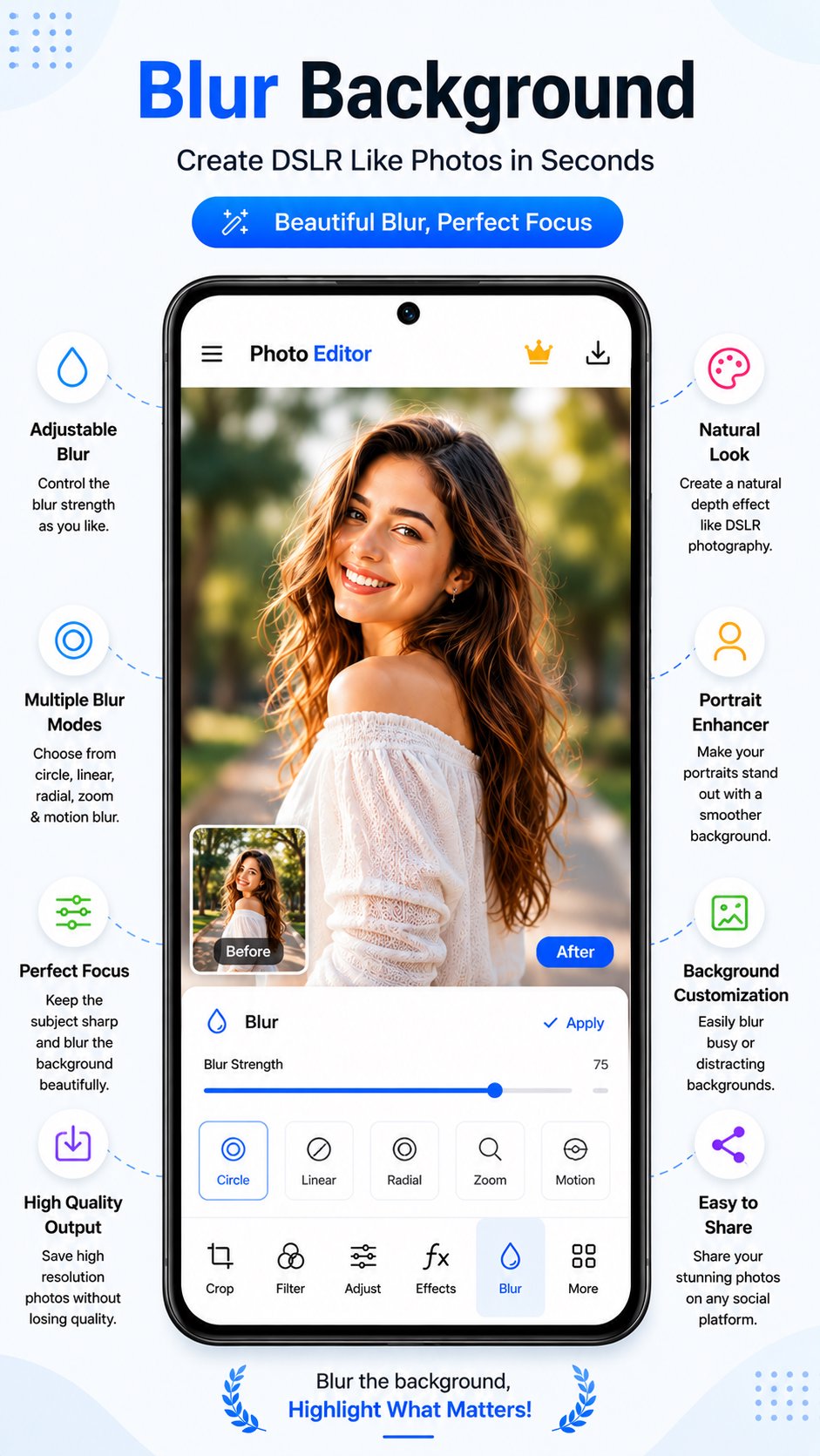
💧 DSLR Blur Background (Bokeh Effect)
Multiple AI Blur Modes: Choose between Circle, Linear, Radial, Zoom, and Motion blur effects.
Adjustable Focus & Intensity: Keep your main subject razor-sharp while softening distracting backgrounds.
Natural Portrait Enhancer: Create depth-of-field shots that rival professional DSLR cameras.
🎨 100+ Filters & Stylish Photo Effects
Trending Presets: Vintage, B&W, Natural, Bright, Moody, Cinematic, Film, Vivid, and Soft filters.
One-Tap AI Enhancement: Instantly improve lighting, tone, contrast, and color balance in a single touch.
Real-Time Live Preview: Easily compare Before / After edits side by side before saving.
🖌️ Draw, Paint & Doodle Canvas
Freehand Drawing: Sketch, paint, or write over photos using your finger or a stylus.
Brush Customization: Control brush size, stroke opacity, and line styles effortlessly.
Shapes & Stickers: Decorate pictures with hearts, crowns, shapes, and trendy sticker packs.
Full Layer & Eraser Support: Erase mistakes smoothly with reliable Undo and Redo controls.
🛠️ Pro Fine-Tuning & Adjustment Tools
Crop & Frame: Precision crop, flip, and rotate tools for perfect composition.
Light & Color Controls: Tune brightness, contrast, saturation, shadows, highlights, and warmth.
Creative Text Styles: Add text with custom fonts, colors, stroke outlines, and background shadows.
High-Resolution HD Export: Save high-quality photos with zero compression or quality loss.
Instant Social Sharing: Share directly to Instagram, WhatsApp, TikTok, Facebook, Snapchat, and more!
🌟 Why Choose This AI Photo Editor?
All-In-One Power: No need to download separate apps for background erasing, collages, and portrait blur.
Fast & Ultra-Lightweight: Clean design optimized for smooth processing and quick photo saves.
Clean & Watermark-Free: Save high-res images in crisp HD quality ready for publication.
Download AI Photo Editor: BG Remover today and create stunning photos in seconds!
Avance

Etiquetas
FotografíaInformación
Desarrollador
Solution Photo Apps
La última versión
1.0.8
Última actualización
2026-10-03
Categoría
Fotografía
Disponible en
Google Play
Mostrar más
Cómo jugar AI Photo Editor: BG Remover con GameLoop en PC
1. Descargue GameLoop desde el sitio web oficial, luego ejecute el archivo exe para instalar GameLoop.
2. Abra GameLoop y busque "AI Photo Editor: BG Remover", busque AI Photo Editor: BG Remover en los resultados de búsqueda y haga clic en "Instalar".
3. Disfruta jugando AI Photo Editor: BG Remover en GameLoop.
Minimum requirements
OS
Windows 8.1 64-bit or Windows 10 64-bit
GPU
GTX 1050
CPU
i3-8300
Memory
8GB RAM
Storage
1GB available space
Recommended requirements
OS
Windows 8.1 64-bit or Windows 10 64-bit
GPU
GTX 1050
CPU
i3-9320
Memory
16GB RAM
Storage
1GB available space