Hindu Calendar - Drik Panchang para PC
Drik Panchang Private Limited
Descarga Hindu Calendar - Drik Panchang en PC con GameLoop Emulator
Hindu Calendar - Drik Panchang en PC
Hindu Calendar - Drik Panchang, proveniente del desarrollador Drik Panchang Private Limited, se ejecuta en el sistema Android en el pasado.
Ahora, puedes jugar Hindu Calendar - Drik Panchang en PC con GameLoop sin problemas.
Descárgalo en la biblioteca de GameLoop o en los resultados de búsqueda. No más mirar la batería o llamadas frustrantes en el momento equivocado nunca más.
Simplemente disfrute de Hindu Calendar - Drik Panchang PC en la pantalla grande de forma gratuita!
Hindu Calendar - Drik Panchang Introducción
Panchang which is also known as Panchangam is used to denote five elements of Vedic Astrology, namely Tithi, Nakshatra, Yoga, Karana and Var i.e. weekday. These five elements when combined for a day are known as Panchang. These five elements change every day with the movement of the Moon and the Sun. Hence, followers of Hinduism refer Panchangam on day-to-day basis. Panchang is also known as Hindu Calendar.
Drik Panchang is one of the most reputed Panchangam available on Internet. It has been made available for Android devices with similar features and precision as that of www.DrikPanchang.com This native Panchang, which doesn't need Internet connectivity to use, comes with following features
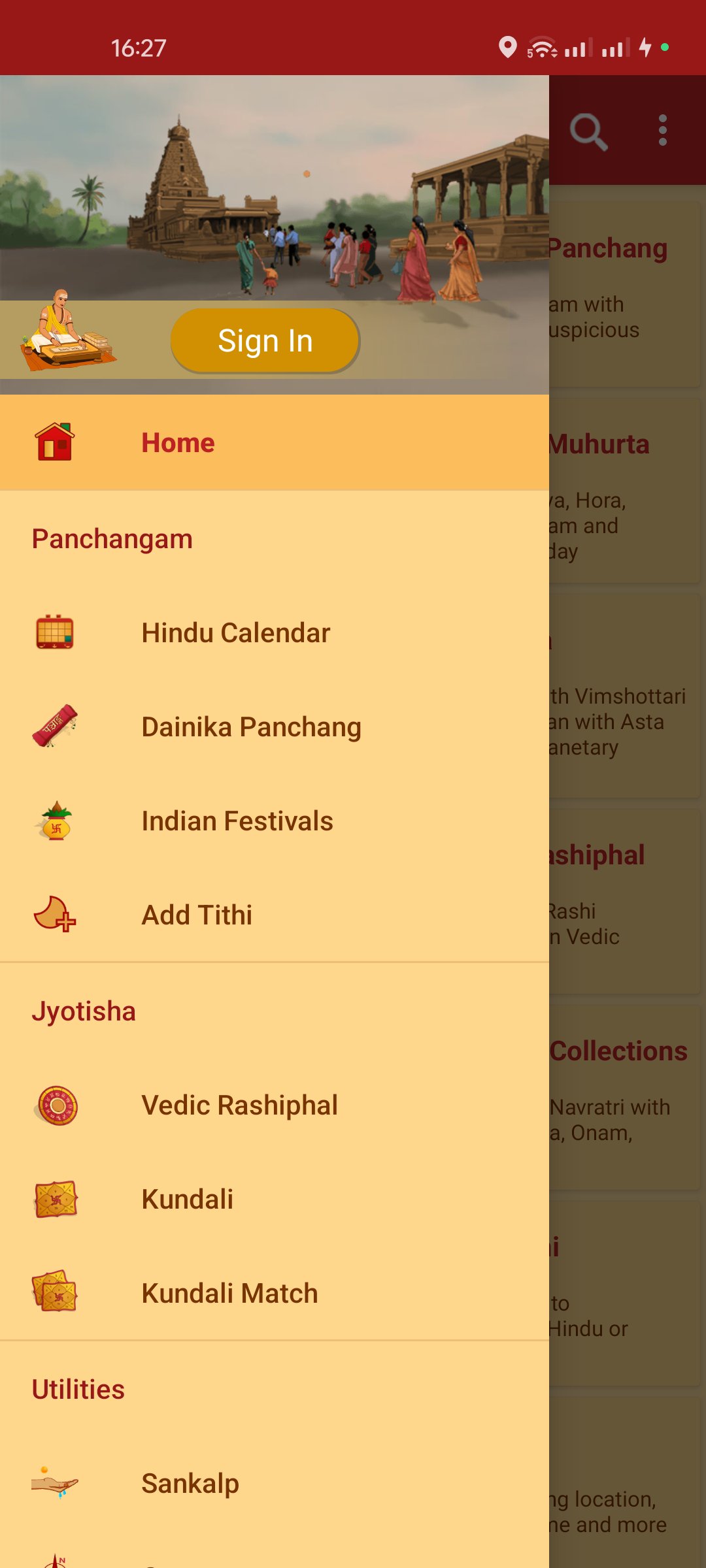
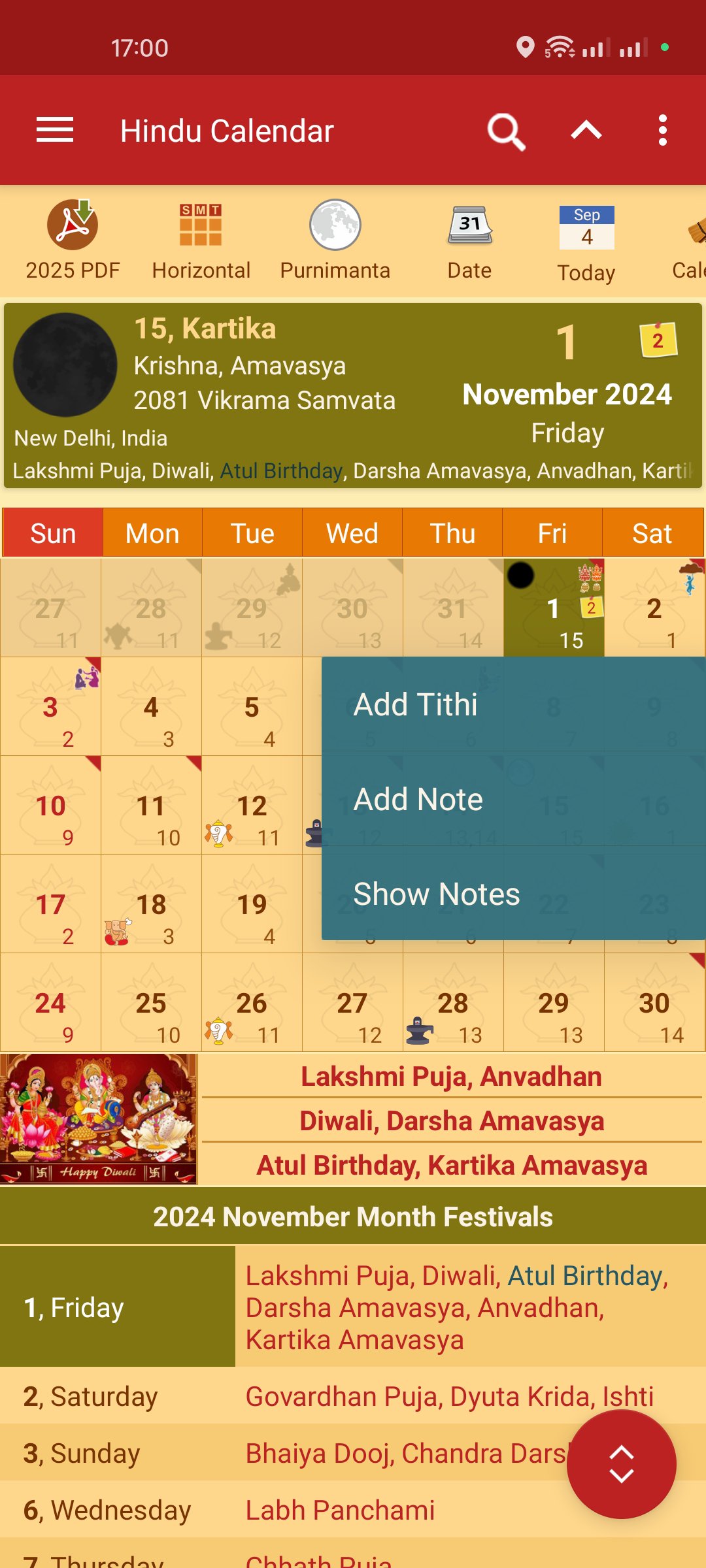
Grid Calendar – The grid can be customized for lunar calendar as well as for solar calendars including Bengali Panjika, Malayalam Panchangam, Odia Panji and Tamil Panchangam.
Festivals – Drik Panchang is the most comprehensive source which lists most Hindu and Indian festivals, Government Holidays, Jayanti, fasting days including Ekadashi, Sankashti, Pradosham, Purnima, Sankranti, Durgashtami and Shivaratri days for each month. The option to set reminder for your favourite festivals and fasting days is also provided.
Kundali Support - Drik Panchang comes with Kundali support and it can generate Lagna, Surya, Chandra, Budha, Guru, Shukra, Shani, Rahu and Ketu Kundali for any date, time and location. Apart from this, Bhav Chalit Chart including D1 to D60 charts can also be generated.
The Kundali can be drawn either in North Indian, South Indian or East Indian chart format. Kundali can be Saved, Edited, Deleted or Opened with the help of Kundali editor. Each Kundali is tagged with running Dasha and Antardasha. Kundali comes with an option to explore detailed Vimshottari Dasha for next 120 years.
Dainika Panchangam - Apart from listing five basic elements of Panchangam, detailed Dainika Panchang highlights Panchaka, Ganda Moola, Bhadra, Vinchudo and all auspicious Yoga including Ravi, Amrita, Sarvartha Siddhi, Tripushkara, Dwipushkara, Ravi Pushya and Guru Pushya for each day.
Muhurta Table - Drik Panchang comes with day and night Choghadiya, Shubh Horai, Udaya Lagna and Pancha Pakshi Muhurta. Each running Muhurta is shown with count down timer.
Compass - An eight-direction Drik Compass based on Vastu Shastra is provided. This compass includes features like Google Maps, Camera and Snapshot options.
Drik Cloud Sync - Drik Panchang app also offers Cloud Sync functionality. With the help of cloud sync, you can access your personalized app data in real time across multiple devices. You can access the latest version of your Kundali and birth details on any device.
Prashnavali - Popular Hindu Prashnavali tools like Rama Shalaka, Ganesha Prashnavali, Durga Prashnavali and Hanuman Prashnavali are given. With the help of these Prashnavali, you can get answers to your deep or complex questions.
Horoscope Match - App can be used to match two horoscopes based on Ashta Kuta. In horoscope matching, Bhakuta Dosha, Nadi Kuta, etc. are considered. Each matched horoscope result is saved for future reference.
Add Tithi - User defined Tithi can be added to Panchang with recursive reminder as per Hindu date or Gregorian date.
Localization - App supports all major Indian languages including Bengali, Gujarati, Hindi, Kannada, Malayalam, Marathi, Odia, Tamil or Telugu with English as the default language.
Location - Panchang can be generated for any location and city across the globe to get correct date for Upavasa and festivals. App comes with in-built DST support and there is no need to adjust timings for DST.
Theme - By default classic theme is set which is based on traditional Indian colors. However, it can be changed to modern looking themes which come in red, green, blue and Krishna colors.
Avance
Etiquetas
Books-&Información
Desarrollador
Drik Panchang Private Limited
La última versión
2.6.0
Última actualización
2025-05-17
Categoría
Books-reference
Disponible en
Google Play
Mostrar más
Cómo jugar Hindu Calendar - Drik Panchang con GameLoop en PC
1. Descargue GameLoop desde el sitio web oficial, luego ejecute el archivo exe para instalar GameLoop.
2. Abra GameLoop y busque "Hindu Calendar - Drik Panchang", busque Hindu Calendar - Drik Panchang en los resultados de búsqueda y haga clic en "Instalar".
3. Disfruta jugando Hindu Calendar - Drik Panchang en GameLoop.
Minimum requirements
OS
Windows 8.1 64-bit or Windows 10 64-bit
GPU
GTX 1050
CPU
i3-8300
Memory
8GB RAM
Storage
1GB available space
Recommended requirements
OS
Windows 8.1 64-bit or Windows 10 64-bit
GPU
GTX 1050
CPU
i3-9320
Memory
16GB RAM
Storage
1GB available space