Smart Settings PC
Root Uninstaller
GameLoopエミュレーターを使用してPCにSmart Settingsをダウンロードします
Smart Settings PC版
開発者Root UninstallerからのSmart Settingsは、過去にAndroidsystermで実行されています。
これで、GameLoopを搭載したPCでSmart Settingsをスムーズにプレイできます。
GameLoopライブラリまたは検索結果にダウンロードしてください。 バッテリーに目を向けたり、間違った時間にイライラしたりすることはもうありません。
大画面でSmart SettingsPCを無料でお楽しみください!
Smart Settings 序章
スマートな設定を自動化して、コンテキストアウェアネスとパワーセーバーの両方に対して、デバイスの設定を最適化するためのツールです。
たとえば、デバイスが会議室の無線LANに接続するときに、"会議"プロファイルが自動的にアクティブ化されるか、またはあなたの会社の無線LANを離れるときには、"アウトドア"プロファイルに変わります。
ダウンロードスマート設定の仕組み]を
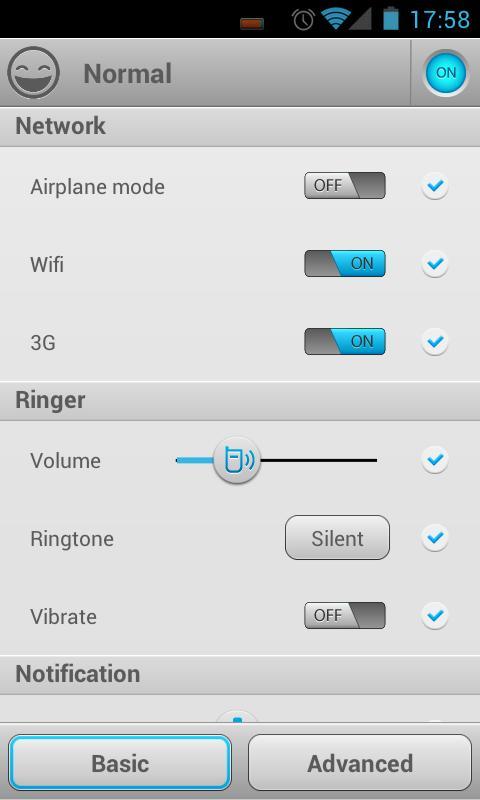
プロファイルには、を含む、デバイス設定のグループです。
☆ネットワーク(飛行機モード、無線LAN、モバイルデータ、GPS)、
☆リンガー(音量、着信音、振動)、
☆お知らせ(音量、着信音、振動)、
☆アラーム(音量、着信音)
☆ディスプレイ(明るさ、壁紙)
☆その他の設定(同期、メディア、DTMF、音声通話、システム)。
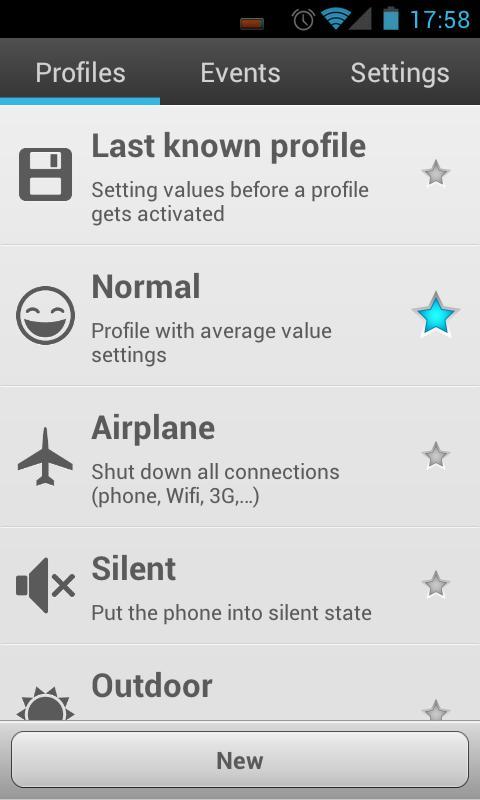
一つは、事前定義された共通のプロファイルとカスタムプロファイルを使用することができます
☆ノーマル、
☆サイレント、
☆屋外、
☆バッテリーセーバー
☆最後の知られているプロファイル(最後に設定を復元するための特別なプロファイル)
☆カスタムプロファイル(あなたが望んで多くのように)
プロファイルは、手動またはイベントによって起動することができます。
イベントの3種類。
☆バッテリー:バッテリーが一定レベル(最優先)に低下し
☆無線LAN:接続または無線LANネットワークへの接続を切断
☆時間:特定の時間または繰り返し(最低優先度)
より多くのイベントが次のバージョンで追加されます。
プロファイルの有効化:
☆自動:イベントはプロファイルにマッピングすることができます。イベントがトリガされると、マッピングされたプロファイルがアクティブになります。プロファイルが優先順位の高いイベントによって活性化されている間にイベントがトリガされる場合、それは無視されることがあります。
☆手動:手動でプロファイルをアクティブにする5つの方法:
- 通知バー:プロファイルが通知領域に表示される設定します。
- クイック·スイッチング画面:新しいショートカットには、あなたのapp引き出しの中に表示されます。この画面でプロファイルを選択することができます。
- [プロファイル]タブの[Toggle"スター"アイコン
- ホーム画面にショートカットを作成します。
- 1Tapクイックバーのアプリを使用します。通知バーが、カスタマイズがたくさんいる。
KW:トグルバッテリーセーバー、コンテキストアウェア、ifttt、タスカー、
ウェブサイト:http://rootuninstaller.com/smart-settings/
Facebookに登録する:http://goo.gl/Brr99
*** english ***
Smart Settings is a tool to automate and optimize device settings, for both context-awareness and power saver.
For example, when the device connect to meeting room’s Wifi, the “Meeting” profile will be automatically activated, or when you leave your company’s Wifi, it turns to “Outdoor” profile.
How Smart Setting works
A profile is a group of device settings, including:
☆ Network (airplane mode, Wifi, mobile data, GPS),
☆ Ringer (volume, ringtone, vibrate),
☆ Notification (volume, ringtone, vibrate),
☆ Alarm (volume, ringtone),
☆ Display (brightness, wallpaper)
☆ Other settings (sync, media, DTMF, voice call, system).
One can use pre-defined common profiles and custom profiles
☆ Normal,
☆ Silent,
☆ Outdoor,
☆ Battery Saver
☆ Last known profile (special profile to restore last settings)
☆ Custom profiles (as many as you want)
A profile can be activated manually or by an event.
3 types of events:
☆ Battery: when battery drops to a certain level (highest priority)
☆ Wifi: connect or disconnect to a wifi network
☆ Time: specific time or repeatedly (lowest priority)
more events will be added in next versions.
Profile activation:
☆ Automatically: An event can be mapped to a profile. When an event is triggered, the mapped profile will be activated. If a event is triggered while a profile is activated by a higher priority event, it may be ignored.
☆ Manually: 5 ways to manually activate a profile:
- Notification bar: configure which profile will be displayed in the notification area.
- Quick switching screen: A new shortcut will be shown in your app drawer. You can select a profile in this screen.
- Toggle “star” icon on Profiles tab
- Create shortcut on home screen
- Using 1Tap Quick Bar app. As notification bar, but alot of customization.
kw: battery saver, context-aware, ifttt, tasker, toggle
Website: http://rootuninstaller.com/smart-settings/
Facebook: http://goo.gl/Brr99
プレビュー
情報
デベロッパー
Root Uninstaller
最新バージョン
1.41
最終更新
2013-03-15
カテゴリー
ツール
上で利用可能
Google Play
もっと見せる
PCでGameLoopを使用してSmart Settingsをプレイする方法
1. 公式WebサイトからGameLoopをダウンロードし、exeファイルを実行してGameLoopをインストールします
2. GameLoopを開いて「Smart Settings」を検索し、検索結果でSmart Settingsを見つけて、「インストール」をクリックします。
3. GameLoopでSmart Settingsを楽しんでください
Minimum requirements
OS
Windows 8.1 64-bit or Windows 10 64-bit
GPU
GTX 1050
CPU
i3-8300
Memory
8GB RAM
Storage
1GB available space
Recommended requirements
OS
Windows 8.1 64-bit or Windows 10 64-bit
GPU
GTX 1050
CPU
i3-9320
Memory
16GB RAM
Storage
1GB available space