Camera One: Wear, Galaxy Watch PC
Shuisky
GameLoopエミュレーターを使用してPCにCamera One: Wear, Galaxy Watchをダウンロードします
Camera One: Wear, Galaxy Watch PC版
開発者ShuiskyからのCamera One: Wear, Galaxy Watchは、過去にAndroidsystermで実行されています。
これで、GameLoopを搭載したPCでCamera One: Wear, Galaxy Watchをスムーズにプレイできます。
GameLoopライブラリまたは検索結果にダウンロードしてください。 バッテリーに目を向けたり、間違った時間にイライラしたりすることはもうありません。
大画面でCamera One: Wear, Galaxy WatchPCを無料でお楽しみください!
Camera One: Wear, Galaxy Watch 序章
Camera One app allows controlling phone cameras through Galaxy Watch or Wear OS smartwatches.
Use cases:
• Selfie or Group photo
• View and record video
• Listen and record audio
• View hard-to-reach places
• Security system
• Baby Monitor
Features:
• Camera: Rear or Front (swipe up|down)
• Photo | Video sizes
• Take a Photo | Video by turning the wrist
• Listen to phone sound
• Audio | Sound | Voice recorder
• Zoom, Flash, Exposure, WB, Filters, HDR, ... (use bezel)
• Time-lapse video: x4, x8, x16, x32
• Timer: 2, 5, 10 secs
• Power saving mode
• Buttons layout styles
• Save copies of photos on the watch
• Save files on the SD card
Works even when the phone screen is off!
All settings are available on your smartwatch.
How to change Zoom, Flash, Exposure, WB, Filters, HDR:
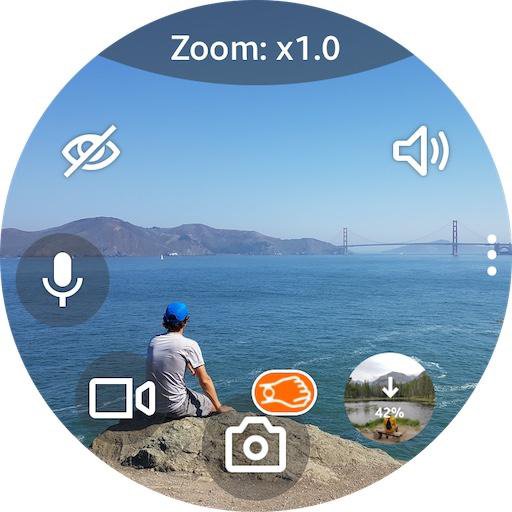
Tap on the top of the screen where is written ‘Zoom: x1.0' to change the bezel mode: Zoom > Flash > Exposure > WB > Filter > ...
Then rotate the bezel to select the value.
For watches without bezel: swipe left | right (any screen area).
For flash: rotate the bezel to select the flash mode: auto | on | off | torch
Sound toggle:
If you don’t hear sound after turn on, go to smartwatch settings - Sound and vibration - Volume - Media (increase it)
Favorite button:
Long tap Sound toggle to switch: Self-Timer <-> Voice recorder (Audio recorder | Sound recorder)
Audio files are saved in: Phone storage \ Voice Recorder.
Taking Photo (video) by turning the wrist:
Turn On/Off - long tap on the photo (video) icon
Also works when the app running in the background
FAQ/Notes:
1. Swipe up or down to switch cameras.
2. High battery consumption?
• After you finish using the app so that it closes completely and no longer consumes battery and stops using the phone's camera, you should close the app using the "Back" button (bottom on the Galaxy Watch), not the "Home" one (top on Galaxy Watch) which will allow the app to continue running but in the background.
3. Connection issue?
• Tap "Settings / Permissions" inside the Camera One app on the phone and follow the instructions.
• Try to uninstall the Camera One app from your phone, install it again, and grant all the permissions the app asks you to. And you should allow everything, not just some of the requested ones, in order for the app to work correctly; and do not change the default app settings, until you check.
Try Premium version for free during the trial period and Buy it later (inside the 'Camera One' app on your phone) when you check out all the functionality and are completely satisfied. If you have any issues, email me at camera.shu@gmail.com and/or use Free version with limited functionality.
プレビュー
タグ
写真仕事効率化ボード情報
デベロッパー
Shuisky
最新バージョン
208
最終更新
2025-08-10
カテゴリー
写真
上で利用可能
Google Play
もっと見せる
PCでGameLoopを使用してCamera One: Wear, Galaxy Watchをプレイする方法
1. 公式WebサイトからGameLoopをダウンロードし、exeファイルを実行してGameLoopをインストールします
2. GameLoopを開いて「Camera One: Wear, Galaxy Watch」を検索し、検索結果でCamera One: Wear, Galaxy Watchを見つけて、「インストール」をクリックします。
3. GameLoopでCamera One: Wear, Galaxy Watchを楽しんでください
Minimum requirements
OS
Windows 8.1 64-bit or Windows 10 64-bit
GPU
GTX 1050
CPU
i3-8300
Memory
8GB RAM
Storage
1GB available space
Recommended requirements
OS
Windows 8.1 64-bit or Windows 10 64-bit
GPU
GTX 1050
CPU
i3-9320
Memory
16GB RAM
Storage
1GB available space