
Geotag Photos with GPS Stamps PC
Master Apps Lab
GameLoopエミュレーターを使用してPCにGeotag Photos with GPS Stampsをダウンロードします
Geotag Photos with GPS Stamps PC版
開発者Master Apps LabからのGeotag Photos with GPS Stampsは、過去にAndroidsystermで実行されています。
これで、GameLoopを搭載したPCでGeotag Photos with GPS Stampsをスムーズにプレイできます。
GameLoopライブラリまたは検索結果にダウンロードしてください。 バッテリーに目を向けたり、間違った時間にイライラしたりすることはもうありません。
大画面でGeotag Photos with GPS StampsPCを無料でお楽しみください!
Geotag Photos with GPS Stamps 序章
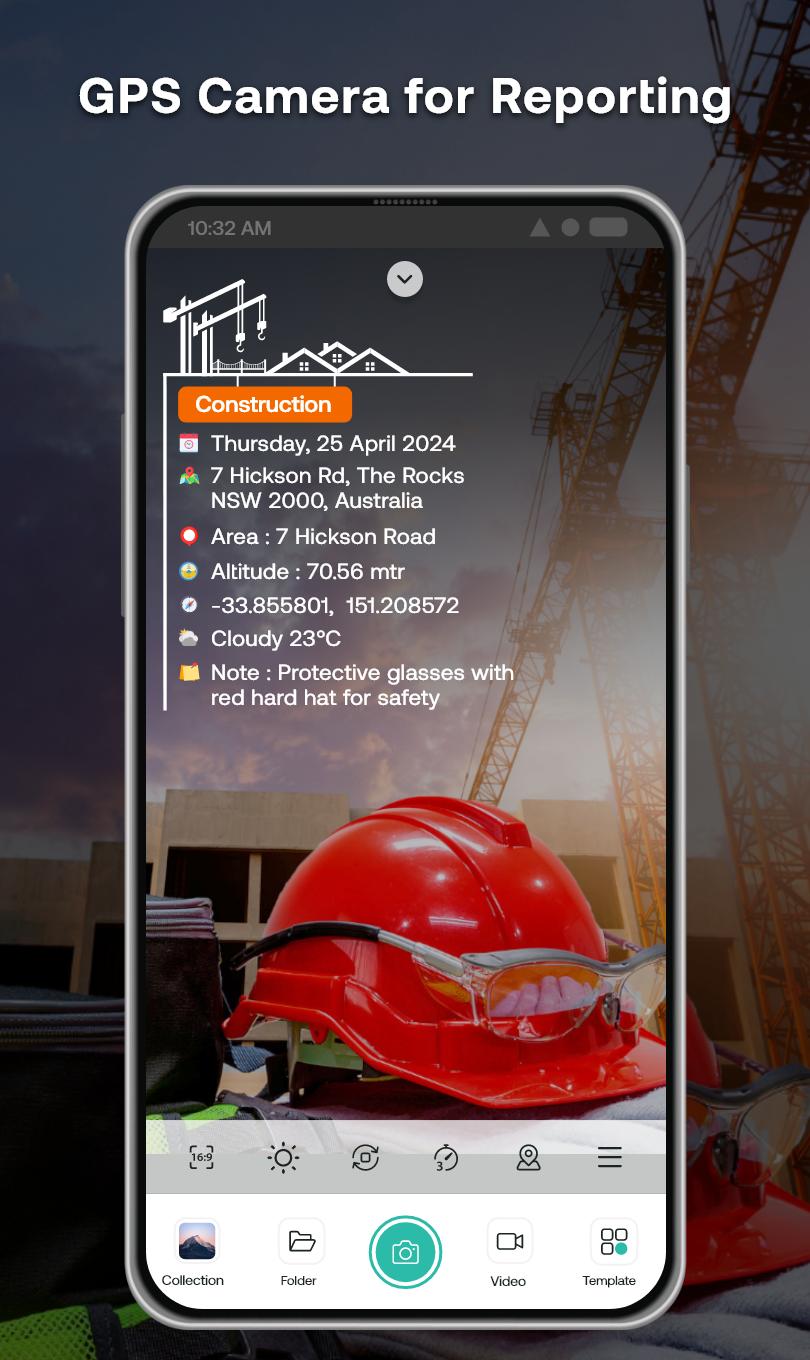
Geotag Stamp Camera – The ultimate Geotagging Photo Camera for all your professional work reports!📌
📸 Capture. 🌍 Geotag. 🗂️ Report.
Take geotag photos with live GPS location and latitude-longitude using our Geotagging Photos app. Auto-add accurate geotags, timestamps, and location info to your photos and videos. Whether for fieldwork, engineering, transportation, or travel, Geotag Camera ensures every photo includes essential location details with latitude/longitude.
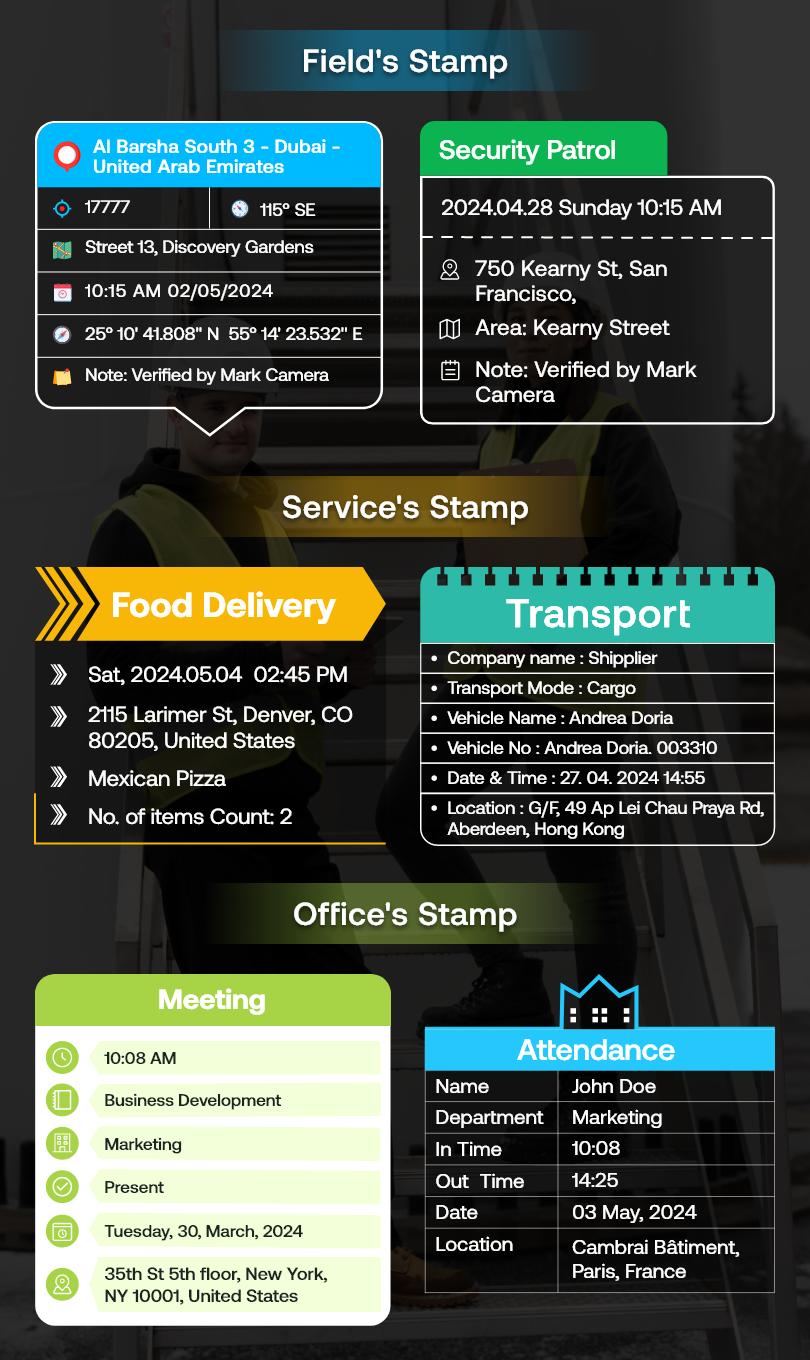
⭐Capture Work Reports Instantly with Pre-Built Templates:
🔰Service Stamps: Perfect for tracking deliveries, tasks, and operations by capturing geotagged photos with precise timestamps and photos with location details.
🔰Field Stamps: Ideal for documenting outdoor projects, surveys, and site inspections, ensuring every geotag photo includes accurate geotag and timestamp information.
🔰Office Stamps: Useful for meetings, attendance tracking, and work records with customizable templates for geotagging photos and adding photos with location details.
⭐Main Stamp Fields in Geotag Photos & GPS Stamp Camera app include:
💠Logo: Add your brand/logo to photos for identification.
✒️Subject: Tag geotag photos with specific project names or categories.
🗓️Date Format: Customize date format (DD/MM/YYYY, etc.).
📍Location: Geotag photos with GPS coordinates & location.
🗺️Area: Record work area details for documentation.
🏔️Altitude: Capture altitude data for location precision.
🧭Compass: Include compass direction for orientation.
🌐Coordinates: Automatically add latitude-longitude for photo geotagging.
🌡️Temperature: Tag photos with current temperature details.
🌬️Wind Force: Document wind speed for environmental conditions.
🍃Air Quality: Capture air quality data for environmental checks.
👷Contractor: Tag photos with contractor details for accountability.
👨💼Supervisor: Document supervisor info for project oversight.
👨🏻🔧Worker: Identify workers captured in Geotag pictures.
📝Note: Add geo notes for additional context to geo-tagged photo.
⭐Geotagging Photos app for Every Need – Fieldwork, Travel, Office & More:
✔️Fieldwork Documentation
-Capture detailed photos with geotag and GPS camera with time stamp for surveying, construction, and land management.
✔️Engineering Work
-Track project progress with geotagging photos and documenting construction phases and technical details.
✔️Office Work & Meetings
-Capture meeting details, track attendance, and clock in/out times with geotagging photos app.
✔️Transportation & Delivery
-Document deliveries, monitor routes, and verify task completion with GPS Mapping Camera.
✔️Travel & Adventure
-Easily document journeys, capture moments and share adventures with geotagged photos.
✔️Work Reporting & Project Management
-Create detailed reports with geotagging photos to track progress and manage projects.
Auto Geotag Camera with GPS Stamps is perfect for professionals in various fields. Capture every detail with accurate location and time tagging to improve your geotagging photos app documentation and reporting.
📲 Download Geotag Photos with GPS Stamp Location Now!
プレビュー
タグ
写真情報
デベロッパー
Master Apps Lab
最新バージョン
1.0.28
最終更新
2025-06-17
カテゴリー
写真
上で利用可能
Google Play
もっと見せる
PCでGameLoopを使用してGeotag Photos with GPS Stampsをプレイする方法
1. 公式WebサイトからGameLoopをダウンロードし、exeファイルを実行してGameLoopをインストールします
2. GameLoopを開いて「Geotag Photos with GPS Stamps」を検索し、検索結果でGeotag Photos with GPS Stampsを見つけて、「インストール」をクリックします。
3. GameLoopでGeotag Photos with GPS Stampsを楽しんでください
Minimum requirements
OS
Windows 8.1 64-bit or Windows 10 64-bit
GPU
GTX 1050
CPU
i3-8300
Memory
8GB RAM
Storage
1GB available space
Recommended requirements
OS
Windows 8.1 64-bit or Windows 10 64-bit
GPU
GTX 1050
CPU
i3-9320
Memory
16GB RAM
Storage
1GB available space