Kustom to the Future for KLWP PC
BaconBits
GameLoopエミュレーターを使用してPCにKustom to the Future for KLWPをダウンロードします
Kustom to the Future for KLWP PC版
開発者BaconBitsからのKustom to the Future for KLWPは、過去にAndroidsystermで実行されています。
これで、GameLoopを搭載したPCでKustom to the Future for KLWPをスムーズにプレイできます。
GameLoopライブラリまたは検索結果にダウンロードしてください。 バッテリーに目を向けたり、間違った時間にイライラしたりすることはもうありません。
大画面でKustom to the Future for KLWPPCを無料でお楽しみください!
Kustom to the Future for KLWP 序章
YOU NEED TO HAVE THE PRO VERSION OF KUSTOM KLWP INSTALLED ON YOUR PHONE TO USE THESE KOMPONENTS - https://goo.gl/UkHJ99
THIS IS NOT A STANDALONE APP - IT WILL NOT BE IN YOUR APP DRAWER
WATCH THIS VIDEO BEFORE DOWNLOADING - https://www.youtube.com/watch?v=g0iV8LF7ORQ&feature=youtu.be
Using a komponent
- Open the Kustom KWLP app
- Tap the + icon
- Select Komponent
- Select Kustom to the Future
- Then tap on the komponent you wish to use
- Make Kustom the Live Wallpaper
- Return to homescreen
Instructions to add a new Wallpaper
• Open up Kustom tap the menu icon and select load preset
• Select Kustom to the Future and select the wallpaper
• Select 'Set Kustom as wallpaper and apply' then return to your homescreen
• Make sure dock is disabled in your launcher settings (Recommended for Nova or similar launcher)
• Enjoy
Kustom to the Future features seven Komponents based on elements from the popular movie. These include -
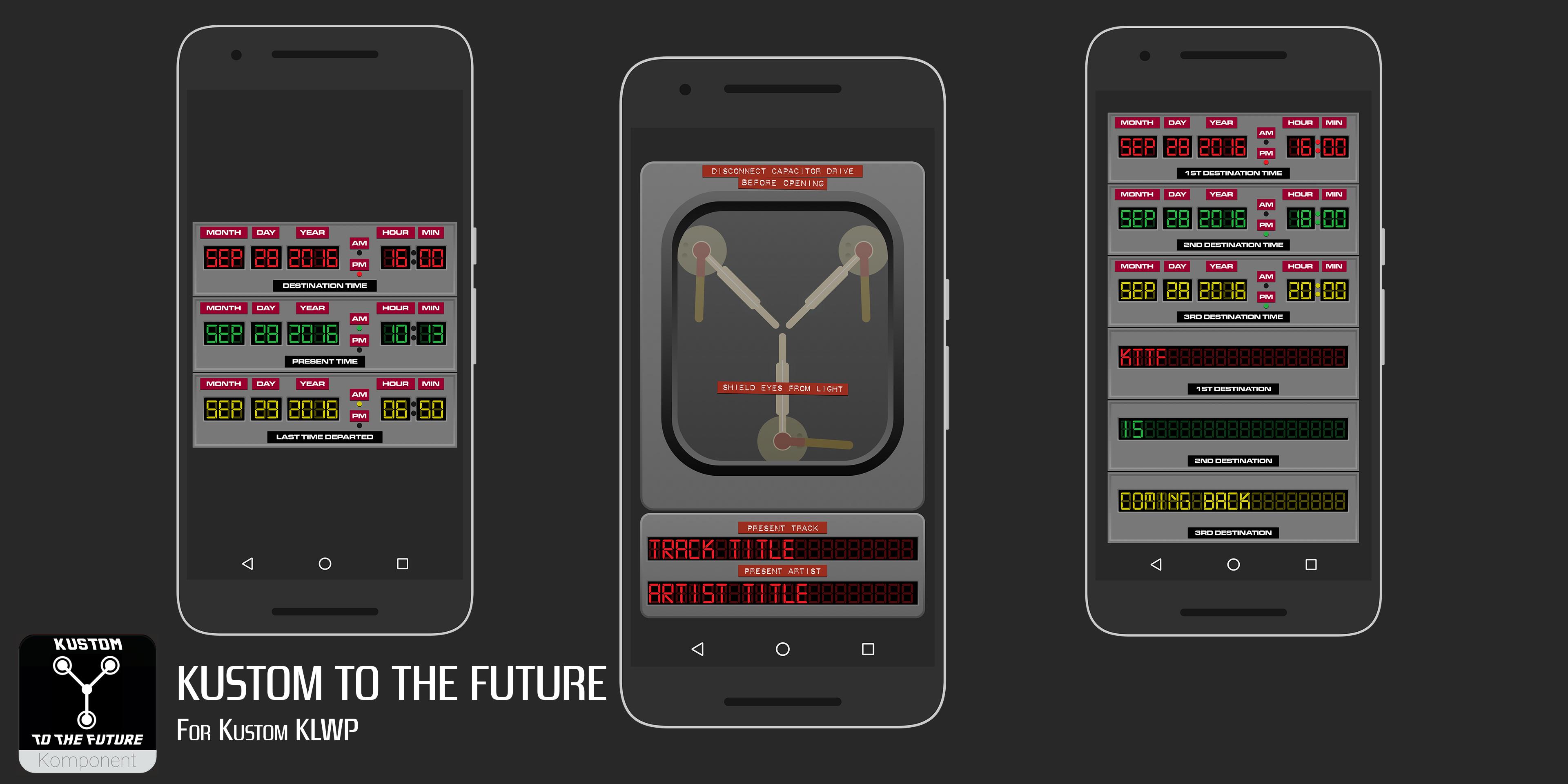
Flux Capacitor - Music Player
Time Circuits - Next calendar event time/date
Current time/date
Next alarm time/date
Time Circuits Event - Time/date & description for next three calendar events
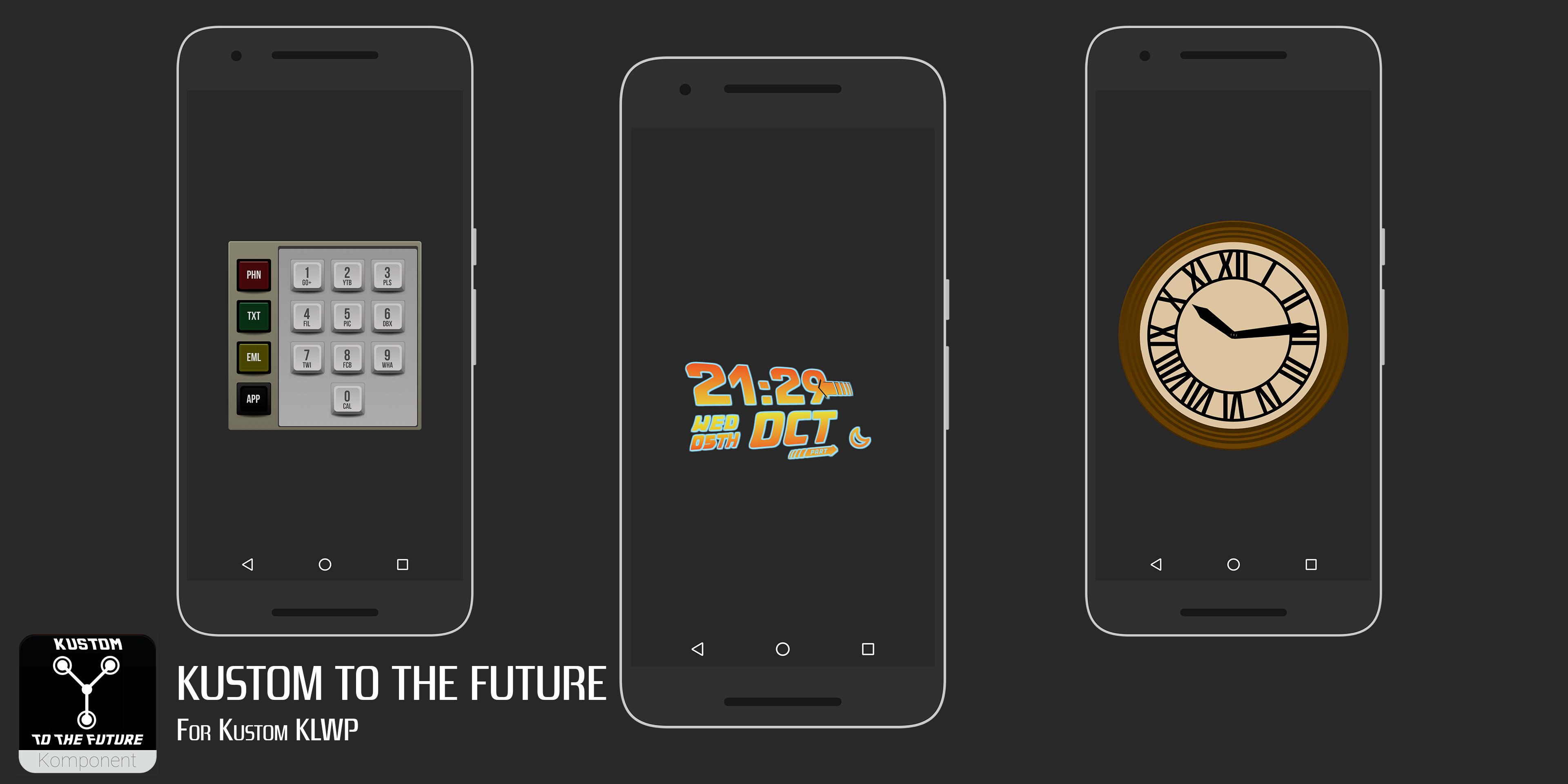
Time circuits keypad - Shortcuts to Phone, SMS, Email & 10 other apps
Logo Clock - Clock based on the film's Logo
Tower Clock - Clock based on the Clock Tower in Hill Valley
Plutonium Gauge - Battery level gauge
Steam Gauge - Battery level gauge
A sample wallpaper is also included with an example setup
KEY FEATURES
--FLUX CAPACITOR---
Tap the bottom flux to Play/Pause
Tap the top left flux to skip to previous track
Tap the top right flux to skip to next track
Artist & Track title shows in bottom
---TIME CIRCUITS---
Top (Red) display shows Date & Time of next calendar event
Middle (Green) display shows current Date & Time
Bottom (Yellow) Display shows next alarm Date & Time
---TIME CIRCUITS EVENT---
Red displays show next event date/time & title
Green displays show 2nd event date/time & title
Yellow display shows 3rd event date/time & title
---TIME CIRCUITS KEYPAD---
Icons on left open phone, SMS, email & Nova Launcher app drawer
The 10 keypad buttons open the following apps
1 - Google+
2 - Youtube
3 - Play Store
4 - ES File Explorer
5 - Quickpic
6 - Dropbox
7 - Twitter
8 - Facebook
9 - Whatsapp
0 - Calendar
---LOGO CLOCK---
Clock and date based on the Logo of the film. Globals to change colours
---TOWER CLOCK---
Simple clock showing time, based on the clock in the Tower in Hill Valley
---PLUTONIUM GAUGE---
Shows current battery level. Based on the Plutonium gauge in the De Lorean
---STEAM GUAGE---
Shows current battery level. Runs clockwise from 100% (White area) to 0% in the red area. Based on the presto log steam gauge in Part III
Use the sample wallpaper included or start a new wallpaper and add the komponents how you wish
Take your phone to 1.21 Gigawatts<\b>
If you have any queries please email me
Enjoy & Thankyou
Find me on Reddit - https://www.reddit.com/user/BaconBitsNI/
or Twitter - https://twitter.com/baconbitskustom
for more Bacon
プレビュー
タグ
カスタマイズ情報
デベロッパー
BaconBits
最新バージョン
2.0
最終更新
2017-03-24
カテゴリー
カスタマイズ
上で利用可能
Google Play
もっと見せる
PCでGameLoopを使用してKustom to the Future for KLWPをプレイする方法
1. 公式WebサイトからGameLoopをダウンロードし、exeファイルを実行してGameLoopをインストールします
2. GameLoopを開いて「Kustom to the Future for KLWP」を検索し、検索結果でKustom to the Future for KLWPを見つけて、「インストール」をクリックします。
3. GameLoopでKustom to the Future for KLWPを楽しんでください
Minimum requirements
OS
Windows 8.1 64-bit or Windows 10 64-bit
GPU
GTX 1050
CPU
i3-8300
Memory
8GB RAM
Storage
1GB available space
Recommended requirements
OS
Windows 8.1 64-bit or Windows 10 64-bit
GPU
GTX 1050
CPU
i3-9320
Memory
16GB RAM
Storage
1GB available space