
Auto Clicker -Tapping PC
guo yun
GameLoopエミュレーターを使用してPCにAuto Clicker -Tappingをダウンロードします
Auto Clicker -Tapping PC版
開発者guo yunからのAuto Clicker -Tappingは、過去にAndroidsystermで実行されています。
これで、GameLoopを搭載したPCでAuto Clicker -Tappingをスムーズにプレイできます。
GameLoopライブラリまたは検索結果にダウンロードしてください。 バッテリーに目を向けたり、間違った時間にイライラしたりすることはもうありません。
大画面でAuto Clicker -TappingPCを無料でお楽しみください!
Auto Clicker -Tapping 序章
2020 best Auto Clicker Tapping
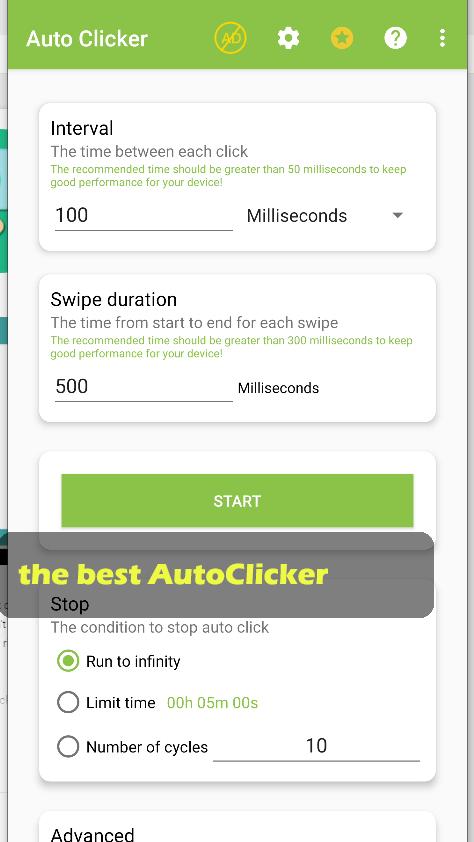
Automatically click or swipe anywhere on the screen you want with custom durations.
Auto Clicker doesn’t require root access
Install Auto Clicker right now to save your time, it's free for you.
Feature
- Support single click, multiple click, and multiple swipes
- set the click time to match your set requirements
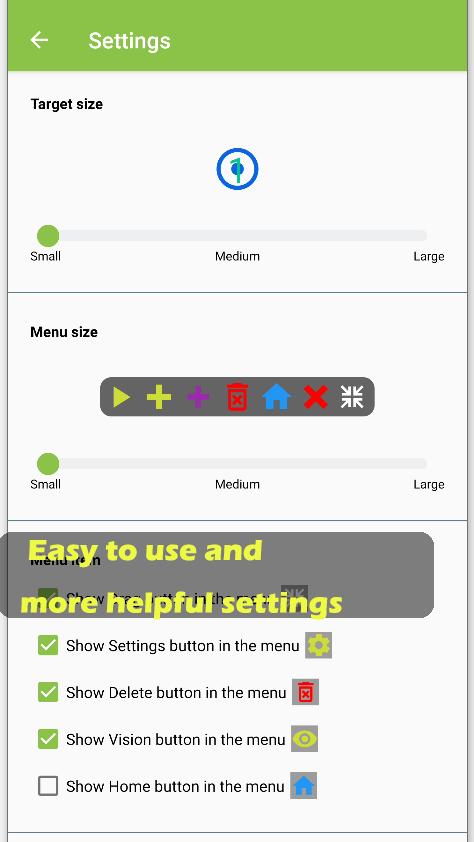
- Touch points can be hidden or displayed at any time
- Change the frequency of clicks at any time
- Save your configs
- Easy to use and more helpful settings
- Support multiple languages
Loop mode can be set
- Loop times
- Loop until stop button is pressed
- Loop for time up
Toolbar settings
- Freely sort button order, or hide unwanted features
Require
- Only support Android 7.0 and up
- System alert window permission
- Accessibility service
プレビュー
情報
デベロッパー
guo yun
最新バージョン
1.0.1
最終更新
2020-10-23
カテゴリー
エンタメ
上で利用可能
Google Play
もっと見せる
PCでGameLoopを使用してAuto Clicker -Tappingをプレイする方法
1. 公式WebサイトからGameLoopをダウンロードし、exeファイルを実行してGameLoopをインストールします
2. GameLoopを開いて「Auto Clicker -Tapping」を検索し、検索結果でAuto Clicker -Tappingを見つけて、「インストール」をクリックします。
3. GameLoopでAuto Clicker -Tappingを楽しんでください
Minimum requirements
OS
Windows 8.1 64-bit or Windows 10 64-bit
GPU
GTX 1050
CPU
i3-8300
Memory
8GB RAM
Storage
1GB available space
Recommended requirements
OS
Windows 8.1 64-bit or Windows 10 64-bit
GPU
GTX 1050
CPU
i3-9320
Memory
16GB RAM
Storage
1GB available space