WAEC Result Checker PC
Classic Vintage
GameLoopエミュレーターを使用してPCにWAEC Result Checkerをダウンロードします
WAEC Result Checker PC版
開発者Classic VintageからのWAEC Result Checkerは、過去にAndroidsystermで実行されています。
これで、GameLoopを搭載したPCでWAEC Result Checkerをスムーズにプレイできます。
GameLoopライブラリまたは検索結果にダウンロードしてください。 バッテリーに目を向けたり、間違った時間にイライラしたりすることはもうありません。
大画面でWAEC Result CheckerPCを無料でお楽しみください!
WAEC Result Checker 序章
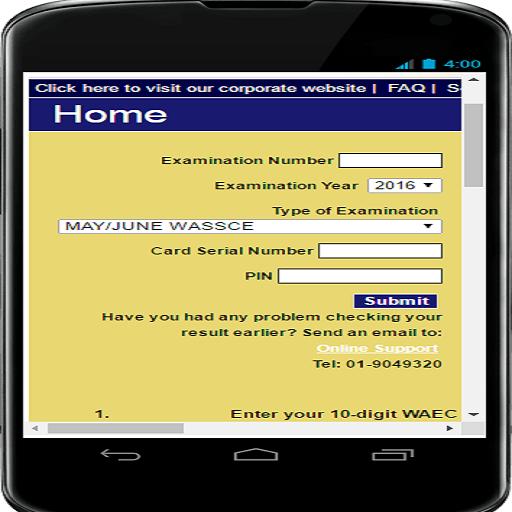
WAEC Result Checker enables secondary school students who sat for WAEC examination check their results on their android phones with ease. They can also print it if their phones. After download follow the instructions: Enter your 10-digit WAEC Examination Number.
(This is your 7-Digit centre number followed by your 3-digit candidate number eg. 4123456789)
Enter the 4 digits of your Examination Year eg. 2002
Select the Type of Examination
Enter the Card Serial Number found on the reverse side of your Scratch card.
Enter the Personal Identification Number (PIN) on your Scratch card
Click Submit and wait for the results window to come up.
プレビュー
情報
デベロッパー
Classic Vintage
最新バージョン
5.0
最終更新
2016-09-22
カテゴリー
教育
上で利用可能
Google Play
もっと見せる
PCでGameLoopを使用してWAEC Result Checkerをプレイする方法
1. 公式WebサイトからGameLoopをダウンロードし、exeファイルを実行してGameLoopをインストールします
2. GameLoopを開いて「WAEC Result Checker」を検索し、検索結果でWAEC Result Checkerを見つけて、「インストール」をクリックします。
3. GameLoopでWAEC Result Checkerを楽しんでください
Minimum requirements
OS
Windows 8.1 64-bit or Windows 10 64-bit
GPU
GTX 1050
CPU
i3-8300
Memory
8GB RAM
Storage
1GB available space
Recommended requirements
OS
Windows 8.1 64-bit or Windows 10 64-bit
GPU
GTX 1050
CPU
i3-9320
Memory
16GB RAM
Storage
1GB available space