
EZ Calendar Widget for PC
INFOLIFE LLC
GameLoop एमुलेटर के साथ पीसी पर EZ Calendar Widget डाउनलोड करें
पीसी पर EZ Calendar Widget
EZ Calendar Widget, डेवलपर INFOLIFE LLC से आ रहा है, अतीत में Android सिस्टर्म पर चल रहा है।
अब, आप EZ Calendar Widget को पीसी पर GameLoop के साथ आसानी से खेल सकते हैं।
इसे GameLoop लाइब्रेरी या खोज परिणामों में डाउनलोड करें। अब और गलत समय पर बैटरी या निराशाजनक कॉलों पर ध्यान नहीं देना चाहिए।
बस मुफ्त में बड़ी स्क्रीन पर EZ Calendar Widget पीसी का आनंद लें!
EZ Calendar Widget परिचय
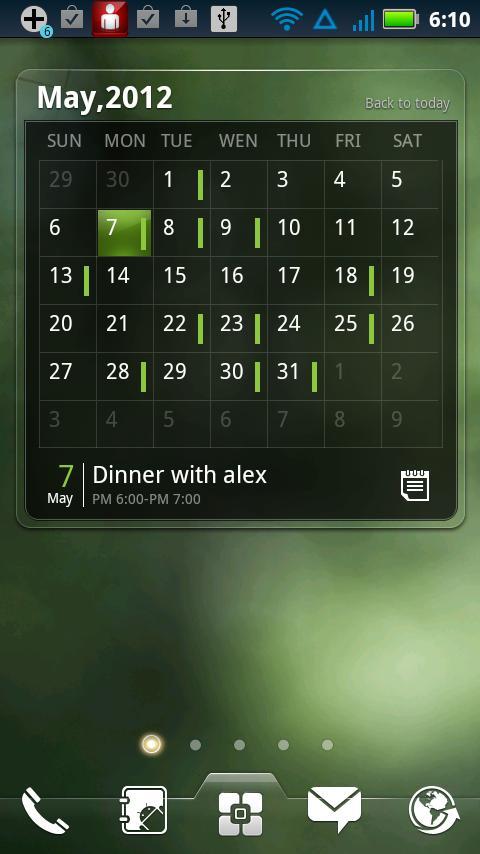
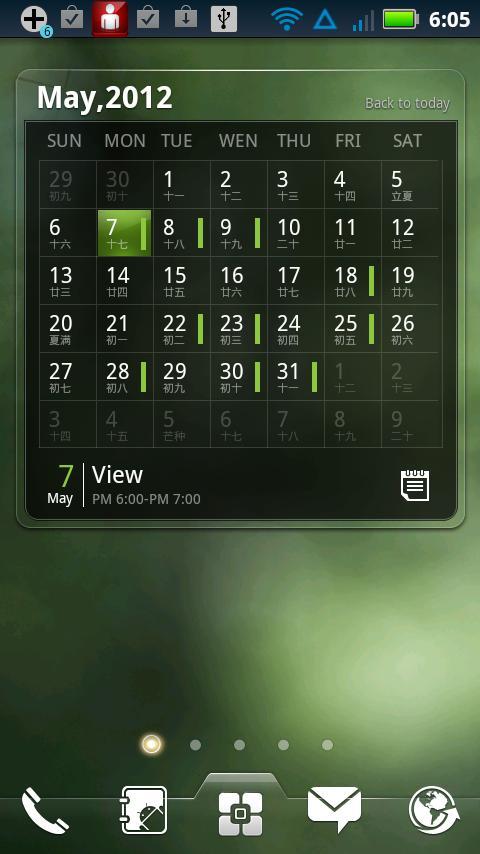
Pretty & Powerful scrollable Calendar & Agenda widget! Brings the real calendar to your home screen.
Notice: this widget is only supported by EZ Launcher, please install EZ Launcher first.
It features:
============
- Show Calendar
- Show Agenda
- Support Flip and Scoll
- Coming agenda remind.
- Add,check,edit agenda
- Support Chinese Lunar
- Support Us festival
Widgets on Android work a bit differently than a normal application. Unlike regular programs they don't just install themselves in the application tray so you have to add them manually. They will not open or launch.
Here's how to add a widget on your Android home screen.
STEPS HOW TO ADD A WIDGET
==========================
1.On your Android home screen, tap any blank or “empty” area with size 4X3 and hold down your finger.
2.An “Add to Home screen” window will pop up. From that window, tap “EZ Widgets”.
3.You’ll be presented with a list of all the installed Widgets on your Android device.
4.Select the widget to add to your home screen by tapping it.
Notes
=====
ROM users-> make sure the widget is NOT moved on SD card.
Widgets are not supposed to be on SD card. Move it back to the phone storage.
पूर्वावलोकन
जानकारी
डेवलपर
INFOLIFE LLC
नवीनतम संस्करण
v0.9.1 beta 3
आखरी अपडेट
2012-11-25
श्रेणी
लाइफ़स्टाइल
पर उपलब्ध
Google Play
और दिखाओ
पीसी पर गेमलूप के साथ EZ Calendar Widget कैसे खेलें
1. आधिकारिक वेबसाइट से GameLoop डाउनलोड करें, फिर GameLoop को स्थापित करने के लिए exe फ़ाइल चलाएँ।
2. गेमलूप खोलें और "EZ Calendar Widget" खोजें, खोज परिणामों में EZ Calendar Widget खोजें और "इंस्टॉल करें" पर क्लिक करें।
3. GameLoop पर EZ Calendar Widget खेलने का आनंद लें।
Minimum requirements
OS
Windows 8.1 64-bit or Windows 10 64-bit
GPU
GTX 1050
CPU
i3-8300
Memory
8GB RAM
Storage
1GB available space
Recommended requirements
OS
Windows 8.1 64-bit or Windows 10 64-bit
GPU
GTX 1050
CPU
i3-9320
Memory
16GB RAM
Storage
1GB available space