Multifunctional Weather Clock for PC
HD Widgets Dev Team
Unduh Multifunctional Weather Clock di PC Dengan Emulator GameLoop
Multifunctional Weather Clock di PC
Multifunctional Weather Clock, berasal dari pengembang HD Widgets Dev Team, berjalan di sistem Android di masa lalu.
Sekarang, Anda dapat memainkan Multifunctional Weather Clock di PC dengan GameLoop dengan lancar.
Unduh di perpustakaan GameLoop atau hasil pencarian. Tidak ada lagi memperhatikan baterai atau panggilan frustasi pada waktu yang salah lagi.
Nikmati saja Multifunctional Weather Clock PC di layar besar secara gratis!
Multifunctional Weather Clock Pengantar
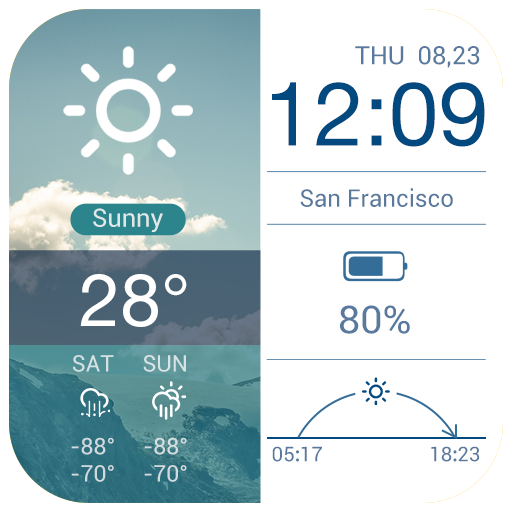
This is a free multifunctional weather clock widgets with many features, like currrent temperature, average temperature, month calendar, 4 day forecasts, compass, battery tracker, and so on.
The clock weather widget features the following:
√This is a small weather channel on your phone for you to get current temperature and other weather information.
This weather widget gives many detailed weather information, like current weather condition, current temperature, average temperature, 4 day forecasts.
√Quick response to month calendar and agenda settings in the clock weather widget
This free widget can also be considered as a calendar widget. This weather forecast widget has a quick response zone leading to calendar settings. With it, you don’t have to download a monthly calendar widget.
√Quick response to alarm clock setting
This beautiful weather report widget can also be considered as an alarm clock widget, as you can quickly set alarm clock with a simple touch on this translucent widget.
√Multiple information available
At the same time, this 4 days forecast widget also provides other information of weather today: humidity, wind speed, compass, battery consumption tracker, sunset and sunrise time, current temperature.
√Clickable hotspots: by tapping corresponding hotspots, you can set alarm clock and important events in the calendar
√World weather: ability to add and change different locations, so you can get weather information of any city worldwide。
With it, you can get basic weather information and forecasts of London, Sydney, Chicago, Auckland and Paris. In the meantime, you can also get New York weather, Hong Kong weather, Houston weather, adelaide weather and accurate weather in orlando.
√Multiple units availabe
√This is a highly localized clock widget supporting over 30 languages.
√Automatic weather update interval: 15 minutes, 30 minutes, 1 hour, 3 hours, 6 hours or one day
√Lightweight and battery-saving: this multifunctional widget will not drain the battery of your phone or occupy much of the internal storage.
The widget is developed Amber Weather team. From Amber Weather, you can also find:
Classic brand-based widgets: Samsung Galaxy style, Moto Blur style, Classic HTC style, Sony Z style widget and Google Now style widget;
Simplistic and minimalist widgets with elegant design;
Animated weather clock widgets with super cool animation design;
3D weather widgets to enlighten your home screen;
Other multifunctional widgets to meet your needs.
At the same time, Amber Weather team also developed other apps like flashlight and fast alarm clock.
Note:
If you have difficulty applying the clock weather widget to your home screen, please watch the video: https://www.youtube.com/watch?v=v5nXvM_6QR4.
If the clock in the weather clock widget stops working, please check whether you have turned on the service guard. What's more, apps like Task Killer, Service Manager, Battery Saver, Clean Master orGame Booster may prevent the clock weather widget from working properly. Please add our app to the White/ Ignore List to keep widgets in sync. In this method doesn't work, please email us: support@amberweather.com
Pratinjau


Informasi
Pengembang
HD Widgets Dev Team
Versi Terbaru
3.0.1_release
Terakhir Diperbarui
2017-02-16
Kategori
Cuaca
Tersedia di
Google Play
Menampilkan lebih banyak
Cara memainkan Multifunctional Weather Clock dengan GameLoop di PC
1. Download GameLoop dari situs resminya, lalu jalankan file exe untuk menginstal GameLoop.
2. Buka GameLoop dan cari “Multifunctional Weather Clock”, temukan Multifunctional Weather Clock di hasil pencarian dan klik “Install”.
3. Nikmati bermain Multifunctional Weather Clock di GameLoop.
Minimum requirements
OS
Windows 8.1 64-bit or Windows 10 64-bit
GPU
GTX 1050
CPU
i3-8300
Memory
8GB RAM
Storage
1GB available space
Recommended requirements
OS
Windows 8.1 64-bit or Windows 10 64-bit
GPU
GTX 1050
CPU
i3-9320
Memory
16GB RAM
Storage
1GB available space