Bluetooth File Transfer & Bluetooth Data Sender for PC
Smart Coder2018
Unduh Bluetooth File Transfer & Bluetooth Data Sender di PC Dengan Emulator GameLoop
Bluetooth File Transfer & Bluetooth Data Sender di PC
Bluetooth File Transfer & Bluetooth Data Sender, berasal dari pengembang Smart Coder2018, berjalan di sistem Android di masa lalu.
Sekarang, Anda dapat memainkan Bluetooth File Transfer & Bluetooth Data Sender di PC dengan GameLoop dengan lancar.
Unduh di perpustakaan GameLoop atau hasil pencarian. Tidak ada lagi memperhatikan baterai atau panggilan frustasi pada waktu yang salah lagi.
Nikmati saja Bluetooth File Transfer & Bluetooth Data Sender PC di layar besar secara gratis!
Bluetooth File Transfer & Bluetooth Data Sender Pengantar
The Bluetooth File Transfer is one of the most important tool and is like a Swiss Knife which you can easily share your Applications, Audio Files, Video Files, Pictures and all sort of files via Bluetooth. It also enables you to share System Applications.
It has also a Sending Bucket™ which keep a list of all the items selected. Through Sending Bucket™, you can easily manage the items to share or transfer. The Sending Bucket™ can be easily accessed through the selected items button.
Another convenient and flexible feature of the Bluetooth Sender is that you can select Applications, Audios, Videos, Pictures and all sort of files, all together and share or transfer it. There is absolutely no restriction on what to share or transfer.
It has also application extractor (apk extractor), which can easily and efficiently extract multiple applications. This feature is very helpful to back up your apps. The extracted apk file can be easily transfer or shared through email etc.
The apk extractor feature can extract more than one apk and shows progress of the overall process very elegantly.
With apk extract feature, one can even extract system apps.
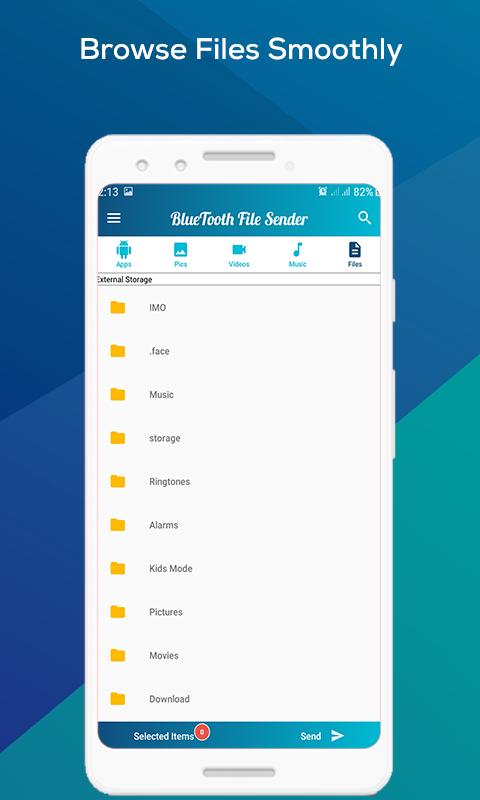
We also have a file explorer. The file explorer can list all sort of files. With the file explorer, now you can easily browse and select your documents, videos, audios, pictures etc. Through the file explorer, now you can select any type of file and share it.
Through this file explorer, you can easily select your MS Word, MS Excel, MS PowerPoint, PDF and tons of other files.
Pratinjau
Tag
AlatInformasi
Pengembang
Smart Coder2018
Versi Terbaru
1.0
Terakhir Diperbarui
2020-10-27
Kategori
Alat
Tersedia di
Google Play
Menampilkan lebih banyak
Cara memainkan Bluetooth File Transfer & Bluetooth Data Sender dengan GameLoop di PC
1. Download GameLoop dari situs resminya, lalu jalankan file exe untuk menginstal GameLoop.
2. Buka GameLoop dan cari “Bluetooth File Transfer & Bluetooth Data Sender”, temukan Bluetooth File Transfer & Bluetooth Data Sender di hasil pencarian dan klik “Install”.
3. Nikmati bermain Bluetooth File Transfer & Bluetooth Data Sender di GameLoop.
Minimum requirements
OS
Windows 8.1 64-bit or Windows 10 64-bit
GPU
GTX 1050
CPU
i3-8300
Memory
8GB RAM
Storage
1GB available space
Recommended requirements
OS
Windows 8.1 64-bit or Windows 10 64-bit
GPU
GTX 1050
CPU
i3-9320
Memory
16GB RAM
Storage
1GB available space