Indonesia
  • Global
  • México
  • 中國台灣
  • India
  • Indonesia
  • Türkiye
  • Việt Nam
  • ประเทศไทย
  • Brasil
  • Perú
  • Colombia
  • Argentina
  • Россия
  • السعودية
  • مصر
  • پاکستان
  • Malaysia
  • 日本
  • 中国香港
  • Philippines
Unduh
Leadwerks Game Engine

Leadwerks Game Engine

69 Positif / 201 Peringkat | Versi: kapan: 1.0.0

Leadwerks Software

  • Indonesia
    Rp260942.09Rp260942.09
    Pergi ke toko
  • Argentina
    Rp100009.53Rp100009.53
    Pergi ke toko
  • Turkey
    Rp166990.28Rp166990.28
    Pergi ke toko

Unduh Leadwerks Game Engine di PC Dengan Emulator GameLoop


Leadwerks Game Engine, adalah permainan uap populer yang dikembangkan oleh Leadwerks Software. Anda dapat mengunduh Leadwerks Game Engine dan game uap teratas dengan GameLoop untuk dimainkan di PC. Klik tombol 'Dapatkan' maka Anda bisa mendapatkan penawaran terbaik terbaru di GameDeal.

Dapatkan permainan uap Leadwerks Game Engine

Leadwerks Game Engine, adalah permainan uap populer yang dikembangkan oleh Leadwerks Software. Anda dapat mengunduh Leadwerks Game Engine dan game uap teratas dengan GameLoop untuk dimainkan di PC. Klik tombol 'Dapatkan' maka Anda bisa mendapatkan penawaran terbaik terbaru di GameDeal.

Leadwerks Game Engine Fitur

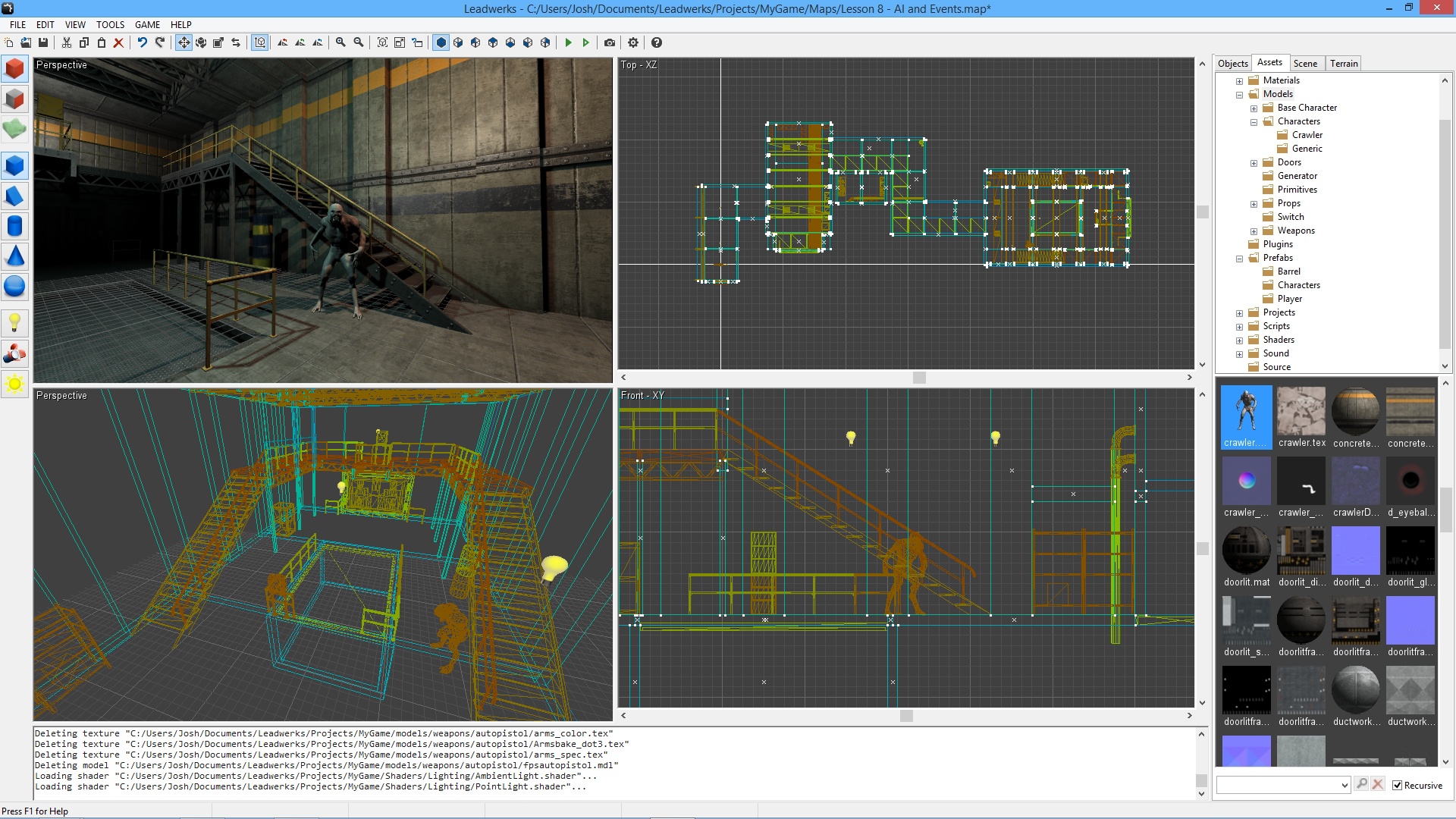
Leadwerks Game Engine is the easiest way to make 3D games and VR experiences. Learn everything you need with our comprehensve tutorials. Build games with the world's most intuitive game development system. Sell your games with a royalty-free license or share them with the world for free.

Key Features

Learn to Make Your Own Royalty-Free Games

We provide tons of documentation and video tutorials walking you through the steps to build your own 3D games. Leadwerks is the perfect pathway to go from total noob to pro game developer. And when you do publish your commercial game, there's no royalties to pay, ever.

New Global Illumination and Volumetric Effects

Leadwerks Game Engine 4.1 introduces environment probes for global illumination and reflections, along with volumetric lighting effects, all in an easy-to-control and intuitive interface. This makes it easier than ever to create games with amazing graphics.

Vegetation Painting System

Leadwerks Game Engine 4 introduces a one-of-a-kind vegetation system for handling massive amounts of foliage. Instead of storing each instance in memory, our new system uses a distribution algorithm to dynamically calculate all relevant instances each frame for rendering and physics. This allows enormous densely packed scenes with minimal overhead. The results are blazingly fast, efficient, and easy to use.

Advanced Graphics

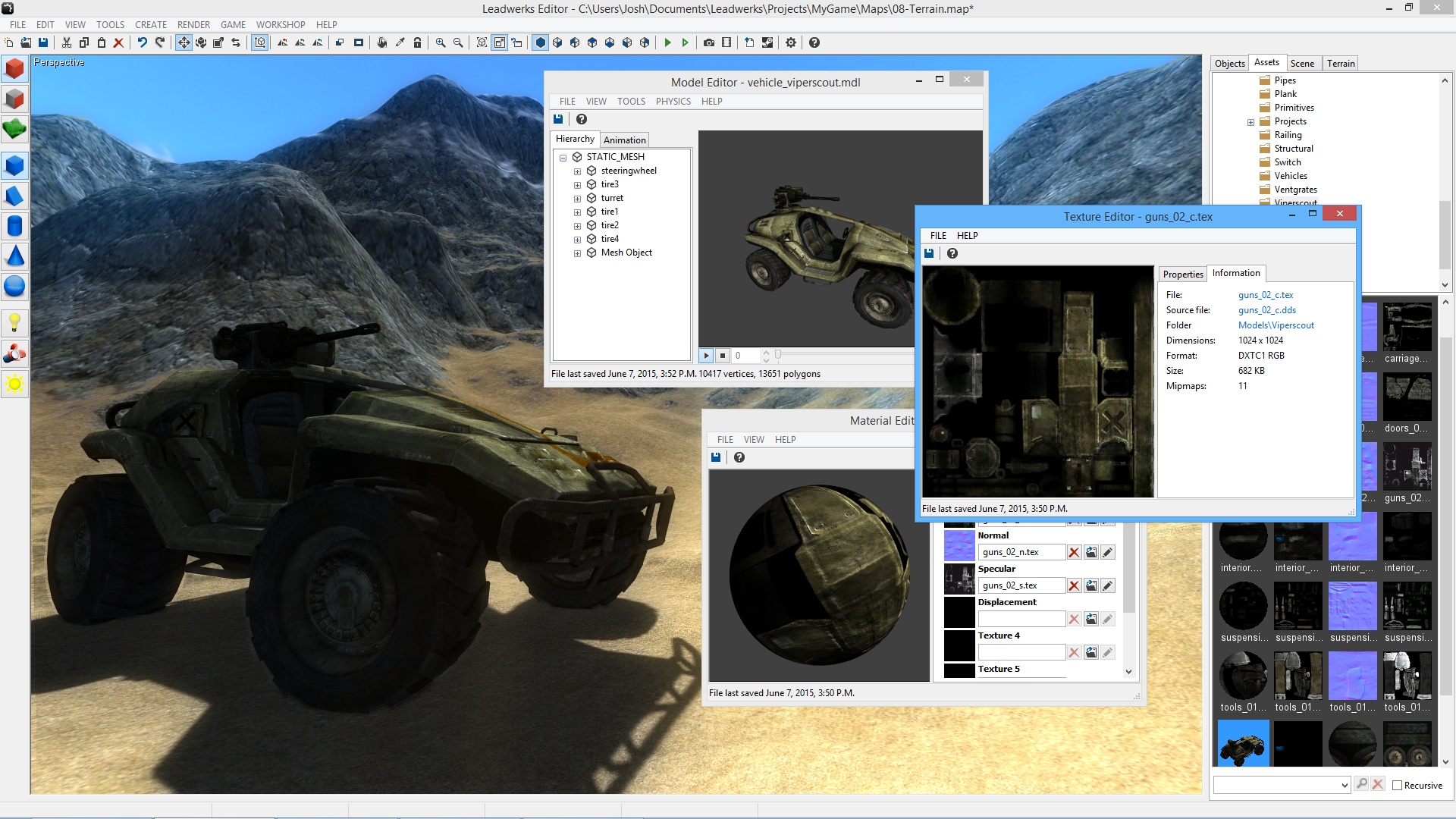
Leadwerks makes AAA graphics achievable with hardware tessellation, geometry shaders, and a deferred renderer with up to 32x MSAA. Our renderer redefines realtime with image quality more like a cg render than real-time games of the past. The use of OpenGL 4.0 provides equivalent graphics to DirectX 11, with cross-platform support across operating systems, for future expansion.

Built-in Level Design Tools

Build game levels from scratch right in our editor with constructive solid geometry. Our tools make it easy to sketch out your design and bring your ideas to life. Anyone can build their own game worlds in Leadwerks, without having to be an expert artist.

Integrated Lua Script Editor

We integrated Lua right into Leadwerks because of its proven track records in hundreds of commercial games including Crysis, World of Warcraft, and Garry's Mod. Lua integrates seamlessly with native code for rapid prototyping and instant control. The built-in debugger lets you pause your game, step through code, and inspect every variable in the program in real-time. Lua is perfect for beginners, and the integrated Just-In-Time (JIT) compiler ensures your games will keep running fast as they grow. (Please note that C++ programming support requires the Standard Edition DLC.)

Visual Flowgraph for Advanced Game Mechanics

Our unique visual flowgraph enables designers to set up game mechanics, build interactions, and design advanced scripted sequences, without touching a line of code. The flowgraph system integrates seamlessly with Lua script, allowing script programmers to expose their own functions and add new possibilities for gameplay.

Royalty-Free License

Your games you make are yours. Yours to play, yours to sell, yours to give away, and do as you please. You will never be charged royalties for any game you make in Leadwerks. And because we only rely on free open-source middleware libraries, you never have to worry about purchasing expensive licenses from third parties.

Steam Features

  • Download and publish game content with Steam Workshop.

  • Publish image renders and YouTube videos directly to Steam from the editor.

  • Built-in Steamworks support makes your game ready to publish to Steam.

  • Peer-to-peer networking, voice chat, and public servers.

Graphics

  • OpenGL 4.0 deferred renderer with uniform lighting model supports any number of lights, all casting soft dynamic shadows.

  • Up to 32x hardware MSAA makes rendered images incredibly sharp and detailed.

  • Full support for vertex, fragment, geometry, and tessellation shaders.

  • Dynamic megatexture terrain provides fast rendering of terrains with many layers.

  • Hierarchical hardware occlusion queries provides fast visibility testing.

  • Hardware tessellation for dynamic real surface displacement on the GPU.

  • Normal mapping with specular and cubemap reflections.

  • Instanced rendering allows fast drawing of large volumes of objects.

  • Hardware skinning provides fast skinned animation.

  • Deferred transparency with multiple overlapping layers of shading.

  • Real-time mesh modification.

  • Trilinear and up to 16x anisotropic filtering.

  • Blend and transition animation sequences.

  • Extract animation sequences in the editor.

Editor

  • Automatic asset management reloads models and textures when they are modified from another application.

  • Drag and drop import of FBX, DDS, BMP, JPG, PNG, TGA, and PSD files.

  • Visual interface controls every aspect of the art pipeline.

  • Constructive solid geometry modeling tools.

  • Brush primitives include box, wedge, cylinder, sphere, arch, tube, and torus.

  • Automatic UV mapping.

  • Brush smooth groups.

  • GPU-accelerated terrain editor makes sculpting silky smooth and fast.

  • Built-in shader editor with instant visualization and error highlighting.

  • Native user interface is used on each supported platform.

Programming

  • Built-in Lua script editor with debugger, code stepping, and syntax highlighting.

  • Visual flowgraph lets you connect objects to control game interactions and set up scripted sequences.

  • Launch your game and debug the Lua virtual machine as it runs.

  • API design with an object-oriented command set lets you code any type of game.

  • Entity scripts provide a per-object hook interface.

  • Direct programming gives you control over your game's loop and program structure.

  • Script variables are displayed in a visual interface and reloaded in real-time.

AI

  • Navmesh pathfinding provides automatic AI navigation that works everywhere.

  • Character controller movement seamlessly integrated with physics and pathfinding systems.

  • Set entities to automatically chase another object or navigate to a position.

Physics

  • Fast and accurate rigid body physics.

  • Constraints including hinge, ball, and sliding joints.

  • Joint actuators provide fast and stable motorized constraints for doors, robotic arms, and other motion.

  • Automatic physics shape calculation.

  • Generate physics shapes in the editor from models or brushes.

  • Swept collision.

  • Raycasting with lines or spheres.

Particles

  • Real-time particle editor with instant visualization.

  • Emission volumes include box, sphere, cylinder, tube, and cone.

  • Adjustable curve graph for alpha and scale.

  • Particle animation sheets with adjustable frame counts and layout.

  • Velocity-based rotation for directional particles like sparks.

Sound

  • 3D sound spatialization.

  • Emit a sound from any entity.

  • Automatic channel management frees up unneeded channels.

  • Skip to any time in sound.

Menampilkan lebih banyak

Unduh Leadwerks Game Engine di PC Dengan Emulator GameLoop

Dapatkan permainan uap Leadwerks Game Engine

Leadwerks Game Engine, adalah permainan uap populer yang dikembangkan oleh Leadwerks Software. Anda dapat mengunduh Leadwerks Game Engine dan game uap teratas dengan GameLoop untuk dimainkan di PC. Klik tombol 'Dapatkan' maka Anda bisa mendapatkan penawaran terbaik terbaru di GameDeal.

Leadwerks Game Engine Fitur

Leadwerks Game Engine is the easiest way to make 3D games and VR experiences. Learn everything you need with our comprehensve tutorials. Build games with the world's most intuitive game development system. Sell your games with a royalty-free license or share them with the world for free.

Key Features

Learn to Make Your Own Royalty-Free Games

We provide tons of documentation and video tutorials walking you through the steps to build your own 3D games. Leadwerks is the perfect pathway to go from total noob to pro game developer. And when you do publish your commercial game, there's no royalties to pay, ever.

New Global Illumination and Volumetric Effects

Leadwerks Game Engine 4.1 introduces environment probes for global illumination and reflections, along with volumetric lighting effects, all in an easy-to-control and intuitive interface. This makes it easier than ever to create games with amazing graphics.

Vegetation Painting System

Leadwerks Game Engine 4 introduces a one-of-a-kind vegetation system for handling massive amounts of foliage. Instead of storing each instance in memory, our new system uses a distribution algorithm to dynamically calculate all relevant instances each frame for rendering and physics. This allows enormous densely packed scenes with minimal overhead. The results are blazingly fast, efficient, and easy to use.

Advanced Graphics

Leadwerks makes AAA graphics achievable with hardware tessellation, geometry shaders, and a deferred renderer with up to 32x MSAA. Our renderer redefines realtime with image quality more like a cg render than real-time games of the past. The use of OpenGL 4.0 provides equivalent graphics to DirectX 11, with cross-platform support across operating systems, for future expansion.

Built-in Level Design Tools

Build game levels from scratch right in our editor with constructive solid geometry. Our tools make it easy to sketch out your design and bring your ideas to life. Anyone can build their own game worlds in Leadwerks, without having to be an expert artist.

Integrated Lua Script Editor

We integrated Lua right into Leadwerks because of its proven track records in hundreds of commercial games including Crysis, World of Warcraft, and Garry's Mod. Lua integrates seamlessly with native code for rapid prototyping and instant control. The built-in debugger lets you pause your game, step through code, and inspect every variable in the program in real-time. Lua is perfect for beginners, and the integrated Just-In-Time (JIT) compiler ensures your games will keep running fast as they grow. (Please note that C++ programming support requires the Standard Edition DLC.)

Visual Flowgraph for Advanced Game Mechanics

Our unique visual flowgraph enables designers to set up game mechanics, build interactions, and design advanced scripted sequences, without touching a line of code. The flowgraph system integrates seamlessly with Lua script, allowing script programmers to expose their own functions and add new possibilities for gameplay.

Royalty-Free License

Your games you make are yours. Yours to play, yours to sell, yours to give away, and do as you please. You will never be charged royalties for any game you make in Leadwerks. And because we only rely on free open-source middleware libraries, you never have to worry about purchasing expensive licenses from third parties.

Steam Features

  • Download and publish game content with Steam Workshop.

  • Publish image renders and YouTube videos directly to Steam from the editor.

  • Built-in Steamworks support makes your game ready to publish to Steam.

  • Peer-to-peer networking, voice chat, and public servers.

Graphics

  • OpenGL 4.0 deferred renderer with uniform lighting model supports any number of lights, all casting soft dynamic shadows.

  • Up to 32x hardware MSAA makes rendered images incredibly sharp and detailed.

  • Full support for vertex, fragment, geometry, and tessellation shaders.

  • Dynamic megatexture terrain provides fast rendering of terrains with many layers.

  • Hierarchical hardware occlusion queries provides fast visibility testing.

  • Hardware tessellation for dynamic real surface displacement on the GPU.

  • Normal mapping with specular and cubemap reflections.

  • Instanced rendering allows fast drawing of large volumes of objects.

  • Hardware skinning provides fast skinned animation.

  • Deferred transparency with multiple overlapping layers of shading.

  • Real-time mesh modification.

  • Trilinear and up to 16x anisotropic filtering.

  • Blend and transition animation sequences.

  • Extract animation sequences in the editor.

Editor

  • Automatic asset management reloads models and textures when they are modified from another application.

  • Drag and drop import of FBX, DDS, BMP, JPG, PNG, TGA, and PSD files.

  • Visual interface controls every aspect of the art pipeline.

  • Constructive solid geometry modeling tools.

  • Brush primitives include box, wedge, cylinder, sphere, arch, tube, and torus.

  • Automatic UV mapping.

  • Brush smooth groups.

  • GPU-accelerated terrain editor makes sculpting silky smooth and fast.

  • Built-in shader editor with instant visualization and error highlighting.

  • Native user interface is used on each supported platform.

Programming

  • Built-in Lua script editor with debugger, code stepping, and syntax highlighting.

  • Visual flowgraph lets you connect objects to control game interactions and set up scripted sequences.

  • Launch your game and debug the Lua virtual machine as it runs.

  • API design with an object-oriented command set lets you code any type of game.

  • Entity scripts provide a per-object hook interface.

  • Direct programming gives you control over your game's loop and program structure.

  • Script variables are displayed in a visual interface and reloaded in real-time.

AI

  • Navmesh pathfinding provides automatic AI navigation that works everywhere.

  • Character controller movement seamlessly integrated with physics and pathfinding systems.

  • Set entities to automatically chase another object or navigate to a position.

Physics

  • Fast and accurate rigid body physics.

  • Constraints including hinge, ball, and sliding joints.

  • Joint actuators provide fast and stable motorized constraints for doors, robotic arms, and other motion.

  • Automatic physics shape calculation.

  • Generate physics shapes in the editor from models or brushes.

  • Swept collision.

  • Raycasting with lines or spheres.

Particles

  • Real-time particle editor with instant visualization.

  • Emission volumes include box, sphere, cylinder, tube, and cone.

  • Adjustable curve graph for alpha and scale.

  • Particle animation sheets with adjustable frame counts and layout.

  • Velocity-based rotation for directional particles like sparks.

Sound

  • 3D sound spatialization.

  • Emit a sound from any entity.

  • Automatic channel management frees up unneeded channels.

  • Skip to any time in sound.

Menampilkan lebih banyak

Pratinjau

  • gallery
  • gallery

Informasi

  • Pengembang

    Leadwerks Software

  • Versi Terbaru

    1.0.0

  • Terakhir Diperbarui

    2014-01-06

  • Kategori

    Steam-game

Menampilkan lebih banyak

Ulasan

  • gamedeal user

    Mar 29, 2018

    Having spent close to 10,000 hours with this engine I have a firm grasp on the present strengths and weaknesses as well as how the engine has developed since its release. Whilst I have barely managed to finish developing a game with this engine unfortunately I wouldn't recommend it to anyone else. Interestingly enough professors at the university I attend had some serious concerns over my choice to use this engine and now I understand where their concerns arose from. Firstly, there were the inherent crashes. Over the past four years the one constant with this engine is the numerous crashes you'll encounter for no particular reason whether scrolling through a list of textures in the asset browser or attempting to open a map. Whilst testing my game I came across such strange issues as a static csg box with no physics enabled causing the game to crash with no debug info. Most of the issues I encountered required me to essentially remove each object in a level until the game no longer crashed, a tedious task to say the least. Next is the lack of fundamental features that every other major engine supports. If you want to pause the game when someone alt-tabs away from the window you'll need an external library that is windows-only and if you want to play videos in the engine you'll need to find code written for the previous version of the engine in 2010. Many features such as a gui system, saving and loading, water, post-effects, global illumination etc were not implemented for months or even years after the release and some continue to not be officially supported. Finally, the lack of support in the forums. Most of the time you'll be solving everything yourself simply because you'll get no response or the "support" will be given after an unacceptably long time. For instance at some point a particular level was crashing in my game but only on particular computers with no similarities between them. I solved the problem myself in around a week after much tedious work however about 5 weeks later I received an email letting me know that the developer of the engine had no idea of what could be causing the crash to occur. Unless you are a workaholic who is going to somehow manage to suffer through the unnecessarily large amount of extra work when developing with such a limited engine and receiving next to no support please avoid this and spend your money elsewhere. Strangely enough the developer of the engine believes Leadwerks is more successful than any other commercial engine available at the moment which gives you a good idea of the kind of delusion you'll need to deal with. Here are some quotes from the developer of Leadwerks: "Therefore Crytek, Unreal, and Unity should be taking notes from me, since I have humiliated them so badly in this arena." "Leadwerks is the leader in the consumer space, and the only company that does well in this market." It really is no surprise that the projects made with this engine are often no more than mini-games since it's pretty much impossible to develop a commercial game.
  • gamedeal user

    Jan 24, 2015

    My short time with Leadwerks and its Sockpuppets here on Steam. At first it looked promising to get a true alternative to Unity "on the cheap", in regards as annual subscription comparison to other engines vs up front fees. The reason for that is, indie developers are on extreme low to no budgets and calculate different than studios taking small risks, only, and are prepared to cut deals on a royalty basis when a game hits the shelves. Or one could spend little to no money for other engines (see below). The good: With under 100 quid, Leadwerks is in the indie pricelist acceptable with no royalties to pay. The Engine has a clean user interface and eveerything for most parts makes sense how to do things. Every newbie will manage to get around quickly how to use the controls in Leadwerks. The bad: Leadwerks' asset pipeline can be quirky when importing static or animated meshes via FBX (a caution to LightWave users). The asset creation tool should be at least Autodesk FBX convertion tool which is free of charge, before importing anything into Leadwerks. Another topic to address is textures with alpha - Leadwerks will not automate anything for you at this point, instead you have to fix everything yourself and depending on complexity, you can spend hours to get a tree look right. The ugly: Leadwerks comes in two flavours; Indie Edition (Lua Scripting language) and Standard Edition (Lua and C++). As such, this is where the Game Engine won't crack the shell to be one tool to rule them all. At least not with the API Documentation efforts been made so far. In fact, it's a disaster to read the API Documentation. Not in everyone's favor to get a skinny bone to chew on. Last but not least, Leadwerks Documentation includes old stuff, depricated or missing non-consistent with the current 3.3 version (including but not limited to like, there is no vegetation painter as opposed to a previous version, no screenspace ambient occlusion, no sample content for the special effects and shaders, glass refraction, not enough from this and not enough from that and overall nothing to offer but "learn Lua"). The bottom line: Leadwerks is not a game engine, but offers the potential to be one in the future (only time will tell). Suggestions to free royalty-free alternatives: - S2 Game Engine - free version for commercial use without royalties (AAA Graphics Engine) - NeoAxis Game Engine - free without limitations but no full source code access - Torque 3D Game Engine - MIT License with full source code UPDATE: The "Developer" of Leadwerks gave me a permanent ban, because I told the truth that Leadwerks is a rip-off. The graphics software doesn't offer a game engine you get. 1. Shaders: no, you can't write a GLSL, instead you have to port it over to Leadwerks to actually work. 2. Asset pipeline - if there is any, instead your FBX files get screwed up and you run into a loop 3. DOCUMENTATION !!! what a JOKE 4. and I could write volumes what a great mess Leadwerks is. 5. don't spend your money on it, get Unity 3D, Neoaxis, Torque, S2 Engine or the 20 quid deal with Epic Games UE4
  • gamedeal user

    Nov 27, 2014

    If you read this before the end of the 2nd December 2014, and you are wanting to be be able to write a 3D game, get this now. Its incredible value at 50% off. If you have and use visual studio and write code in C++, and want to use it to write a game, splash out and get the Standard version too. I bought mine in a previous sale, with -25% off, and have invested many hours in using this latest version during the beta testing of 3.3. There are lots of video tutorials on you-tube, which are really useful for a beginner to understand how to start to use Leadwerks. The Forum http://www.leadwerks.com/werkspace/ is a great community resource, which is always worth a visit when your stuck, answers to many of your questions can be found by searching in here. If its not already answered you can ask the community, and there are some really great people who have been using Leadwerks for years, including Josh (Leadwerks CEO) who respond with knowlegeable answers. The steam workshop is really improved in version 3.3 and the community provide free resources for you to use in your programs. For the indie edition you can even publish your completed game, or prototype onto the workshop for other Leadwerks users to try and comment on, this also gives you a count of the number of subscribers. In addition the latest feature of publishing games also gets you a web page for you to customise, and can create links to standalone zips of your completed game for non leadwerks users to try, though I haven't actually got to this stage yet. For those who want to create their own models, you can update Blender, with an export utility thats provided, and then make models and import them into Leadwerks. Other vendors such a WorldCreator can also be used to create landscapes and these can be imported using the RAW files, which you can then paint and alter in Leadwerks, or you can just create landscapes directly in Leadwerks. Many other proprietry programs can also be used to create models and can be imported into Leadwerks. Water effects can be found in the forums, I have recently been adding this to my Work in Progress. You can create your own textures, from photos, crop them to squares in GIMP 2.8, other photo editors also work, and either reflect them horizontally and veritcally to form a new tile, or for images like grass or mud simply use the Filters > Map > Make Seamless to get a tile that you can port straight back into Leadwerks. Then you can use Leadwerks to make a normal tile, that will give your tile 3D surface effect. There are hundreds of textures already availabe on the Workshop, provided by the community, in addition to the starter set you get with Leadwerks installation, so don't worry even if you don't yet have the artistic skills. You can paint your map with the workshop and built in textures to start with then simply replace the textures with your own as you make them, and you dont have to repaint the map to do so, as the painting is done by layering the textures. Simply replace one of the 16 textures in the terrain tool, with your own. If your not into landscapes you can use CSG brushes, ie basic geometry for builing your map, boxes, cones, wedge, cylinder and sphere, and compound geometry Arch, torus and tube. Or combine both methods. With Leadwerks you get an animated model, called a Crawler, which you can easily colour and size to your requirements. It comes with a script which can control its behaviour to some extent, and you can adapt the script to make them respond in slightly different ways. Once you are near to finalising your map, you can run a Build Navmesh tool, which will scan your map and mark out all the places that are navigable by the Crawlers. This can be viewed in the editor to see the pathways between places on your map. The Leadwerks engine automatically uses this Navmesh to control pathfinding for the Crawlers without having to code anything yourself. The Navmesh does take a few minutes to complete, on slower pcs, time to put the kettle on. You get 1 pistol as a starter weapon, other weapons are available in the optional (pay extra for) FPS weapon download, and there are some more free ones on the workshop provided by the community. You also have ambient lighing and detailed lighting to add to your scene, these can be incorporated inside models, like car headlights for instance, use spot lights inside the model, to shine out and use a point light outside the model to show the headlight shining. You can also add particle effects, called emitters, to your map and by tweaking the colours, make steam, or smoke, or lava blobs. Overall its a fantastic tool, and its has a royalty free commercial license builtin to it, so no more royalty payments need to be made to leadwerks, even if you go on to sell the game you make commercially. There are always things that can be improved, and Josh does a great job of taking Leadwerks forward adding features to the beta release, the latest version 3.3 has just gone live, I guess about 6 months between releases. This product does need some coding skills to get the most out of it, but if you don't code, you can still do many things like creating landscapes adding crawlers and still have a lot of fun. The FPS weapon pack is already to use and requres no coding skills to use it. The scrips that make the gameplay are available to look at and amend, so once you understand how things interact, you can start by changing some of the scripts values, such as walking speed, and see how the gameplay changes, many of these values can be made to appear on the scenes list of items, as each entry can have its own script tab and you can show the values being used and change them. I would reccomend having a decent PC, with a SSD drive, as this will save you a lot of loading time. I have an NVIDIA GTX 750 Ti graphics card and quite often get 60fps wondering around my levels. In ceartain areas though, through bad coding or design of a level can cause this to drop to 5 fps, but with a bit of tuning these bad areas can be brought back up to 15fps, without too much hassle, like for instance turning off shadows on the Crawlers, or reducing the number of particles used in an emitter from 9000 to 300, but making them much bigger. The workshop could do with some more animated models, with some nice movements, jumping, stagering, lunging, rolling etc. So if your an animater, your work would be a most welcome addition to the community workshop. Hope you enjoy your Leadwerks experience, I know I have.
  • gamedeal user

    Jan 25, 2014

    Leadwerks advertising caught me at the right time, I was seeking an alternative to Unity that included features that shouldn't be excluded in this day and age, and I wasn't about to pay $1500 for the them. As an individual hobbyist, the price was right, the advert promised to turn players into to gamers! And I have absolutely no doubt it could... that is if you've created games in LUA before. This is definitely not an engine for beginners, it's an advanced engine for individuals who are well versed in LUA game development. The severe lack of progressive tutorials for new users is unacceptable and even though the community maybe helpful most times, they expect you as a newcomer to know exactly what they're speaking of... And even though most are right when they state you should learn LUA, the implementation of the language isn't 1:1 with Leadwerks, which led me to frustration and confusion. As an artist first, the lack of LUA/Leadwerks tutorials working together becomes very very demotivating to someone such as myself. Aside from that, the features aren't there yet (for example an integrated HUD creator) and if you're not making another FPS then you may become quickly frustrated as I have. At this point, I don't have buyers remorse, but I am really upset at myself because I was unfortunately swept away by the advertising which led me to not doing full due diligence as I usually do on any product I buy. I will hold onto the engine as I really have hopes for it maturing, but at this point it's off my list until the next update and some time has passed to allow for documentation to be created.
  • gamedeal user

    Apr 4, 2017

    [h1][b][u]Leadwerks Game Engine[/u][/b][/h1] [quote][quote][url=https://www.leadwerks.com]Leadwerks is the easiest way to build 3D games[/url][/quote] Well no. Screw it, who wants easy engines! Return to Scratch2D for a simple engine. [list][*][h1]It's new[/h1][/list] Relatively - but at least Leadwerks isn't finished yet. There're [b][u]constantly updates[/u][/b] - adding vitally important features. That means there aren't already all features but it seems like it's all coming piece by piece. [list][*][h1]It's easy[/h1][/list] That's not true. It's programmable with Lua, an minimalistic-python-like language, for pros there even is a version with C++. Compared to Unity, [b][u]scripting is relatively easy[/u][/b]. There also is a "flowgraph"-editor but I don't use it at all. [list][*][h1]It's Source engine - in free[/h1][/list] Yes, Leadwerks looks like a Source Engine Copy-Cat. It really isn't, it just looks like. But the big advantage of using Leadwerks is: [b][u]your games are your games[/u][/b]. Leadwerks is royalty free and doesn't use third-party which need any licenses. [list][*][h1]It looks good[/h1][/list] Hm, that's up to you. [list][*][h1][u]Conclusion[/u][/h1][/list] Not really finished, Leadwerks is a fresh, royalty free engine with different difficulties of programming. Worth 90€ as a professional game developer. If you're an pour indie game maker or teenager, wait for 75-85% sale. [h1][b]8.5 / 10[/b][/h1] [/quote]
  • gamedeal user

    Jul 4, 2014

    (Edited 2/21/2016, updated to reflect 4.0) Aside from the fantastic graphics capabilities, this is a very good engine for the price! It provides a lot of freedom and the workshop is a great feature that should be integrated into other engines the way it is in this engine. Haha, this might be a bit long but here are my pros and cons: Pros: -Graphics: this is likely something that will improve much more in the future, but what's already in the engine is great to be honest, especially since you can achieve a lot of performance with the deferred renderer since it lessens the performance hit of geometry and lights -Support: the engine is mainly a one man show, but the support from the development team and their (his) strong presence in the community is great -Shader Editing: it's very easy to edit shaders and the post-processing stack is very simple but effective -Price: I know $100 may seem like a lot, but with what you get out of this engine, it's well worth it -Polish: this engine is very easy and intuitive to work with (especially the drag-and-drop options) and CSG editing, which are the best CSG tools of any game engine I've used -Workshop: This actually sort of sets this engine apart from the rest since so many quality assets are in the workshop with a great and helpful community -License: The license is great for both the Workshop and the engine itself -Coding: I was hesitant about using Lua, but for me it's a great language for this type of engine, and it's pretty easy to put objects with Lua scripts into a scene without breaking other code. Also, it's super fast to test because it doesn't need to be recompiled. -Vehicles: This used to be a missing feature, but it now has been put into the engine, and the physics are very stable and realistic -Exporting games: This has been changed a lot since the first release. You can now publish files with encrypted folders to help protect assets and code. -Animation: This has also been changed a bit. Models imported can have additional animations imported from models with similar bone structures, which helps to reduce redundancies with animating. Also, there is a panel that allows for working with animations (such as extracting animations from other animations-this makes more sense once you start working with it). -Character controller: I forgot to talk about this, but it's become one of the most polished and powerful features of the program. This is a custom-made physics component for characters in the game and allows for pathfinding, realistic movement, and controlled physics. In short, while it isn't too flexible, it provides a great physics base for characters and the player. -Vegetation: the vegetation system is great, and in some ways it's innovative in it's implementation which means better performance Neutral: -OpenGL: most games today use DirectX, and that's fine but they are limited to Windows. OpenGL is roughly as powerful as DirectX from a graphics point of view. OpenGL can be used by Linux games, which is nice. Unfortunately, OpenGL for computers (non-mobile) are often overlooked by driver developers (notoriously AMD), and AMD often has bugs related to this. Usually they are sorted out, but this can be frustrating from a developer point of view Cons: -Hardware: this engine requires a lot in terms of hardware to create useful projects (of course this is a downside of a deferred renderer in general), but with that comes with great graphical potential -Water: the water in this engine is average in quality -No streaming: this is a big one if you want to do open-world games because you'd run out of VRAM Overall, I would definitely recommend this engine, especially since the development team behind it is very helpful and supportive of the community. IMPORTANT NOTES (read carefully): Some people may be confused by past documentation and think that this program can export Android and iOS. This is NOT true. These platforms were only in the early versions of LE 3, and they have since been completely dropped in favor of PC gaming. DO NOT buy this software if you plan to make mobile apps with it because you won't have the ability to do so. Also, download the demo BEFORE purchasing. If you have trouble running it, there is plenty of support in terms of links to various drivers, particularly for ATI and Intel cards (NVidia cards tend to work the best with Leadwerks). Both ATI and Intel cards tend to have drivers bugs often for Leadwerks. That being said, the developer does a good job at contacting ATI and Intel to get these bugs fixed and has provided links to earlier drivers that work well.
  • gamedeal user

    Nov 28, 2015

    I spent a good while (12+ months) reading up on Leadwerks and other game engines before I finally made my purchase. The deciding factors were native Linux support and royalty free licensing without an astronomical price tag. Other engines will deploy a game on platforms other than Windows, but may not actually be usable without installing the engine itself in Windows and that was a "no-go" for me. The UI is simple. You're not inundated with tons of tools resulting in hours upon hours of reading through documentation before you can create a particle emitter. In fact, the UI is so simple, I was able to create a basic obstacle course before I even bothered looking at the tutorials. Speaking of tutorials, while they are short, they explain what they set out to explain, how to do the thing in their title. I was also really impressed with the fact that, as simplistic as the scripting tutorials were, they can take someone with zero (LUA) scripting skills and get them to at least the point of usefulness (assuming they are using Leadwerks' API). In fact, part of the tutorials is that at the end, you have a working game. So essentially, you go from "zero" to semi-confident in as long as it takes you to read and follow along. That's not bad. Will I end up making a masterpiece game after only two weeks of use? Nope, even as an experienced polyglot software developer I still have plenty to learn. But, it's doesn't seem so unattainable of a goal to be able to put together some basic games, whether or not they are worth selling is a whole other ballgame. If you've always wanted to learn about game development but were put off by costs or complicated tools, then Leadwerks Game Engine is a good way to get started.
  • gamedeal user

    Apr 18, 2015

    This is a pretty good package overall, but I'm going to say it's not for everyone. I'm a professional programmer with 20+ years, about 4 in the games industry. This is from a single programmer's perspective. Pros: * Streamlined. For a programmer who wants to work on gameplay design and development, most of the nitty gritty boring stuff is handled. Map format (level editor), resource loading/handling, 3d animation, robust OpenGL renderer, sound, integrated scripting are all here. You can really just focus on your designs. These boring, but core, features probably murder most upstarts. * Not a game maker. This isn't generic, confining, game maker software forcing you to work within the boundaries it provides. It's literally a toolbox/API full of the basic necessities you'll need to upstart a game project. * C++ add-on (Standard Edition DLC). Having this allows you to integrate anything into your project. It's mandatory in my opinion, but even so, it's a bargain at $99 (Indie Edition)+$99 (Standard DLC). I got both my packages on sale I think, so I basically paid $100 for the whole engine, which is asinine for the time it saves me for projects. * Solid Level Editor. Remember, this is not game making software. The editor works more like a level-editor for popular game engines, and it's pretty sleek. There's a few quirks with it, but it's production quality overall. Meh (not a pro, not a con): * Small Developer. This is a mixed bag. On one hand, the guy is pretty active and pretty responsive, and quite professional (in my experience). However, for features and bugs, it can take a while for things to get addressed. The software is pretty solid overall, but there's a few issues that have hung around without fixing yet and are kind of annoying. * Documentation. This could be better, but it works. I've found a few instances where somethings are missing/not explained, but overall, it's not too bad. The API docs are actually really good, I think. Examples are sparse, though, which is why I bring it up, and why I put it here. Can say pro just because of the API docs, can't say con just because examples are not very present. Which brings me to... * Community. Again, mixed feelings here. I love there's lots of writeups and youtube videos showing examples (that aren't present in the official docs). So it's kind of a community-based learning scenario. There's some really cool regulars that are very knowledgable and helpful. On the other hand, there's a handful of dimwits on the boards that seem to just troll/bash. I don't know if the developer just has enemies but there oft times seems to be a lynch squad out to prove how bad the engine is, and they want you to know it. It's distracting, and shouldn't be tolerated, yet in the limited time I've spent interacting on the boards, it's fairly persistant. Community would be a pro if there was a more established administration of the official boards. Otherwise, the community is just quite small and getting answers to questions can be very hit or miss (where the aforementioned docs are lacking). Cons: * Bugs and/or the "LE" way. This is not glitchy software by any means. My main gripes presently are the physics act weird out of the box (can be replaced with C++ edition or tweaking). Also, the model importer for complex texturing and animation key framing is rather particular. You will need to fuss with things outside the editor and implement a lot of 3rd party utilities, like FBX exporter, add-ons for blender, etc. Not very many "free" or testing models you download online will simply work, you'll have to tinker. There's kind of an "LE" way of doing modelling (to a minor degree). Once you learn this stuff it's not a big deal, but it sure can lead to hair pulling sessions. * Features. Some basic features that should be present aren't yet (decals, for example). These are on the horizon, but sometimes I fear version 4 (more $$$) will come before we see things like decals, which honestly, should have existed at release. Bottomline: If you or someone on your team is experienced in programming, this is a really good deal for a startup project. Most everything you need is here, and anything else you can add-on with a little bit of work. It's not a game maker, so if you are not a programmer (in any fashion), do not expect to drag and drop your way to a feature title. That's just not what this product is. It's more like an advanced programmer's toolbox. It is what I'd say "frontier" software, meaning, not everything is obvious and you will need to think on your feet for some things. For some reviewers who say the engine doesn't "look" good, please keep in mind, it only looks as good as your art. It's otherwise a really solid rendering/toolbox/API that takes out gritty, boring details game projects require, allowing you to focus on content creation. You will need to adapt to some of it's quirks, but so far, those only seem to be with a few subsystems. Once learned though, most of that is an afterthought. 8/10.
  • gamedeal user

    Jun 9, 2016

    This review is posted for both the indie and professional version 4.0 of Leadwerks. Before I go into this, just for internetz credibility reasons because that's a thing I guess, I'm going to note that I'm a model & texture designer first and a programmer like fourth or something. I have extensive knowledge of a lot of free, professional and indie-level game development engines and suites, I've worked on a lot of projects for a lot of people -- Now I'm not saying I'm completely fluent with some of these editors I'll be comparing, because there's definitely room to always learn -but- I have researched quite a bit and dumped lots of hours into many of them, including the Unreal Engine, Gamemaker Studio and Unity. I do have a somewhat decent grasp on a variety of languages (LUA, C++, HTML5, Java, Uscript and so on.) So with that all being said, some points of this review will touch base on comparison of other editors against Leadwerks 4.0 I'll be listing my perspective on both the indie and pro versions of the editor, and on the two different rigs (by relevant specs) I used them on (one strong, one weak). [b]PCs Used Leadwerks on:[/b] [list] [*] AMD Athlon 64 x2 5000+ 2.6ghz | 4gb RAM DDR2 (1066) | nVidia Geforce 980 (2gb) & nVidia Geforce 550 TI [*] Intel i7-4790K 4.0ghz | 16bb DDR3 RAM (2133) | nVidia Geforce 980 (2gb) | OCZ Vertex 4 SSD [/list] [b]PROS:[/b] [list] [*] Frequently goes on sale and can be used as an alternative to buying a Unity license. Both have a somewhat similar setup: People familiar with Unity will recognize and understand how the hierarchy and asset settings function. [*] Very easy-to-use editor allows you to create brushes on the fly with little to no effort. [*] LUA scripting allows you to do some complex actions and keep the load light. (C++ available in Pro version.) [*] The engine itself has a fairly decent lighting engine. [*] Friendly interface and a simple asset hierarchy similar to the older Unity3D versions. [*] Surprising amount of overall engine flexibility for the price. [*] API reference site exists and is maintained with every update. [*] Very nice Steam Workshop integration, it's easy to publish and get user workshop content, shaders, placeholders and everything else for entry level stuff and testing reasons. [*] Fully functional terrain editor with multi-layered texturing, which you can have set by elevation and however you carve it. you can also paint it fairly easily with a texture of your choice and blend them together. [/list] [b]CONS:[/b] [list] [*] Skybox creation is limited strictly to cubemaps. As far as I know, after a lot of researching and toying around, there isn't a way to do projection or spheremaps for a skybox. While you can still make some amazing looking skyboxes this way, it hurts in the category of trying to make outdoor environments visually immersive when you can't have free flowing clouds, ships in the atmosphere, large buildings off in the distance and things of that nature. [*] It falls behind compared to other cheaper alternatives. The amount of time learning the API and getting oriented with it could be better spent on another engine (Unity, Unreal Engine, and so on.) - For simple projects, Leadwerks is amazing, but for a more mechanically defined experience, there's better readily available. [*] I'm a visual designer more than I am a programmer: Importing your own models can sometimes be annoying. Just remember, if you export from Blender to Leadwerks (.fbx) to change the scale in Blender. A small model in blender can appear MASSIVE and take up the entire scene if it is free-exported. You also have to calculate normals with every new import, regardless of Blender's export. To be fair on this one; I don't know enough about what FBX entails, but I do know that no other engine I've used has this problem. Also, mesh above 10k tris don't handle well during imports. [*] Bugs, lots of bugs. Luckily, the community is aware of most of them and they seem to be fixed with every update. [*] Ghost assets. Sometimes upon removing an asset from the scene the asset's 'ghost' gets left behind. In test-play, you'll notice the collision will still be there for the object after you've already deleted it, causing you to have to save and restart Leadwerks before it goes away and things get back to normal. This also happens in the hierarchy, where you'll delete an asset but it stays in the scene (even as an instanced prefab). So rather than deleting your asset in the hierarchy and it being done with the deleted asset, you have to actually navigate to the folder your asset is in, and physically delete it from your hard drive to get rid of it from the editor. [*] Terrain editor, while very nice, is a memory hog. Sometimes when you lie down a new terrain of 1024x1024, it can cause Leadwerks to crash. This happened more frequently on my AMD machine than it does on my Intel one, mostly because of the 4gb VS 16gb gap - And yes, it still can use the full 16gb when it first lies the terrain out for editing, it's ridiculous. [*] One of the greatest bugs Leadwerks has is that if you have an asset, say a character or projectile that moves too fast, collisions get ignored (regardless of physics properties or collision restraints) and pass through objects, terrain, brushes and a variety of other things. It seems to be based on a combination of the speed and size of the object also -- Smaller objects at the same movement speed tend to collide properly most of the time. I played with it for a bit and showed it to one of the gurus in community, and he noted it also. [/list] [b]GREY AREAS:[/b] [list] [*] The API Reference site, while maintained pretty frequently, has a few areas where explanation is light. Certain things that require more explanation have very little, and things that require very little have tons. [*] The Leadwerks community, both on Steam and the official forum is extremely helpful and very knowledgable. They've become adept at fixing a wide variety of problems. However, the community is extremely small and some of the weirder issues I ran into (again, turned out to be bugs) are harder to fix if one of their guru users aren't being active that day. The size of the community could be partially blamed on the "price vs. buyer" skepticism - People won't always want to drop $99 on things they can't readily find a ton of info about. I know I didn't, even after reading the forums, digging around Reddit, Steam groups and elsewhere. I waited until I could get the Indie version for $20 on the first sale, then waited again a few months later until the Pro update showed up for $20. [*] While they market it as easy to use without scripting, I attempted to try to make something without messing at all with the scripting editor and could see how a new user would have some issues creating a functioning project without using only the default Leadwerks assets. They have this in-editor node system similar to the one Blender and Unreal Engine use for their shaders. It allows you to plug logic from existing scene-based assets into other assets also in the scene. While this seems great, it sort of still requires you to script your own assets, because you still have to create the functions for the node to plug into on each asset. Meaning that the only "scriptless" part of this would be the mapping portion of the editor and the ability to import assets (this doesn't always mean scriptless either). [/list] [b]TL;DR:[/b] Leadwerks is great for simple projects and it gets better every update, but right now it leaves a lot to be desired for more complex stuff. User friendly, but not game-mechanically friendly, and somewhat buggy.
  • gamedeal user

    Feb 23, 2015

    I'm very disappointed with this software. It's incredibly basic, with simple add ons which IMO should come with the software, costing ridiculous amounts. The work people have done with previous versions has been practical thrown out, as it's changed so much with no backwards compatibility. So it seems little consideration is given to people trying to make things with this software. The only great things this has going for it is the royalty-free part. It is fairly easy to use too. I'm pleased I at least waited for the sale discount and opted to only get the lui version. You will also need the beta drivers to run this software if you have a ATI GPU. link Kindly put there in the developers responce.
Load More

FAQ

PC Games Cheaper On Gamedeal | Find The Best Deals of Games Here!

Finding the right place to get the best game deals can prove to be quite a hassle when comparing game prices on multiple sites. However, you can skip through all the trouble by letting Gamedeal handle the price comparisons and grab only the best deal prices for you!


We compare game prices on all the trusted storefronts and list game deals starting with the lowest price possible at the moment. Looking for something more specific? Search it on Gamedeal and find all the best deals and cd keys discount codes to make the most out of your bucks. 


Not sure what you looking for? Browse through our massive library of games from different genres to find epic deals for your favorite games from the biggest retailers in the market. Can’t afford the game you are looking for? Make sure to wishlist it and stay up-to-date with all the price changes in the future.


Say Bye to Hefty Game Deals!

Gamedeal is your one-stop shop to find all the best deals from your favorite retailers including Steam, Epic Games, Gamestop, and many more under one roof. Looking for games that cost you nothing? We have got you covered with our free games list that includes free PC and Playstation games.


We help you stay on top of the news with upcoming Steam sales and Gamestop promo codes to ensure you get the game of your choice at the lowest price possible. From old-school classics to modern AAA titles, there is something for everyone to play here.

Lebih Banyak Aplikasi Serupa

Lihat semua

Lebih Banyak Aplikasi Serupa

Lihat semua
Klik Untuk Menginstal