
QUBE 電腦版
Qube Inc.
用GameLoop模拟器在電腦上玩QUBE
QUBE 電腦版
來自發行商 Qube Inc. 的 QUBE 能夠在安卓系統上運行。
現在,您可以在電腦上使用 GameLoop 模擬器流暢地玩 QUBE。
在 GameLoop 遊戲庫或搜索結果中下載。 不需要再暢玩遊戲時盯著電池電量或被令人懊惱的來電打斷。
只需在電腦大屏幕上免費下載暢玩QUBE 電腦版!
QUBE 簡介
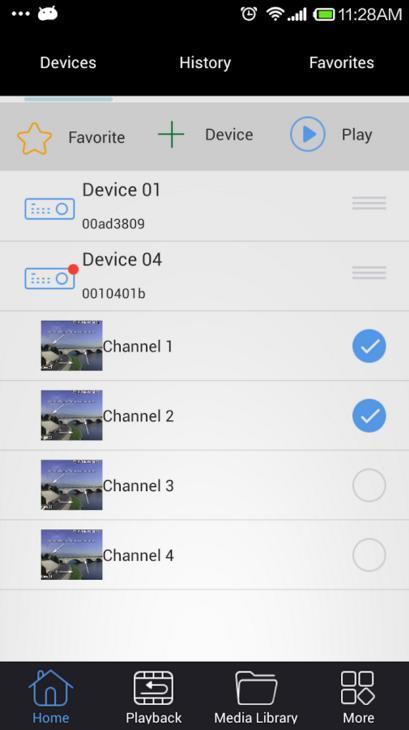
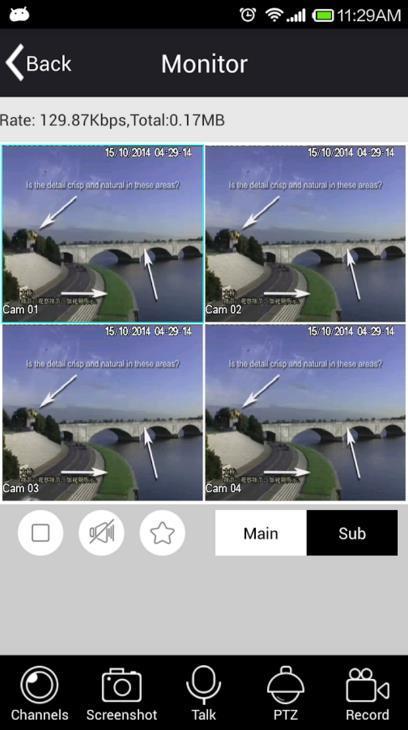
The QUBE allows users to view CCTV cameras that are connected to TVRs from Iphone devices. Users are able to view their security cameras remotely over the Internet.
App Features:
1.The software allows the user to carry over WIFI and GPRS video viewing;
2.Support P2P function, QR Code scan;
3.Support IP and domain direct connection feature.
4.Support single or four player, multi-channel switching, screen shots, videos;
5.Control the Pan, Tilt, Focus, Zoom of PTZ cameras, and iris control from your smart phone and tablet.
6.Search and playback recording surveillance video that has been recorded to the TVR.
7.Support local image and local video viewing.
8.Automatically adapt language according to the mobile phone language
9.Support equipment and channel favorites feature.
Contact Us:
In any problems encountered when using the software or if you need any help, please contact us:
E-mail: support@buyqube.com
Website: http://www.buyqube.com
預覽
訊息
開發商
Qube Inc.
最新版本
2.6.3.160413
更新時間
2016-06-21
類別
工具
同時可用
Google Play
更多
如何在電腦上用 GameLoop 玩 QUBE
1. 從官網下載GameLoop,然後運行exe文件安裝GameLoop
2. 打開GameLoop,搜索“QUBE”,在搜索結果中找到QUBE,點擊“安裝”
3. 享受在 GameLoop 上玩 QUBE 的樂趣
Minimum requirements
OS
Windows 8.1 64-bit or Windows 10 64-bit
GPU
GTX 1050
CPU
i3-8300
Memory
8GB RAM
Storage
1GB available space
Recommended requirements
OS
Windows 8.1 64-bit or Windows 10 64-bit
GPU
GTX 1050
CPU
i3-9320
Memory
16GB RAM
Storage
1GB available space