
QR Attendance, Scanner, Reader 電腦版
INNOVACIA SDN BHD
用GameLoop模拟器在電腦上玩QR Attendance, Scanner, Reader
QR Attendance, Scanner, Reader 電腦版
來自發行商 INNOVACIA SDN BHD 的 QR Attendance, Scanner, Reader 能夠在安卓系統上運行。
現在,您可以在電腦上使用 GameLoop 模擬器流暢地玩 QR Attendance, Scanner, Reader。
在 GameLoop 遊戲庫或搜索結果中下載。 不需要再暢玩遊戲時盯著電池電量或被令人懊惱的來電打斷。
只需在電腦大屏幕上免費下載暢玩QR Attendance, Scanner, Reader 電腦版!
QR Attendance, Scanner, Reader 簡介
Easy QR attendance.
Innovacia QR Scanner has been equipped with a feature to create a QR Code for attendance.
Nowadays, most business and offices will require their visitors to fill up attendance. Once you have created the QR Attendance, print it out and put it at your business or office entrance.
When a visitor scans the QR Code Attendance with a mobile phone, it will open up an attendance form for them to fill up (name, phone number and date/time) and send it online.
The business or office owner (QR Code Attendance Creator) can view their visitor attendance list from the app. Use the Search function to filter by date.
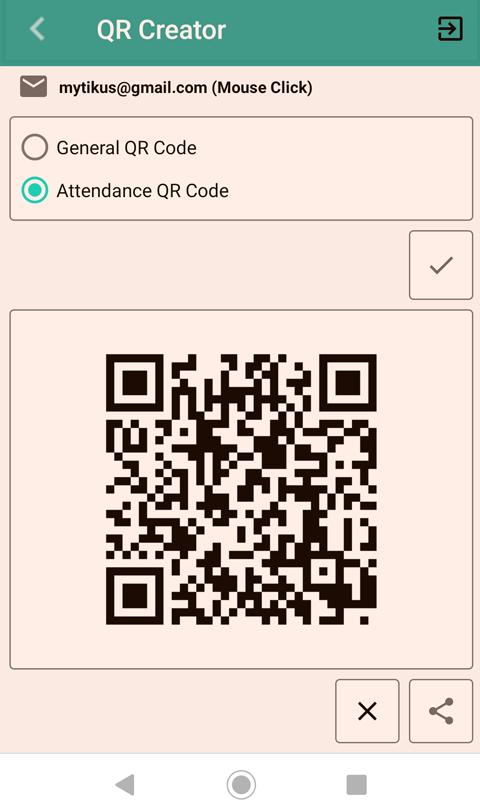
To create QR Code Attendance:-
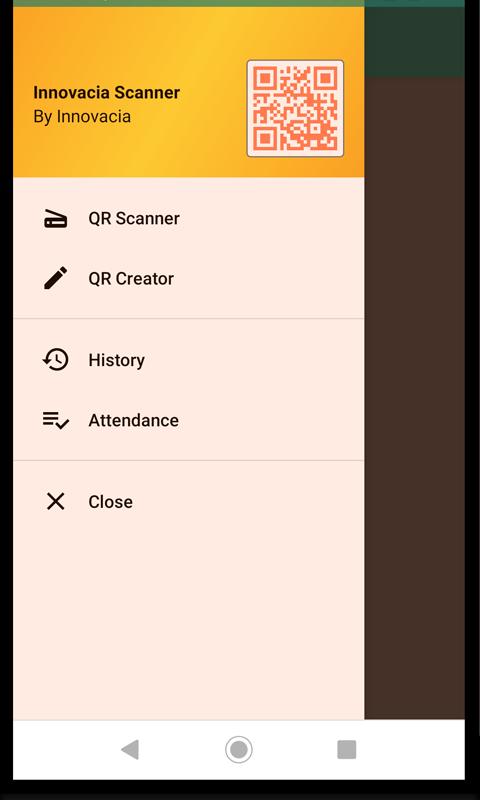
1. Select QR Creator from the left navigator
2. Login with your Gmail account
3. Select Attendance QR Code and click the Tick button to generate the QR code for attendance.
4. Then click on the Share button to print, email or send to other apps for print out.
To view Attendance List:-
1. Select Attendance from the left navigator
2. Login with your Gmail account that you've used to create the QR code
3. View attendance list
4. Click on the Search button to filter the information
To print out Attendance List:-
1. Select Attendance from the left navigator
2. At the menu, select Export All
Besides QR Attendance, Innovacia Scanner can also perform QR code scanner for VCard. The Innovacia scanner will automatically detect the QR format and if the QR code contains VCard information format, you can store the scanned information as a business card which may contain Name, Designation, Company Name, Address, Telephone, Email and URL.
Once the QR code has been scanned, you will have the option to save the information in the database.
To retrieve the QR code information in the future, you can open up from the Biz Card Listing or History Listing. From the listing, you can manage to delete or open the information.
預覽
標籤
工具訊息
開發商
INNOVACIA SDN BHD
最新版本
1.11
更新時間
2022-04-06
類別
工具
同時可用
Google Play
更多
如何在電腦上用 GameLoop 玩 QR Attendance, Scanner, Reader
1. 從官網下載GameLoop,然後運行exe文件安裝GameLoop
2. 打開GameLoop,搜索“QR Attendance, Scanner, Reader”,在搜索結果中找到QR Attendance, Scanner, Reader,點擊“安裝”
3. 享受在 GameLoop 上玩 QR Attendance, Scanner, Reader 的樂趣
Minimum requirements
OS
Windows 8.1 64-bit or Windows 10 64-bit
GPU
GTX 1050
CPU
i3-8300
Memory
8GB RAM
Storage
1GB available space
Recommended requirements
OS
Windows 8.1 64-bit or Windows 10 64-bit
GPU
GTX 1050
CPU
i3-9320
Memory
16GB RAM
Storage
1GB available space