Cleanup 360: Cleaner & Booster 電腦版
Optimizemobi
用GameLoop模拟器在電腦上玩Cleanup 360: Cleaner & Booster
Cleanup 360: Cleaner & Booster 電腦版
來自發行商 Optimizemobi 的 Cleanup 360: Cleaner & Booster 能夠在安卓系統上運行。
現在,您可以在電腦上使用 GameLoop 模擬器流暢地玩 Cleanup 360: Cleaner & Booster。
在 GameLoop 遊戲庫或搜索結果中下載。 不需要再暢玩遊戲時盯著電池電量或被令人懊惱的來電打斷。
只需在電腦大屏幕上免費下載暢玩Cleanup 360: Cleaner & Booster 電腦版!
Cleanup 360: Cleaner & Booster 簡介
Meet Cleanup 360, which is different from other cleaning apps – offers you smart suggestions and makes your job easier with its artificial intelligence assistant.
In just a few taps, you can get rid of junk and cache files, speed up your device performance, optimize battery usage, and protect your privacy and security. You can also schedule tasks such as cleaning, optimization, and protection to be performed automatically.
So, let's take a look at the key features:
✨ INTELLIGENT CLEANUP ASSISTANT
• Clean up your storage by scheduling 15+ Auto-Clean tasks such as deleting caches, junks, and duplicates
• Free up your memory in case of high memory usage, when unused apps are found, or when the screen is turned off
• Optimize battery and extend its life in case of low battery, high battery temperature or high battery usage
• Auto-optimize for fast charging
• Detect abnormal battery and memory usage
• Detect high battery temperature and get alert notifications
• Real-time device security suggestions
• 25+ smart assistant notifications
🗑️ SMART CLEANING
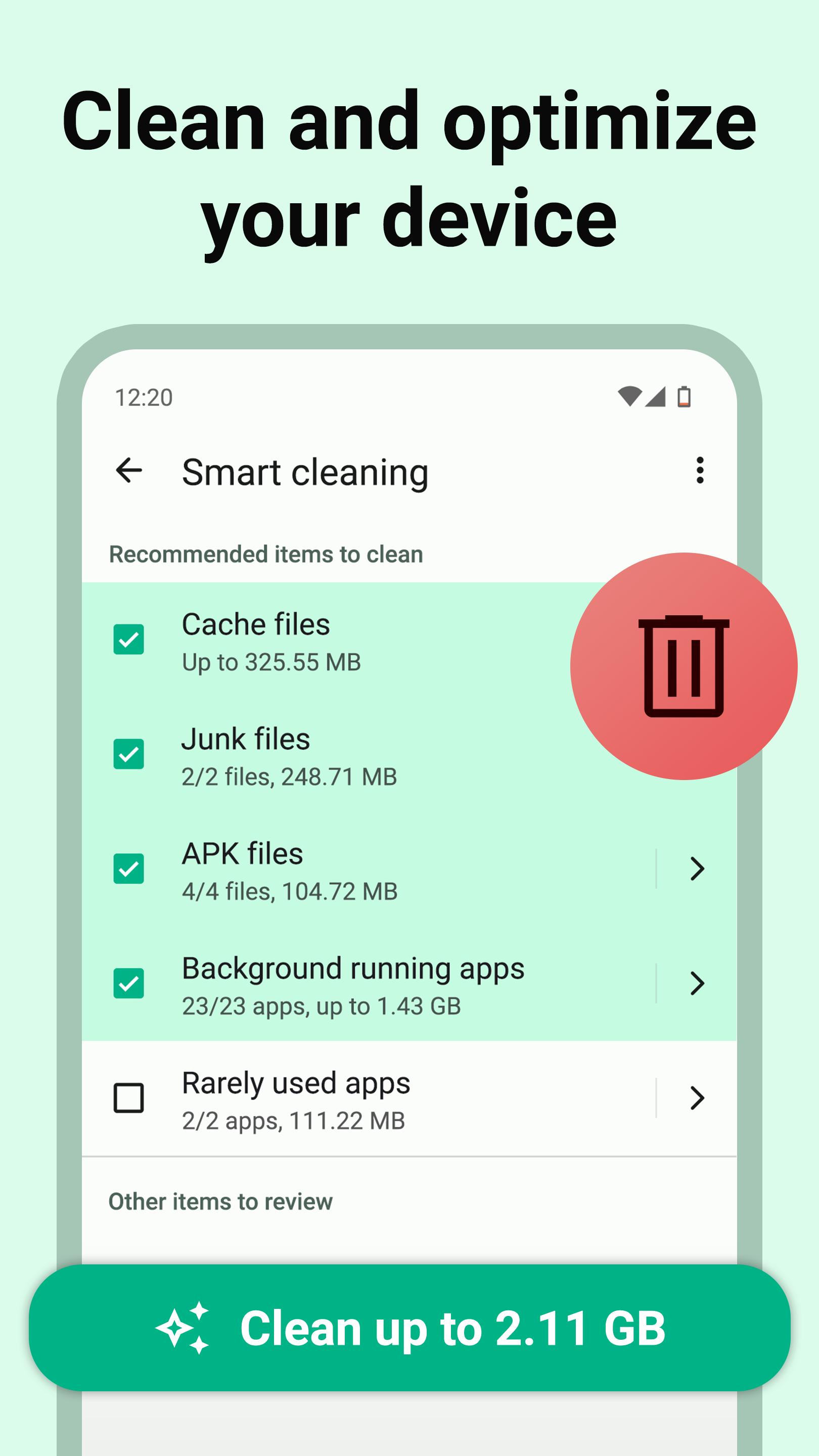
• Get rid of all unnecessary files and apps with a few taps
• Clear cache files, delete junk (such as log, trash, thumb, temp, obsolete and residual) files, archives, backups, screenshots, downloads, ads
• Clean app data files such as WhatsApp messages or Spotify data
• Uninstall rarely used and outdated apps
• Stop background running apps to save more RAM
📁 ANALYZE AND CATEGORIZE FILES
• Categorize every file on your device – photos, videos, documents, downloads, large files, and more
• File manager & explorer – open, delete, rename, search, sort, share, archive or extract files
• Clean up cache files
• Delete duplicate files, images, videos
• Delete similar photos
• Resize and compress images without losing quality
• Compress or archive files (.zip)
🔍 MANAGE APPS AND PERMISSIONS
• Analyze all apps in your device, including system apps
• App manager & explorer – install, uninstall, search, sort, share, archive or extract apps
• Manage app permissions with Permission Audit
• Detect unused and rarely used apps that take up storage
• See how much cache space each app takes up
• See details of battery draining and data consuming apps
• Batch uninstall apps and system apps
• Compress or archive apps
🚀 BOOST DEVICE PERFORMANCE
• Improve your device performance by stopping background apps with Task Killer
• Free up RAM and boost CPU
• Speed up your phone and tablet
• Hibernate apps to save battery life
• Cool down your device temperature
• Boost your gaming performance, increase your FPS and fix lags
🔋 EXTEND BATTERY LIFE
• Battery saver and optimizer
• Predict when your battery will run out
• Check your battery health and capacity
• Monitor your battery temperature and get alerts
🌏 MONITOR DATA USAGE
• Track data usage on a daily, weekly, monthly, or yearly basis
• Scan devices on your WiFi to see who is connected to your WiFi and block them
• Optimize and boost your internet speed
🛡️ PROTECT PRIVACY & SECURITY
• Analyze WiFi security – detect security issues such as weak encryption, WiFi phishing, SSL stripping, or DNS hijacking
• Delete malicious and harmful apps on your device
• Get security suggestions – such as if your device is rooted or not
⚙️ SEE SYSTEM SPECS
• Check out your system information such as brand, model, Android version, CPU, RAM, screen resolution, battery capacity (mAh), temperature, IP address, etc.
💡 QUICK TIPS 💡
There are several steps you can take with Cleanup 360 to make your Android phone or tablet run faster:
1) Remove any unused apps and files from your device
2) Archive or move rarely used files and apps to external storage (SD card)
3) Compress your images that take up a lot of space
4) Close all unnecessary apps that running in the background
5) Use AI Assistant to clean and optimize your device automatically
Download Cleanup 360 – Free cleaner app for Android now!
Visit: https://optimizemobi.com/cleanup-360/
預覽
標籤
工具訊息
開發商
Optimizemobi
最新版本
2023.4.0
更新時間
2023-01-23
類別
工具
同時可用
Google Play
更多
如何在電腦上用 GameLoop 玩 Cleanup 360: Cleaner & Booster
1. 從官網下載GameLoop,然後運行exe文件安裝GameLoop
2. 打開GameLoop,搜索“Cleanup 360: Cleaner & Booster”,在搜索結果中找到Cleanup 360: Cleaner & Booster,點擊“安裝”
3. 享受在 GameLoop 上玩 Cleanup 360: Cleaner & Booster 的樂趣
Minimum requirements
OS
Windows 8.1 64-bit or Windows 10 64-bit
GPU
GTX 1050
CPU
i3-8300
Memory
8GB RAM
Storage
1GB available space
Recommended requirements
OS
Windows 8.1 64-bit or Windows 10 64-bit
GPU
GTX 1050
CPU
i3-9320
Memory
16GB RAM
Storage
1GB available space