Camera Motion Alarm 電腦版
graphtoweb.com
用GameLoop模拟器在電腦上玩Camera Motion Alarm
Camera Motion Alarm 電腦版
來自發行商 graphtoweb.com 的 Camera Motion Alarm 能夠在安卓系統上運行。
現在,您可以在電腦上使用 GameLoop 模擬器流暢地玩 Camera Motion Alarm。
在 GameLoop 遊戲庫或搜索結果中下載。 不需要再暢玩遊戲時盯著電池電量或被令人懊惱的來電打斷。
只需在電腦大屏幕上免費下載暢玩Camera Motion Alarm 電腦版!
Camera Motion Alarm 簡介
GoAlarmV is an advanced security camera app that takes advantage of the built-in camera to detect movements. Alarm will start playing a sound whenever an event has occurred.
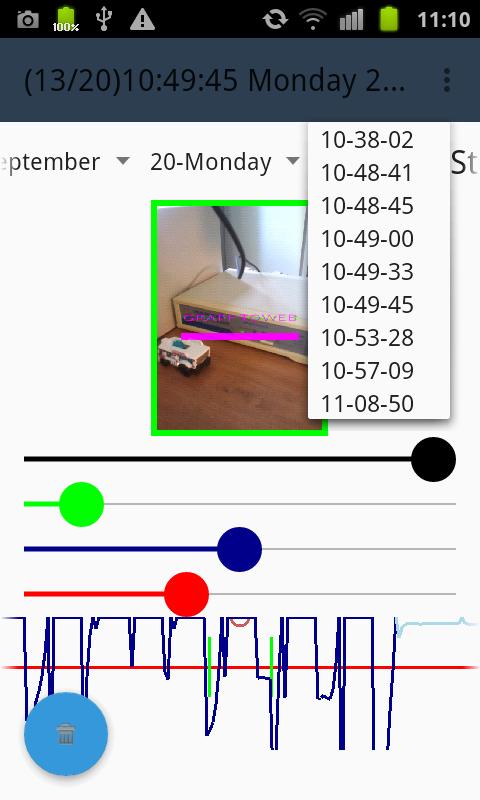
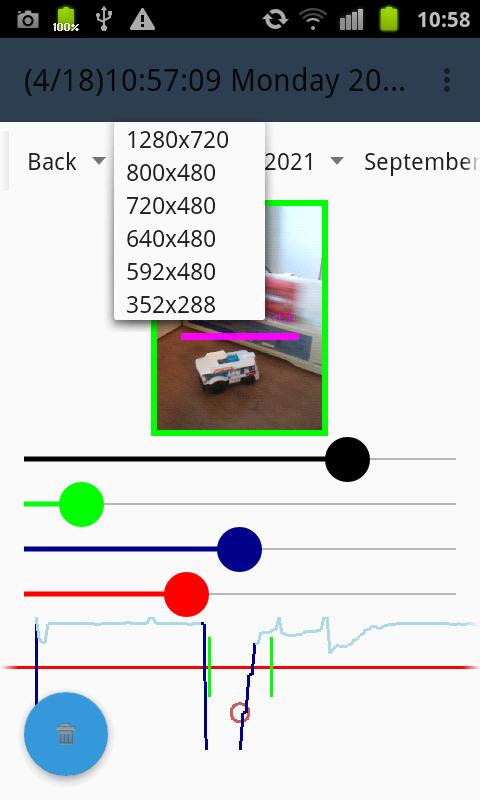
The motion detection algorithm is easily tunable thank to a real time graphics which display the detector response. Tuning of the detector is simply done with four spinners. The red spinner is allowing to setup the minimum value for triggering an alarm event. The blue spinner is scaling the amplitude of the curve. The green spinner is filtering the events (according to width) which will produce an alarm. The black spinner is smothering the sensor value. Spinner can be locked and unlocked with long press.
The video view has two different working modes. During live video mode the view has a red border. During replay mode the view has green border. Switching live or replay mode is done by double tab the video frame. It is possible to zoom in and out the image with the two fingers gesture.
During the replay mode (green border) the entire recorded images event can be reviewed. The recorded events are classified respectively by production year, month, day and time. They are directly accessible with the four drop down menu bar in the menu panel. To navigate quickly to the previous or next recorded events just scroll down or up the video view. To navigate quickly to the previous or next frame just scroll left or right the video view. The real time graphics can as well be scrolled in order to quickly navigate through all the currents displayed events. The application has also incorporated the classical button “play”, “rewind” and “forward”.
Video sequences are stored on the device disc. A maximum storage value can be setup (default is 200 Mb). When place is missing old sequences are automatically destroyed. A blue rounded button is allowing to destroy the currently selected video and optionally all video of the currently selected day.
When the phone is connected to a Wi-Fi router, video and alarm signal of the mobile phone can be monitored on any browser at a remote location. The connection is secure with username and password being respectively “root” and “admin”. The password should be changed and can be displayed with a long press on the title “Administrator Password”. Old video sequence can be reviewed and deleted as well. The monitor web pages will enable to create its own alarm.
Product features:
✅ Detect automatically all camera and size.
✅ Works when the phone is sleeping, in the background or behind a screen lock.
✅ Storage disc can be set to a maximum. Delete automatic old image if place is missing.
✅ Option to launch automatically the application when mobile is booting.
✅ Start up is delayed to allow leaving the room.
✅ Alarm is delayed to allow stopping the alarm before playing sound.
✅ Image quality can be set to save disc space.
✅ Phone can be silent to only record without warning.
✅ Video stream is remotely accessible. Default credentials are root/admin.
✅ Alarm can be setup and watched in any standard browser on the internet
預覽
標籤
工具訊息
開發商
graphtoweb.com
最新版本
1.1
更新時間
2023-12-07
類別
工具
同時可用
Google Play
更多
如何在電腦上用 GameLoop 玩 Camera Motion Alarm
1. 從官網下載GameLoop,然後運行exe文件安裝GameLoop
2. 打開GameLoop,搜索“Camera Motion Alarm”,在搜索結果中找到Camera Motion Alarm,點擊“安裝”
3. 享受在 GameLoop 上玩 Camera Motion Alarm 的樂趣
Minimum requirements
OS
Windows 8.1 64-bit or Windows 10 64-bit
GPU
GTX 1050
CPU
i3-8300
Memory
8GB RAM
Storage
1GB available space
Recommended requirements
OS
Windows 8.1 64-bit or Windows 10 64-bit
GPU
GTX 1050
CPU
i3-9320
Memory
16GB RAM
Storage
1GB available space