
Pomodoro Pro - Focus Timer 電腦版
Tecinus JSC
用GameLoop模拟器在電腦上玩Pomodoro Pro - Focus Timer
Pomodoro Pro - Focus Timer 電腦版
來自發行商 Tecinus JSC 的 Pomodoro Pro - Focus Timer 能夠在安卓系統上運行。
現在,您可以在電腦上使用 GameLoop 模擬器流暢地玩 Pomodoro Pro - Focus Timer。
在 GameLoop 遊戲庫或搜索結果中下載。 不需要再暢玩遊戲時盯著電池電量或被令人懊惱的來電打斷。
只需在電腦大屏幕上免費下載暢玩Pomodoro Pro - Focus Timer 電腦版!
Pomodoro Pro - Focus Timer 簡介
Boost Your Productivity with the Pomodoro Timer App
In today's fast-paced world, maintaining focus and managing time effectively can be challenging. Whether you're working on an important project or studying for an exam, the Pomodoro Timer app is designed to help you stay on track and get the most out of your time. By leveraging the proven Pomodoro technique, this app helps you break your work into focused intervals, promoting efficiency and preventing burnout.
Core Features:
Pomodoro Timer:
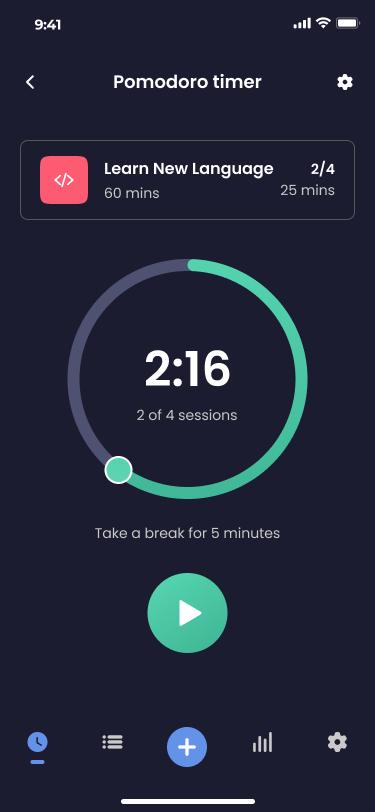
The heart of the app is its Pomodoro Timer, a tool that allows you to break down your work into 25-minute focused intervals, separated by short 5-minute breaks. This technique is known to improve concentration and prevent fatigue, ensuring you maintain a high level of productivity throughout the day. You can also customize the length of your work sessions and breaks to better suit your personal working style.
Comprehensive Task Management:
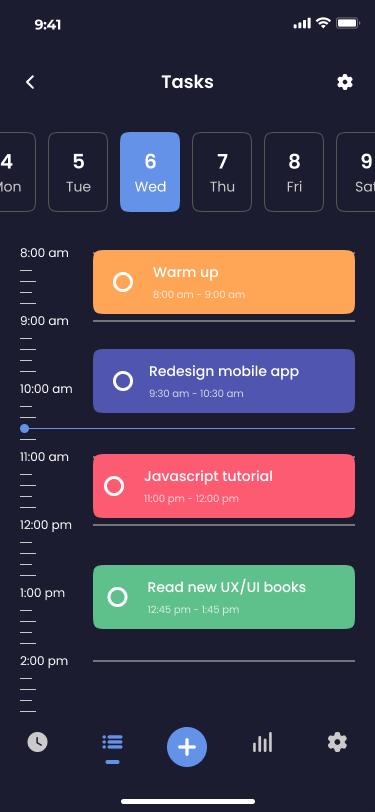
Stay organized with our robust task management system. Easily create to-do lists, categorize tasks based on their priority, and monitor your progress in real time. Whether you're managing daily chores, work projects, or study assignments, this feature ensures that nothing falls through the cracks. Mark tasks as complete, reorder them, and set deadlines to keep everything on schedule.
Schedule Management:
Efficiently plan your day, week, or even month with the app’s schedule management feature. Create, view, and manage your work schedule all in one place. You can set up recurring tasks, block out time for specific activities, and ensure that your most important work gets done. The app also allows you to sync your schedule with your calendar, so you're always aware of upcoming deadlines and commitments.
Advanced Time Tracking:
Gain insights into how you spend your time with detailed time tracking features. This tool logs the duration of each Pomodoro session and tracks the time spent on individual tasks. Review your time logs to identify productivity patterns, understand where your time goes, and make informed adjustments to your workflow. Over time, this helps you to become more efficient and achieve better results.
Customizable Notifications and Settings:
Tailor the app to your specific needs with fully customizable settings. Adjust the length of your Pomodoro sessions and breaks, set reminders for when it's time to start a new session, and receive notifications that keep you on track. You can even customize the sounds and alerts to make the experience more enjoyable and less intrusive.
Who Can Benefit from the Pomodoro Timer App?
Professionals:
Perfect for anyone who needs to focus on work tasks without distractions, from freelancers and remote workers to office employees.
Students:
Ideal for students who want to improve their study habits, manage their study schedule, and keep track of time spent on assignments or exam preparation.
Task-Oriented Individuals:
Great for anyone who needs to manage multiple tasks and deadlines, ensuring they stay organized and productive.
Why Pomodoro Timer is Your Best Choice:
User-Friendly Interface:
Our app is designed with simplicity in mind, offering an intuitive user experience that’s accessible for both beginners and advanced users. The clear and clean interface ensures you can quickly set up your tasks, start your Pomodoro sessions, and manage your schedule without any hassle.
Highly Customizable:
Unlike other productivity apps, Pomodoro Timer offers a high degree of customization. This flexibility allows you to adapt the app to fit your unique working and learning style, ensuring you get the most out of every session.
Completely Free:
All these powerful features are available at no cost.
Let's Start your journey towards a more focused and productive life today!
預覽
標籤
效率提升訊息
開發商
Tecinus JSC
最新版本
1.2.1
更新時間
2024-09-20
類別
效率提升
同時可用
Google Play
更多
如何在電腦上用 GameLoop 玩 Pomodoro Pro - Focus Timer
1. 從官網下載GameLoop,然後運行exe文件安裝GameLoop
2. 打開GameLoop,搜索“Pomodoro Pro - Focus Timer”,在搜索結果中找到Pomodoro Pro - Focus Timer,點擊“安裝”
3. 享受在 GameLoop 上玩 Pomodoro Pro - Focus Timer 的樂趣
Minimum requirements
OS
Windows 8.1 64-bit or Windows 10 64-bit
GPU
GTX 1050
CPU
i3-8300
Memory
8GB RAM
Storage
1GB available space
Recommended requirements
OS
Windows 8.1 64-bit or Windows 10 64-bit
GPU
GTX 1050
CPU
i3-9320
Memory
16GB RAM
Storage
1GB available space