
Voice Changer for Call 電腦版
Cast4TV
用GameLoop模拟器在電腦上玩Voice Changer for Call
Voice Changer for Call 電腦版
來自發行商 Cast4TV 的 Voice Changer for Call 能夠在安卓系統上運行。
現在,您可以在電腦上使用 GameLoop 模擬器流暢地玩 Voice Changer for Call。
在 GameLoop 遊戲庫或搜索結果中下載。 不需要再暢玩遊戲時盯著電池電量或被令人懊惱的來電打斷。
只需在電腦大屏幕上免費下載暢玩Voice Changer for Call 電腦版!
Voice Changer for Call 簡介
Why use Voice Changer for Call?
*For fun, I don't want my friends to hear my voice, I want to change my voice.
*In order to protect privacy, I don't want others to know who I am, I want to change my voice.
What is Voice Changer for Call?
*Voice Changer for Call can change the pitch of your voice in real time, it makes your voice become male, female or child voice.
*Voice Changer for Call can change the echo in real time, it makes you sound as if you are in a hall or on a stage.
*Voice Changer for Call can be used for making calls, voice chats and conference calls, and output the changed audio to another phone.
*Voice Changer for Call can be used to play games, voice chat and conference calls, and output the changed audio to another computer.
*Voice Changer for Call can be used in outdoor activities to output the changed audio to another Loudspeaker.
How to use Voice Changer for Call?
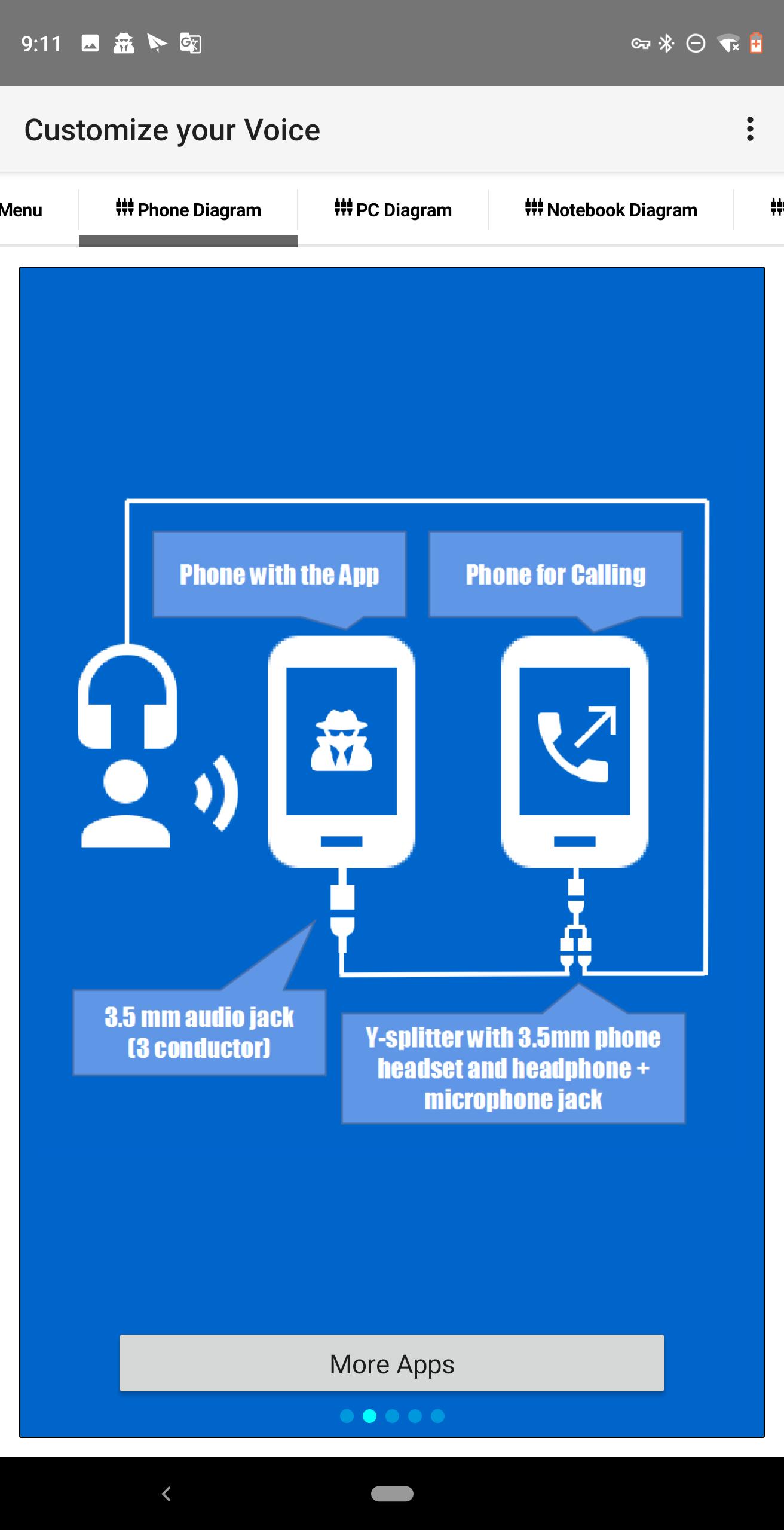
*Mobile phone connection method:
①3.5mm Phone headset Adapter Y Splitter Jack Cable with Separate female Microphone port and female Headphone port
②3.5mm Male to Male Auxiliary Audio Cable (3 conductor)
Use the mobile phone running Voice Changer for Call as a microphone, connect the audio output to ②, ② to the female Microphone port of ①, and connect the A headphone to the female Headphone port of ①. Connect the Headset Jack of ① to another mobile phone. It can Used for phone calls, voice chats and conference calls.
*PC connection method:
①3.5mm Male to Male Auxiliary Audio Cable (3 conductor)
Use the mobile phone running Voice Changer for Call as a microphone, and connect the audio output to ①, ① to the female Microphone port of the PC, and connect the A headphone to the Headphone port of the PC. The PC can play games, voice chat and conference calls.
*Notebook connection method:
①3.5mm Phone headset Adapter Y Splitter Jack Cable with Separate female Microphone port and female Headphone port
②3.5mm Male to Male Auxiliary Audio Cable (3 conductor)
Use the mobile phone running Voice Changer for Call as a microphone, connect the audio output to ②, ② to the female Microphone port of ①, and connect the A headphone to the female Headphone port of ①. Connect the Headset Jack of ① to the Headset port of the Notebook. Notebook can Used for playing games, voice chats and conference calls.
*Loudspeaker connection method:
①3.5mm Male to Male Auxiliary Audio Cable (3 conductor)
Use the mobile phone running Voice Changer for Call as a microphone, and connect the audio output to ①, ① to the female Microphone port of Loudspeaker.
How to run Voice Changer for Call?
After confirming that the wires are connected, adjust the Effect and Reverb, and click "Microphone On".
If the sink phone cannot hear the sound, it is usually because the sink phone cannot detect Jack. If the sink phone has a USB OTG, please use a USB soundcard and input audio by the Microphone port of the USB soundcard.
預覽
標籤
Music-&訊息
開發商
Cast4TV
最新版本
1.1.7
更新時間
2024-09-25
類別
Music-audio
同時可用
Google Play
更多
如何在電腦上用 GameLoop 玩 Voice Changer for Call
1. 從官網下載GameLoop,然後運行exe文件安裝GameLoop
2. 打開GameLoop,搜索“Voice Changer for Call”,在搜索結果中找到Voice Changer for Call,點擊“安裝”
3. 享受在 GameLoop 上玩 Voice Changer for Call 的樂趣
Minimum requirements
OS
Windows 8.1 64-bit or Windows 10 64-bit
GPU
GTX 1050
CPU
i3-8300
Memory
8GB RAM
Storage
1GB available space
Recommended requirements
OS
Windows 8.1 64-bit or Windows 10 64-bit
GPU
GTX 1050
CPU
i3-9320
Memory
16GB RAM
Storage
1GB available space