GlycoV Equalizer - Bass & 3D 電腦版
Kushiheim
用GameLoop模拟器在電腦上玩GlycoV Equalizer - Bass & 3D
GlycoV Equalizer - Bass & 3D 電腦版
來自發行商 Kushiheim 的 GlycoV Equalizer - Bass & 3D 能夠在安卓系統上運行。
現在,您可以在電腦上使用 GameLoop 模擬器流暢地玩 GlycoV Equalizer - Bass & 3D。
在 GameLoop 遊戲庫或搜索結果中下載。 不需要再暢玩遊戲時盯著電池電量或被令人懊惱的來電打斷。
只需在電腦大屏幕上免費下載暢玩GlycoV Equalizer - Bass & 3D 電腦版!
GlycoV Equalizer - Bass & 3D 簡介
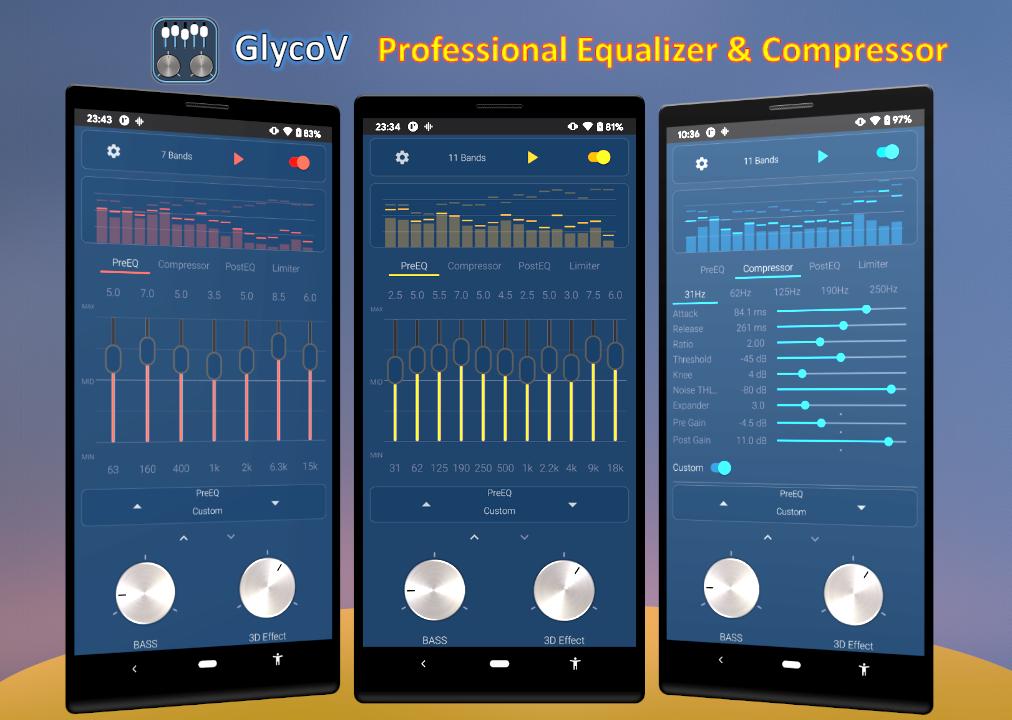
Music tool to enjoy music with equalizer operation, bass boost and 3D effect. You can change the sound quality of music players, audio players, videos, music streaming apps, radio apps, etc. You can also change and reflect the effect on the music playing in multi-window mode or from the notification. (*1)
Basic Function:
- Bass Boost
- 3D effects (Virtualizer)(*2)
- Graphics with OpenGL (Visualizer)(*3)
- Loudness Enhancer and Volume(*4)
- 10 built-in presets for Equalizer
- 1 custom preset
- 16 color themes
- Operation from notification
- Multi-window mode support(*5)
(*1) Not compatible with some models.
(*2) Stereo widening effect can be used. By using a headset, you can get the best sound effect.
(*3) Due to the fact that the sound of the output mix is reflected in the graphics, user permission is required to start the application due to Android specifications.
(*4) Swipe between the knobs or touch the up/down arrows to open the next screen.
(Loudness value will not be saved when the app is closed.)
In portrait mode: Swipe vertically.
In landscape mode: Swipe horizontally
(*5) Multi-window mode is available for Android 7 and above. When using with apps that do not allow background playback, it is convenient to use two apps side by side.
Special features from Android 9 and above:
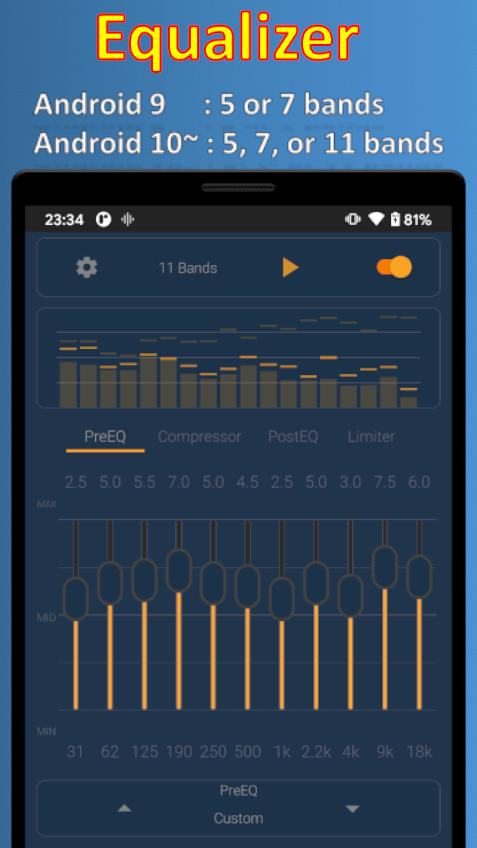
- Change the number of bands (Android 9 : 5 or 7 bands, Android 10 and above : 5, 7, 11 bands)
- Separate presets for pre-equalizer and post-equalizer (28 types + 1 custom)
- Compressor
- Limiter
This equalizer application will not work if you start it when other equalizers are running.
You need to follow the steps below to start it.
1. completely stop both GlycoV app and other equalizer apps.
1.1 In the case of an app that cannot be terminated from the notification (There are some apps that do not send notification)
Press and hold the app icon and select "Force Stop" in the "App Info" screen.
2. Launch GlycoV application.
====== For users with Android 9 and above ======
On Android 9 or higher, you can enjoy music with the best sound by adjusting the Compressor.
The effector consists of Pre EQ --> Compressor --> Post EQ --> Limiter in that order. To make it easy to change the Pre EQ when adjusting the Compressor, the Pre EQ can also be changed in the Compressor.
1. How to easily increase the bass using the Compressor (first try using 62Hz or 63Hz, which are easy to hear)
- Lower the value of Pre Gain.
- Increase the value of Post Gain.
- Lower the Ratio value slightly.
- Raise the Threshold a little.
(First, move the Seek Bar of these four parameters slowly to the left and right to feel the change in sound. 2.)
2. an example of the procedure for adjusting Post EQ at the end is shown below. (This is just an example and not necessarily the best way to do it.)
Step 1: Set the Post EQ preset to FLAT.
Step 2: Set all Compressor and Limiter presets to Default. (Don't set In Gain and Out Gain too high, just set them to about 0.
Step 3. change Pre EQ, Pre Gain, and Post Gain to your favorite values for each frequency. Adjust the Ratio and Threshold as necessary.
Step 4. increase the volume to the desired level with Out Gain. If necessary, adjust the In Gain.
Step 5. finally, adjust Post EQ if necessary.
If you use Android 9 or later, you may not want to use Bass Boost and Loudness as much as possible.
===========================================
Notes.
To exit the app completely, you need to exit from the notification.
Loudness, In Gain, and Out Gain values will not be saved after exiting the app.
Extreme settings may cause sound crack. Please enjoy this app with moderate settings and volume at your own risk.
預覽
標籤
Music-&訊息
開發商
Kushiheim
最新版本
2.7.7
更新時間
2025-08-30
類別
Music-audio
同時可用
Google Play
更多
如何在電腦上用 GameLoop 玩 GlycoV Equalizer - Bass & 3D
1. 從官網下載GameLoop,然後運行exe文件安裝GameLoop
2. 打開GameLoop,搜索“GlycoV Equalizer - Bass & 3D”,在搜索結果中找到GlycoV Equalizer - Bass & 3D,點擊“安裝”
3. 享受在 GameLoop 上玩 GlycoV Equalizer - Bass & 3D 的樂趣
Minimum requirements
OS
Windows 8.1 64-bit or Windows 10 64-bit
GPU
GTX 1050
CPU
i3-8300
Memory
8GB RAM
Storage
1GB available space
Recommended requirements
OS
Windows 8.1 64-bit or Windows 10 64-bit
GPU
GTX 1050
CPU
i3-9320
Memory
16GB RAM
Storage
1GB available space