
Wise - Online Teaching app 電腦版
Wise Leap Technologies
用GameLoop模拟器在電腦上玩Wise - Online Teaching app
Wise - Online Teaching app 電腦版
來自發行商 Wise Leap Technologies 的 Wise - Online Teaching app 能夠在安卓系統上運行。
現在,您可以在電腦上使用 GameLoop 模擬器流暢地玩 Wise - Online Teaching app。
在 GameLoop 遊戲庫或搜索結果中下載。 不需要再暢玩遊戲時盯著電池電量或被令人懊惱的來電打斷。
只需在電腦大屏幕上免費下載暢玩Wise - Online Teaching app 電腦版!
Wise - Online Teaching app 簡介
WISE – your trustable online teaching app right at your fingertips where you can admit unlimited students!
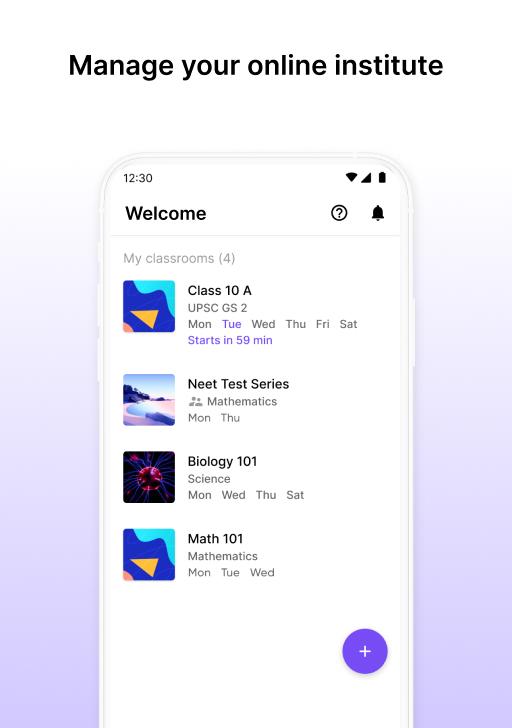
Just open the app, create your classroom, invite students to join and begin with them a journey of comprehensive online classroom experience with a simple interface.
CREATE MULTIPLE CLASSROOMS
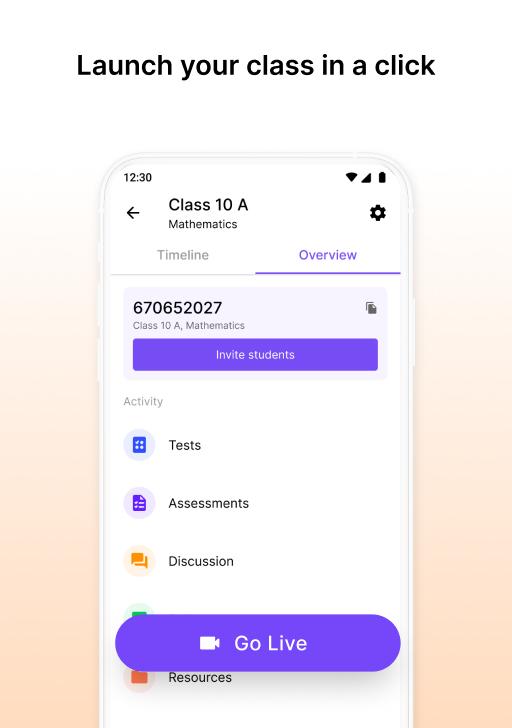
Create separate rooms for every class you teach online. One-time creation that gets automatically shared with your students. No more meeting links and password sharing before every class.
AUTOMATED ATTENDANCE
A lot of time is wasted on taking attendance manually during the class. So, we give you attendance reports right after every online class you take including the percentage of class attended by every student.
DISCUSSION BOARDS
Start discussions with or among students for resolving doubts anytime after the class. Stop juggling across WhatsApp groups to keep a track of students’ doubts and queries. Use the discussion board to post-course updates or any class-wide announcements.
SHARE RESOURCES
Share study modules, pre-reads, references, online curated content, course-related video links, etc.
ASSESSMENTS
Give assessments as per your choice - day and time deadlines, or no deadlines. Get ‘Classroom feels’ with audio feedback on every submission, grade them, and mark one of the submissions as a solution you think is correct to guide other students.
EASY TO CREATE MCQ’S
Upload questions in seconds, create and schedule MCQ’s along with marking scheme as you seem fit.
CREATE POSTERS
If you are a teacher or tutor teaching online, want the world to know about it? Use WISE’s posters to create awareness about your class via WhatsApp or any other platform!
It is extremely simple to use and works smoothly even on low bandwidth. So, get started with WISE App today!
Are you a teacher at a school? Or a principal who wants to keep a track on teachers’ and students’ progress? Do you run a coaching institute? Or an individual teacher? Do you want to start your online course, but overwhelmed with managing its operations?
WISE App – a solution for all your online educational problems, in one place!
As a school teacher, create a timetable for your students on WISE App without the need of having to schedule meetings and sending meeting ids/passwords every time. Increase engagement level by facilitating after class discussions, sharing class material or videos and conducting regular assessments. Receive automated attendance reports, right after every class you teach.
If you’re a principal, using WISE App for your school will be super-efficient. Get access to all your school’s virtual classrooms and track the growth of each class. No need to wait for WhatsApp messages to receive daily reports.
Tutors with WISE can teach online and streamline their classes. Use discussions boards to resolve the doubts of students. Share your study material and videos through the resources tab. Schedule regular short tests to keep the competitive spirit alive within the students.
Teaching individually with WISE lets you organize classroom experience and operations. Upgrade the learning experience of your students’ learning experience by sending/receiving regular assignments and homework.
Plan your next webinar or webinar series on WISE App. With a single step registration, get all your participants at one place. Interact with them before the webinar through the discussions tab. Use WISE for sending/receiving feedback and inputs in between two back to back webinars.
Are you waiting to teach online? Overwhelmed with starting a course? WISE App is there for all! A unified platform that helps you enrol students, start taking classes, send/receive resources and more - get started today!
Are you a social bee, then follow us on Social Media:
Twitter: https://twitter.com/wiseapplive
Facebook: https://www.facebook.com/wiseapplive
Instagram: https://www.instagram.com/wiseapplive/
Still have a question or suggestion, shoot us a mail on info@wiseapp.live
預覽
標籤
教育訊息
開發商
Wise Leap Technologies
最新版本
12.1
更新時間
2025-10-03
類別
教育
同時可用
Google Play
更多
如何在電腦上用 GameLoop 玩 Wise - Online Teaching app
1. 從官網下載GameLoop,然後運行exe文件安裝GameLoop
2. 打開GameLoop,搜索“Wise - Online Teaching app”,在搜索結果中找到Wise - Online Teaching app,點擊“安裝”
3. 享受在 GameLoop 上玩 Wise - Online Teaching app 的樂趣
Minimum requirements
OS
Windows 8.1 64-bit or Windows 10 64-bit
GPU
GTX 1050
CPU
i3-8300
Memory
8GB RAM
Storage
1GB available space
Recommended requirements
OS
Windows 8.1 64-bit or Windows 10 64-bit
GPU
GTX 1050
CPU
i3-9320
Memory
16GB RAM
Storage
1GB available space