
Docente Mentor 3.0 電腦版
System Strategy
用GameLoop模拟器在電腦上玩Docente Mentor 3.0
Docente Mentor 3.0 電腦版
來自發行商 System Strategy 的 Docente Mentor 3.0 能夠在安卓系統上運行。
現在,您可以在電腦上使用 GameLoop 模擬器流暢地玩 Docente Mentor 3.0。
在 GameLoop 遊戲庫或搜索結果中下載。 不需要再暢玩遊戲時盯著電池電量或被令人懊惱的來電打斷。
只需在電腦大屏幕上免費下載暢玩Docente Mentor 3.0 電腦版!
Docente Mentor 3.0 簡介
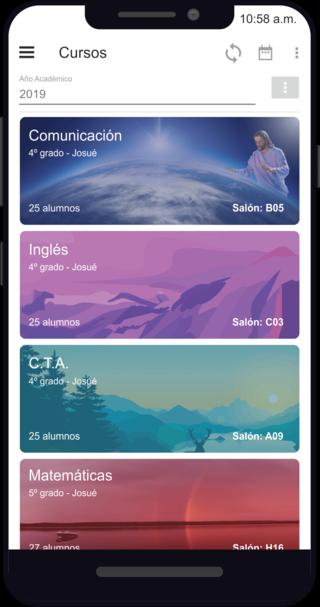
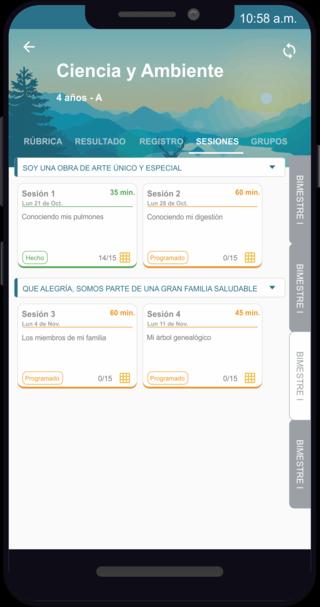
Sessions organized by Units: The Mentor Teaching App synchronizes with the iCRM Educational Web Platform the teacher's courses, students per course and the content of the learning sessions that will take place in each Unit, thus facilitating the work of the teacher.
Digital Registry: The App has a digital registry that centralizes evaluations of rubrics, tasks, sessions, organizing them by skills and competencies.
Assessment with Rubrics: In less than 10 seconds, teachers easily create rubrics with predefined criteria and various types of achievement levels.
Session Execution: The teacher controls the execution of the learning process activities with a single click, thus achieving continuous improvement in the execution of the sessions.
Evaluation Sessions: In each session the teacher can create items and rubrics to carry out the formative evaluation. You can also create tasks associated with a session.
Homework Management: The teacher can create assignments inside and outside of a session, assign a rubric for their respective evaluation, in addition to publishing the assignment and their grades for parents and students.
Group Management: The teacher can create random groups or by learning styles and then use them in the headings or rubrics, thus achieving speed in the group evaluations.
Attendance Control: The teacher can take attendance control by section or by course and report to parents in case of tardiness and absences.
Registration of Cases: The teacher can register merits, demerits, etc ... and report to the necessary instances in real time.
Learning Styles: The teacher has information on the learning styles of each student in order to use the appropriate strategies to achieve greater learning.
預覽
標籤
教育訊息
開發商
System Strategy
最新版本
2.0
更新時間
2021-10-22
類別
教育
同時可用
Google Play
更多
如何在電腦上用 GameLoop 玩 Docente Mentor 3.0
1. 從官網下載GameLoop,然後運行exe文件安裝GameLoop
2. 打開GameLoop,搜索“Docente Mentor 3.0”,在搜索結果中找到Docente Mentor 3.0,點擊“安裝”
3. 享受在 GameLoop 上玩 Docente Mentor 3.0 的樂趣
Minimum requirements
OS
Windows 8.1 64-bit or Windows 10 64-bit
GPU
GTX 1050
CPU
i3-8300
Memory
8GB RAM
Storage
1GB available space
Recommended requirements
OS
Windows 8.1 64-bit or Windows 10 64-bit
GPU
GTX 1050
CPU
i3-9320
Memory
16GB RAM
Storage
1GB available space