Always Battery (Icon Changer) PC
KP Funny Apps
قم بتنزيل Always Battery (Icon Changer) على جهاز الكمبيوتر باستخدام GameLoop Emulator
Always Battery (Icon Changer) على الكمبيوتر الشخصي
Always Battery (Icon Changer) ، القادم من المطور KP Funny Apps ، يعمل على نظام Android في الماضي.
الآن ، يمكنك لعب Always Battery (Icon Changer) على جهاز الكمبيوتر باستخدام GameLoop بسلاسة.
قم بتنزيله في مكتبة GameLoop أو في نتائج البحث. لا مزيد من الانتباه إلى البطارية أو المكالمات المحبطة في الوقت الخطأ بعد الآن.
ما عليك سوى الاستمتاع بجهاز Always Battery (Icon Changer) على الشاشة الكبيرة مجانًا!
Always Battery (Icon Changer) مقدمة
The Most Beautiful Battery Icon for Android Phone! Free!
=============================================
******** Known Issue *********
- The icon disappear randomly, this is because Android system kills battery services due to low memory condition. Unfortunately, This cannot be fixed. However, the system will start killed services again automatically in a few seconds. So, you don't have to start service by yourself.
- There are some devices that can't place the battery icon in the notification bar..
=============================================
Now you can enjoy gaming, movies, YouTube or any full screen apps without worrying about remaining power anymore with Always Battery!
Always Battery is an application which displays battery level status in percentage and icon. Always Battery is different from other battery apps/widgets, since it will not only display battery icon on notification bar or home screen as widget, but it can shows in any areas of your screen as you wish. Battery icon will stay on top screen all the time, no matter which app you are using, even full screen mode such as watching movie, gaming or using camera etc. You don’t have to close your app for just to see how long your battery will last.
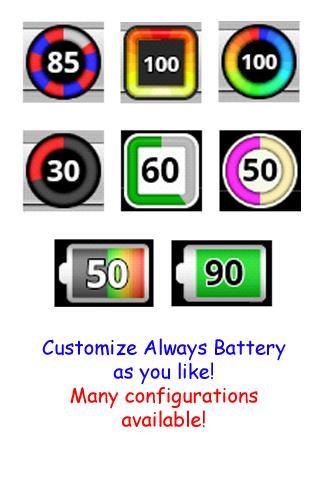
Always Battery comes with many features and configurations. You can design its color, size and appearance for foreground and background as you like. So you can make your best custom battery.
You can also replace your default icon with Always Battery by placing it over the default one.
When in Full Screen, worry no more that battery icon will bother your sight on the screen. Just switch to simple mode, only battery percentage will be displayed. This will keep it least bothering your screen. To switch between Simple and Normal modes is easy, just click and hold at the battery icon.
If you don't want to set the settings by yourself, just select the preset which included in the app, there are many beautiful presets.
If you like Always Battery, please help support by rate 5 stars!
=============================================
Recent Changes :
version 2.00
- 2 default icon styles
- add many presets
- battery charging animation while plugged
- save/load setting available
version 2.10
- fixed a bug when remaining battery is lower than 5%
- add "Round Rectangle" style
- add 2 presets
- better memory usage and management
- add "Alternate Position" which will be used during 0.00 - 9.59 am. Use this option if you want to place the Always Battery icon over default battery icon but the default
version 2.11
- fix bug when sleep on some devices
- "Alternate Position" support for am/pm.
- add option to display percentage symbol (%)
- add option to change stroke width
version 2.12
- fixed auto start service for Android 4.0+
version 2.19
- added 1x1 widget, you can use this widget to toggle on/off the battery icon
- added live wallpaper (bouncing battery icon)
معاينة
العلامات
أدواتمعلومة
مطور
KP Funny Apps
احدث اصدار
2.26
آخر تحديث
2015-12-07
فئة
أدوات
متاح على
Google Play
أظهر المزيد
كيف تلعب Always Battery (Icon Changer) مع GameLoop على جهاز الكمبيوتر
1. قم بتنزيل GameLoop من الموقع الرسمي ، ثم قم بتشغيل ملف exe لتثبيت GameLoop.
2. افتح GameLoop وابحث عن "Always Battery (Icon Changer)" ، وابحث عن Always Battery (Icon Changer) في نتائج البحث وانقر على "تثبيت".
3. استمتع بلعب Always Battery (Icon Changer) على GameLoop.
Minimum requirements
OS
Windows 8.1 64-bit or Windows 10 64-bit
GPU
GTX 1050
CPU
i3-8300
Memory
8GB RAM
Storage
1GB available space
Recommended requirements
OS
Windows 8.1 64-bit or Windows 10 64-bit
GPU
GTX 1050
CPU
i3-9320
Memory
16GB RAM
Storage
1GB available space