
Onsite GPS Site Survey Camera PC
All Excellent Apps
قم بتنزيل Onsite GPS Site Survey Camera على جهاز الكمبيوتر باستخدام GameLoop Emulator
Onsite GPS Site Survey Camera على الكمبيوتر الشخصي
Onsite GPS Site Survey Camera ، القادم من المطور All Excellent Apps ، يعمل على نظام Android في الماضي.
الآن ، يمكنك لعب Onsite GPS Site Survey Camera على جهاز الكمبيوتر باستخدام GameLoop بسلاسة.
قم بتنزيله في مكتبة GameLoop أو في نتائج البحث. لا مزيد من الانتباه إلى البطارية أو المكالمات المحبطة في الوقت الخطأ بعد الآن.
ما عليك سوى الاستمتاع بجهاز Onsite GPS Site Survey Camera على الشاشة الكبيرة مجانًا!
Onsite GPS Site Survey Camera مقدمة
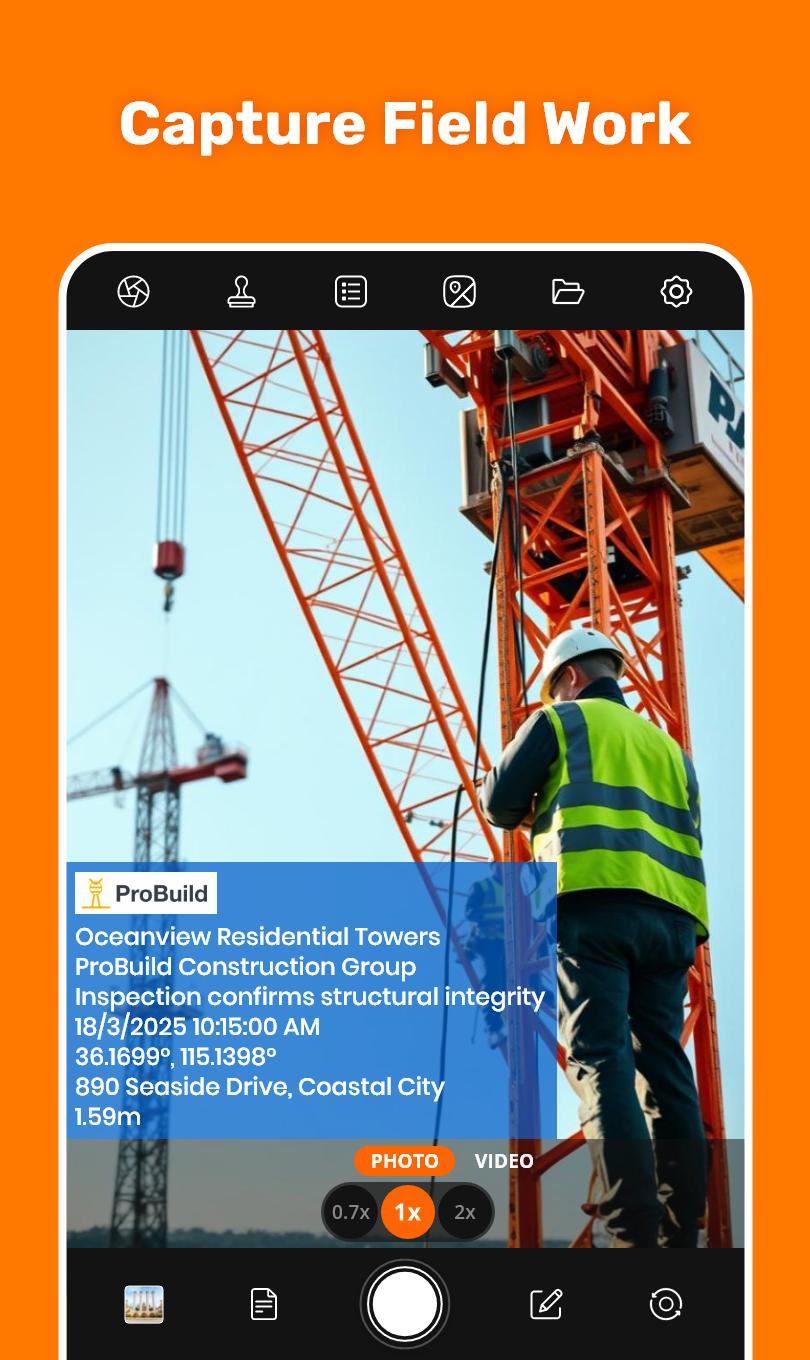
Are you ready to simplify site reporting by capturing photos with all the details you need automatically? Onsite GPS Site Survey Camera makes it easy to tag photos & videos with GPS location, datetime stamps, and other essential details. Whether you're managing inspections, reporting site surveys, or tracking daily progress, this timestamp GPS camera ensures professionalism and enhances site management.
Simple to Use:
⇒ Open onsite survey GPS camera and frame your shot
⇒ Select GPS location, datetime stamps, & annotations, then Customize to fit your needs.
⇒ Take a photo or video—your detailed, professional photo is ready instantly.
Variety of Stamping Options:
⇒ Logo: Conduct GPS surveys with adding company or project logo for branding
⇒ Project Name: Construction photo stamps with project name (e.g., Skyline Tower Project)
⇒ Company Name: Add company name (e.g., ABC Construction Co) to construction photos
⇒ Note : Add custom notes (e.g.,"Work Completed") to provide context from GPS Camera
⇒ Date & Time: Add datetime stamps (15-Oct-2023 3:30:34 PM) for progress tracking.
⇒ Time Zone: Show as (UTC+5:30), (GMT+5:30), or (IST) for global compatibility.
⇒ Onsite Coordinates: Add GPS in formats (Lat: 37.7749, Long: -122.4194) for mapping.
⇒ Onsite Address: Add exact address (e.g.123 Main Street, CA) for location clarity.
⇒ Plus Code: Add concise code (e.g.849 CWC8+R9) for quick referencing.
⇒ Accuracy: Show photo stamps as (±3m) or (±10ft) to validate data reliability.
⇒ Altitude : Add stamp (e.g., 150m) for terrain analysis & improved location surveying.
⇒ Pitch: Display angles like (Pitch: 10°) or (Offset: 5°) for structural evaluations.
Stamp Customizations:
Logo Size : Resize logos for better visibility
Text Style : Choose from variety of font styles to match professional style.
Text Color : Customize stamp text colors for clarity and contrast.
Background Color : Add or adjust background color behind the stamps for readability.
Position : Place stamps anywhere on photo to suit your layout preferences.
For Professionals:
⇒ Construction: Use Construction site management app to track progress, conduct location surveys, & generate progress reports for construction projects with precise gps survey data.
⇒ Project Managers: Ensure daily reports, site compliance, and construction projects with stakeholders using this construction site management app .
⇒ Field Workers : Capture detailed onsite records for field trips, work photo stamps , and time attendance —ideal for construction workers and field teams.
⇒ Law Enforcement: Collect reliable evidence adding location on photo —a must-have location survey GPS camera app for investigations.
⇒ Engineers: Document location surveys, structural evaluations and site surveys professionally with this gps survey tool.
⇒ Onsite Supervisors : Monitor progress reports, manage teams, and ensure accurate site management for construction site and property location survey tasks.
Common Questions -
Que: Can this construction site app help with progress reports?
Ans: Yes! Use this gps camera to capture and make daily progress reports with geotagged photo stamps, gps coordinates, and datetime stamps.
Que: Why choose this GPS survey camera over other location survey cameras?
Ans: This best site survey camera offers advanced features like pitch angle, plus codes, and customizable stamps for construction professionals.
Que: Can I use this geotagging camera for large-scale construction projects?
Ans: The GPS camera is designed for construction site management, allowing you to stamp thousands of construction photos with precise gps survey data for large-scale projects.
Onsite GPS Site Survey Camera app helps you capture geotagged photos with stamps for construction projects, field reporting, and more. Use it to document construction site surveys and track progress easily.
معاينة

العلامات
التصويرمعلومة
مطور
All Excellent Apps
احدث اصدار
1.2.12
آخر تحديث
2025-09-16
فئة
التصوير
متاح على
Google Play
أظهر المزيد
كيف تلعب Onsite GPS Site Survey Camera مع GameLoop على جهاز الكمبيوتر
1. قم بتنزيل GameLoop من الموقع الرسمي ، ثم قم بتشغيل ملف exe لتثبيت GameLoop.
2. افتح GameLoop وابحث عن "Onsite GPS Site Survey Camera" ، وابحث عن Onsite GPS Site Survey Camera في نتائج البحث وانقر على "تثبيت".
3. استمتع بلعب Onsite GPS Site Survey Camera على GameLoop.
Minimum requirements
OS
Windows 8.1 64-bit or Windows 10 64-bit
GPU
GTX 1050
CPU
i3-8300
Memory
8GB RAM
Storage
1GB available space
Recommended requirements
OS
Windows 8.1 64-bit or Windows 10 64-bit
GPU
GTX 1050
CPU
i3-9320
Memory
16GB RAM
Storage
1GB available space