ScreenHide With Screen Overlay PC
Expressway Apps
قم بتنزيل ScreenHide With Screen Overlay على جهاز الكمبيوتر باستخدام GameLoop Emulator
ScreenHide With Screen Overlay على الكمبيوتر الشخصي
ScreenHide With Screen Overlay ، القادم من المطور Expressway Apps ، يعمل على نظام Android في الماضي.
الآن ، يمكنك لعب ScreenHide With Screen Overlay على جهاز الكمبيوتر باستخدام GameLoop بسلاسة.
قم بتنزيله في مكتبة GameLoop أو في نتائج البحث. لا مزيد من الانتباه إلى البطارية أو المكالمات المحبطة في الوقت الخطأ بعد الآن.
ما عليك سوى الاستمتاع بجهاز ScreenHide With Screen Overlay على الشاشة الكبيرة مجانًا!
ScreenHide With Screen Overlay مقدمة
Screen overlay app to protect your privacy and hide your screen instantly.
Stop others from viewing your screen in public.
Control brightness, reduce distractions, and use your phone comfortably anywhere.
✨ ScreenHide With Screen Overlay is a powerful and easy-to-use screen overlay app that helps you protect your screen, improve visibility, and stay focused in any situation.
Whether you're commuting, studying, working, or relaxing — this screen overlay app gives you full control over how your screen looks and feels.
🔥 What You Get with This Screen Overlay App
✔️ Privacy Protection
Hide your screen from nearby people
Keep chats, passwords, and personal apps safe
Feel confident using your phone in public
✔️ Advanced Screen Dimmer for Eyes
Reduce brightness
Comfortable night usage
✔️ Distraction-Free Screen Experience
Limit screen visibility when needed
Stay focused on work, study, or reading
Avoid unnecessary interruptions
🎨 Customize Your Screen Overlay
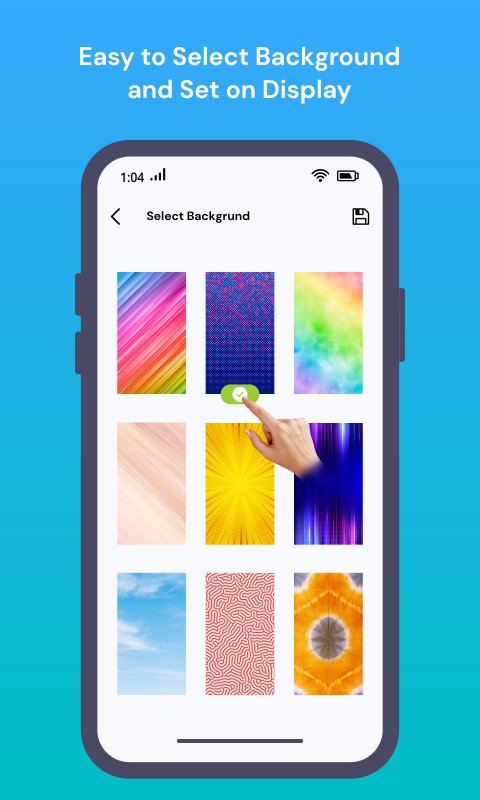
✔️ Choose solid colors for overlay
✔️ Apply built-in background designs
✔️ Select images directly from your gallery
✔️ Preview changes before applying
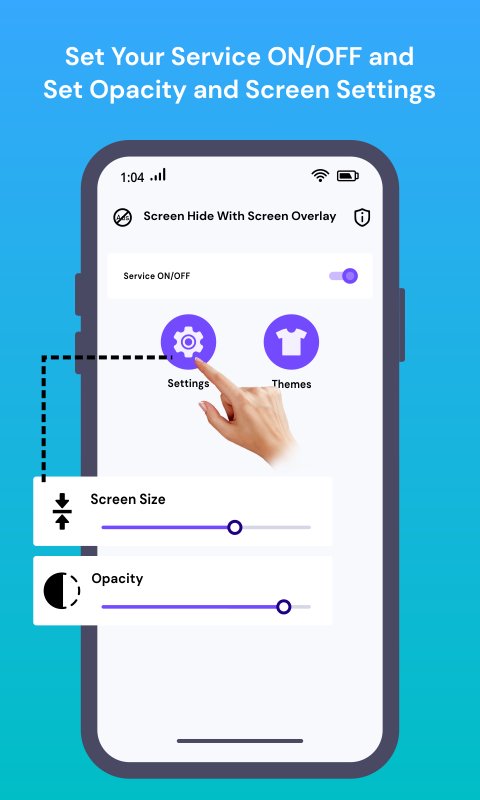
✔️ Adjust opacity based on your need
Create a personalized screen overlay that matches your style.
⚡ Quick & Smart Controls
✔️ Floating button for instant show/hide
✔️ Access controls without opening the app
✔️ Adjust overlay size and opacity quickly
✔️ Runs smoothly in the background
🎯 Mask Mode (Focused Viewing)
✔️ Display only a selected portion of your screen
✔️ Move mask anywhere with drag & drop
✔️ Set fixed positions: center, top, bottom, left, right
Ideal for reading, learning, and limiting screen usage.
📳 Shake to Control Overlay
✔️ Shake device to hide or show overlay
✔️ Simple and fast interaction
✔️ No need to manually switch every time
⏰ Smart Scheduler
✔️ Set time to automatically enable or disable overlay
✔️ Useful for bedtime, office hours, or study routine
✔️ Works without manual effort
🔒 Privacy & Data Safety
Your privacy is our priority.
ScreenHide does not collect, store, or share any personal data.
All features work completely on your device.
📌 Permissions Explained Clearly
The app uses the following permissions:
• SYSTEM_ALERT_WINDOW (Draw over other apps)
Used to display the screen overlay on top of other apps so you can hide or dim your screen anytime.
• FOREGROUND_SERVICE & FOREGROUND_SERVICE_SPECIAL_USE
Required to keep the overlay service running continuously in the background without interruption.
• SCHEDULE_EXACT_ALARM
Used for the scheduler feature to automatically enable or disable the overlay at your selected time.
• READ_EXTERNAL_STORAGE
Allows you to select images from your device gallery to use as custom overlay backgrounds.
• VIBRATE
Provides small vibration feedback for actions like shake detection and quick controls.
All permissions are used only for app functionality and never for data collection.
👉 Download now and start protecting your screen in seconds.
معاينة
العلامات
إضفاء الطابع الشخصيمعلومة
مطور
Expressway Apps
احدث اصدار
1.25
آخر تحديث
2026-04-08
فئة
إضفاء الطابع الشخصي
متاح على
Google Play
أظهر المزيد
كيف تلعب ScreenHide With Screen Overlay مع GameLoop على جهاز الكمبيوتر
1. قم بتنزيل GameLoop من الموقع الرسمي ، ثم قم بتشغيل ملف exe لتثبيت GameLoop.
2. افتح GameLoop وابحث عن "ScreenHide With Screen Overlay" ، وابحث عن ScreenHide With Screen Overlay في نتائج البحث وانقر على "تثبيت".
3. استمتع بلعب ScreenHide With Screen Overlay على GameLoop.
Minimum requirements
OS
Windows 8.1 64-bit or Windows 10 64-bit
GPU
GTX 1050
CPU
i3-8300
Memory
8GB RAM
Storage
1GB available space
Recommended requirements
OS
Windows 8.1 64-bit or Windows 10 64-bit
GPU
GTX 1050
CPU
i3-9320
Memory
16GB RAM
Storage
1GB available space