WearMedia Musik Player Wear PC
QubinApps
قم بتنزيل WearMedia Musik Player Wear على جهاز الكمبيوتر باستخدام GameLoop Emulator
WearMedia Musik Player Wear على الكمبيوتر الشخصي
WearMedia Musik Player Wear ، القادم من المطور QubinApps ، يعمل على نظام Android في الماضي.
الآن ، يمكنك لعب WearMedia Musik Player Wear على جهاز الكمبيوتر باستخدام GameLoop بسلاسة.
قم بتنزيله في مكتبة GameLoop أو في نتائج البحث. لا مزيد من الانتباه إلى البطارية أو المكالمات المحبطة في الوقت الخطأ بعد الآن.
ما عليك سوى الاستمتاع بجهاز WearMedia Musik Player Wear على الشاشة الكبيرة مجانًا!
WearMedia Musik Player Wear مقدمة
Music Player App for Phone and Smartwatch
Wear Media - Music player, MP3 player
New functions
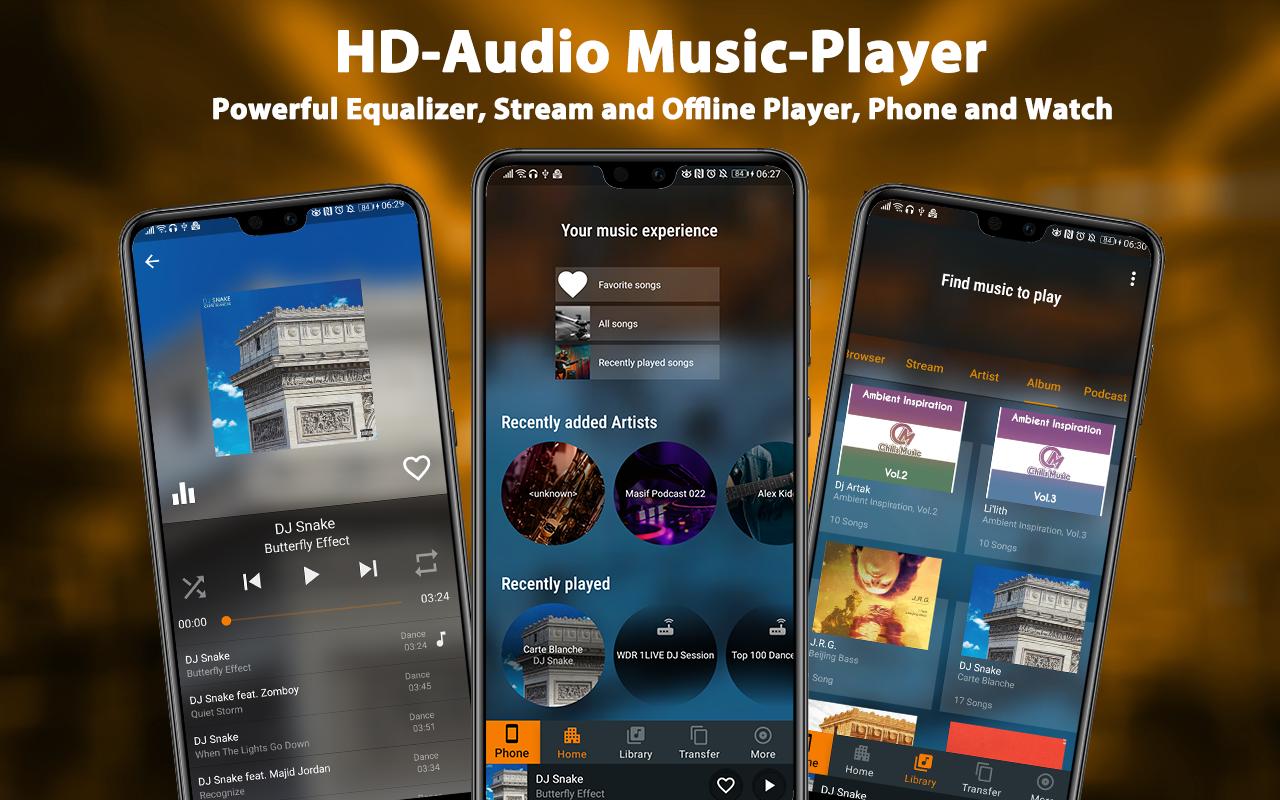
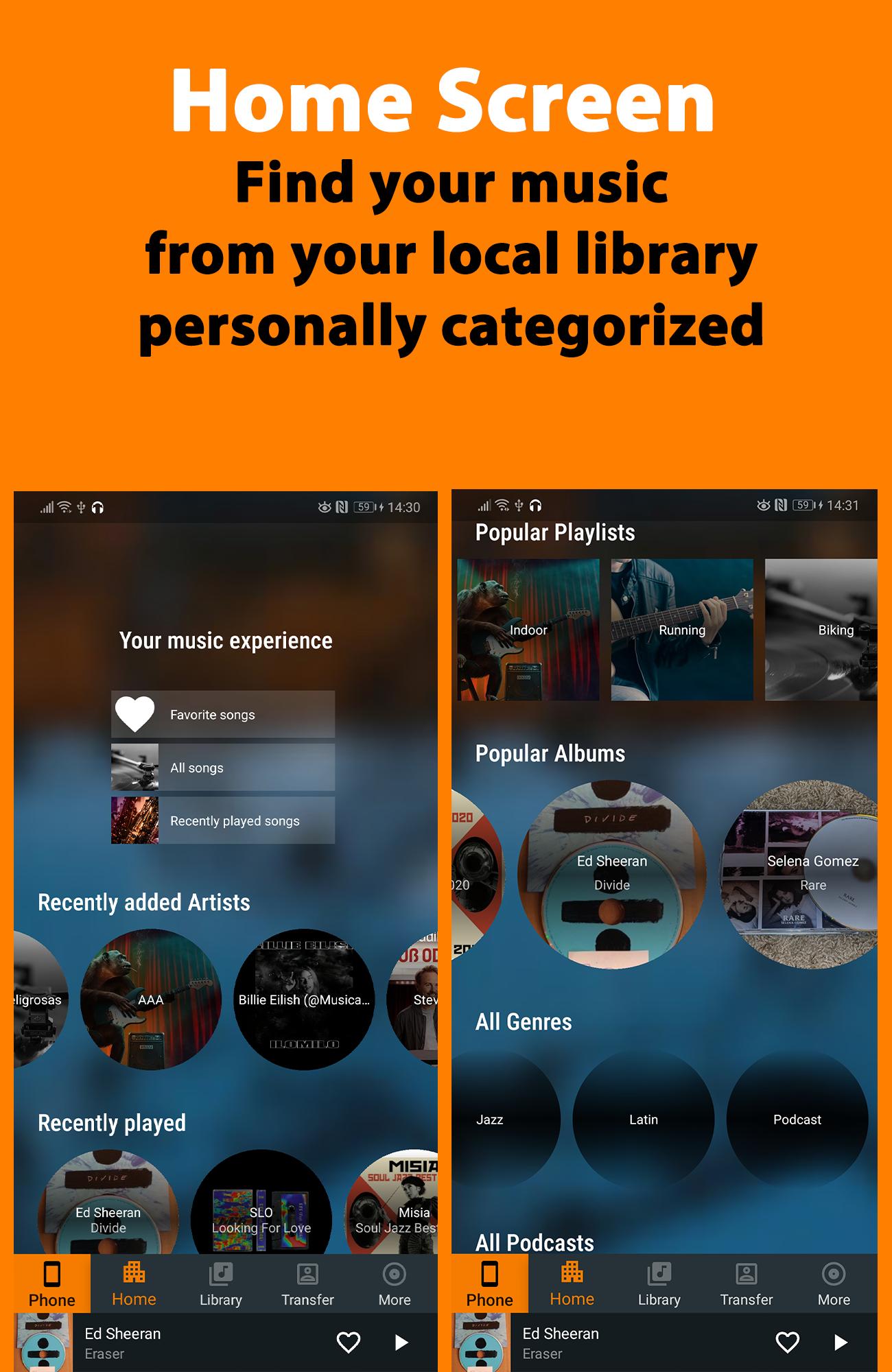
Discover the new design of WearMedia. You can now use the integrated music player to favor your favorite songs and podcasts, create playlists and share them with your friends. The new personalized interface on the home page displays your music experience in categories. For example, Favorites, All Songs, Recently Played Songs, Recently Added Artists, Recently Played, Popular Artists, Genre and Release Date. So you have your own personal music player with all your songs sorted and categorized on one page, so you can get the most out of it. The new built-in equalizer with various effects also enhances your music experience on your smartphone and Smartwatch. You can also stream web radio with different stations or play it via M3U file. Streams can be combined in playlists and transferred to the Watch.
About this app
Listen to your favorite songs, podcasts, and playlists anytime, anywhere without Wi-Fi with your smartphone OR your SmartWatch.
WearMedia is not only a music player that allows you to play your favorite songs or podcasts in high quality, it also allows you to transfer your music and audio files in all formats and your pictures from your smartphone to your Smartwatch. As a file is transferred to your Smartwatch, you can track the progress of the copy process. It helps you to better estimate the total transfer time of your files. Copied files or playlists can be removed at any time.
Once your favourite songs or podcasts are transferred to the Smartwatch, you can play them independently from your smartphone with the integrated music player. Wearing a smartphone can be especially annoying when you're outdoors, such as when jogging. With WearMedia, all you need is your Smartwatch, and you can continue to play your songs and podcasts.
With the music player, you can favourise songs, create playlists and share them with your friends. Because WearMedia has a share function. So you can easily share any song or podcast with friends via Messenger apps. If you're listening to a song you like, you can add it to your favorites using the heart button. Alternatively, you can also add the song to any playlist.
On the home page of WearMedia you have an overview of your favorite songs and playlists. In addition, you will find further categories like recently added artists, recently played, popular artists and genre. Furthermore, songs and podcasts are sorted by release date, which you will find under the respective year. This gives you a better overview.
The music player also includes an equalizer on both the phone and the watch. The music player is compatible with many formats like MP3, WAV, FLAC, AAC, etc.
Main functions
⭐ Supports all music file format - MP3, MP4, WAV, M4A, FLAC, 3GP, OGC etc
⭐ Webradio with different stations
⭐ fast transmission via Wifi possible between phone and watch
⭐ Copy and manage songs, podcasts and pictures on Smartwatch
⭐ Offline music player on the Smartwatch
⭐ Powerful equalizer, also applicable on your Smartwatch
⭐ Share and favor songs
⭐ Create Playlists
⭐ View all songs, artists, albums, folders and playlists
⭐ Easy search of songs by keywords
⭐ Shuffle playback or playback in sequence
⭐ Quickly play a short version of any song
⭐ Perfect for outdoor training
Compatible with all Wear OS devices
Do you have suggestions for improvement, language extensions or feature requests? Please let us know! We will work on implementing them. If you have problems with the APP, please contact us. We will try to solve them.
Satisfied users are very important to us!
qubinapps@gmail.com
معاينة
العلامات
Music-&معلومة
مطور
QubinApps
احدث اصدار
3.2.3_32333
آخر تحديث
2024-01-16
فئة
Music-audio
متاح على
Google Play
أظهر المزيد
كيف تلعب WearMedia Musik Player Wear مع GameLoop على جهاز الكمبيوتر
1. قم بتنزيل GameLoop من الموقع الرسمي ، ثم قم بتشغيل ملف exe لتثبيت GameLoop.
2. افتح GameLoop وابحث عن "WearMedia Musik Player Wear" ، وابحث عن WearMedia Musik Player Wear في نتائج البحث وانقر على "تثبيت".
3. استمتع بلعب WearMedia Musik Player Wear على GameLoop.
Minimum requirements
OS
Windows 8.1 64-bit or Windows 10 64-bit
GPU
GTX 1050
CPU
i3-8300
Memory
8GB RAM
Storage
1GB available space
Recommended requirements
OS
Windows 8.1 64-bit or Windows 10 64-bit
GPU
GTX 1050
CPU
i3-9320
Memory
16GB RAM
Storage
1GB available space