Colombia
  • Global
  • México
  • 中國台灣
  • India
  • Indonesia
  • Türkiye
  • Việt Nam
  • ประเทศไทย
  • Brasil
  • Perú
  • Colombia
  • Argentina
  • Россия
  • السعودية
  • مصر
  • پاکستان
  • Malaysia
  • 日本
  • 中国香港
  • Philippines
Descargar
Pixel Game Maker MV

Pixel Game Maker MV

65 Positivo / 173 Calificaciones | Versión: 1.0.0

Gotcha Gotcha Games,KADOKAWA

Comparación de precios
  • United States
    $84.99$84.99
    Ir a la tienda
  • Argentina
    $15.43$15.43
    Ir a la tienda
  • Turkey
    $25.76$25.76
    Ir a la tienda

Descarga Pixel Game Maker MV en PC con GameLoop Emulator


Pixel Game Maker MV, es un popular juego de Steam desarrollado por Gotcha Gotcha Games,KADOKAWA. Puede descargar Pixel Game Maker MV y los mejores juegos de Steam con GameLoop para jugar en la PC. Haga clic en el botón 'Obtener' para obtener las últimas mejores ofertas en GameDeal.

Obtén Pixel Game Maker MV juego de vapor

Pixel Game Maker MV, es un popular juego de Steam desarrollado por Gotcha Gotcha Games,KADOKAWA. Puede descargar Pixel Game Maker MV y los mejores juegos de Steam con GameLoop para jugar en la PC. Haga clic en el botón 'Obtener' para obtener las últimas mejores ofertas en GameDeal.

Pixel Game Maker MV Funciones

Make action, adventure, shoot-‘em-ups... even multiplayer (up to four players!) games can be created with ease!

Have a great idea for a game, but don’t have anyone to pitch it to, or any programming experience? Now with Pixel Game Maker MV, you can turn that idea into an actual, playable game with nothing but a PC and this software! Make the games you want to play, the way you want to play them: side-scrolling action platformers, top-down adventure/RPGs, multiplayer VS. battles, racing, puzzles, pinball, shoot-‘em-ups, horror, Metroidvania... You name it, you can make it in the style and genre of your choice!

Simple enough even for total beginners!

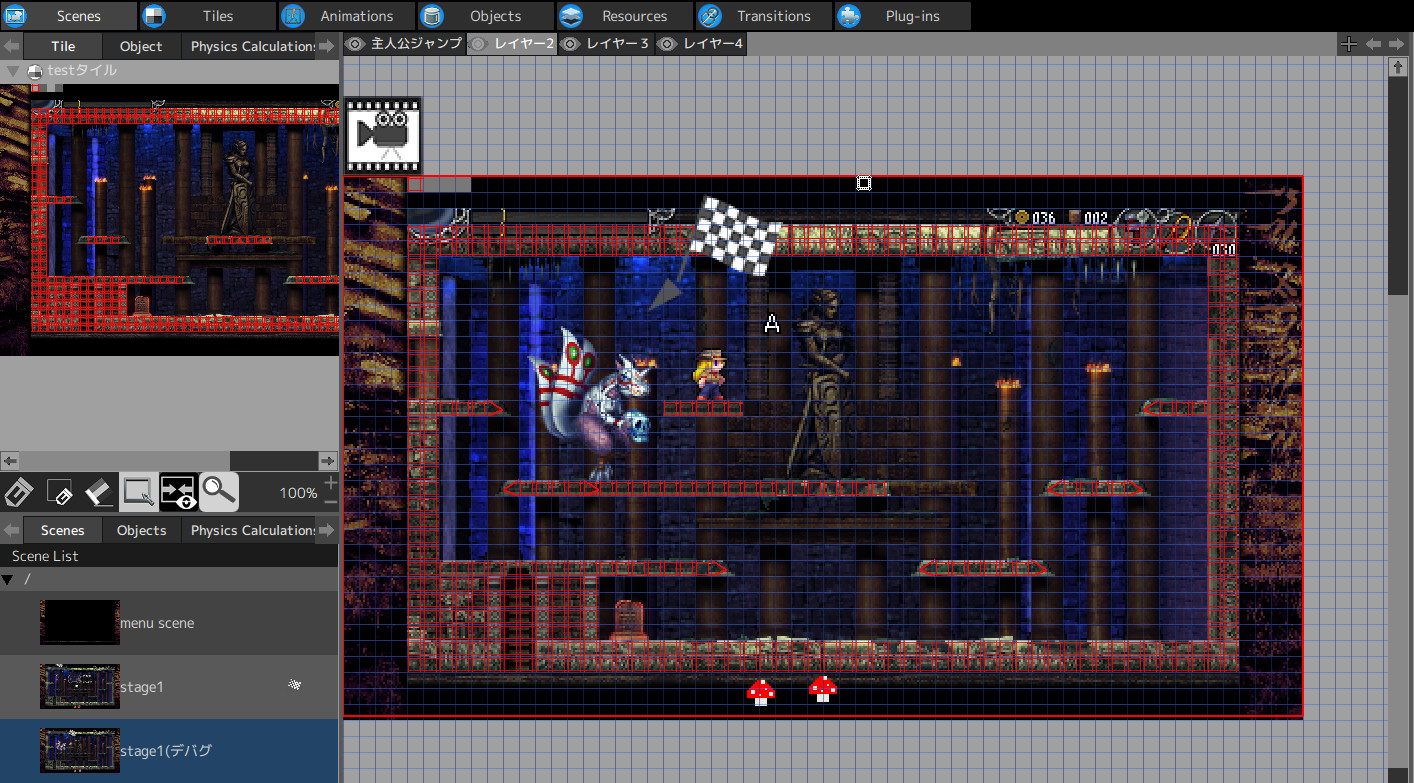
The basic controls and functions are extremely simple and easy to pick up. Create pixel-based animations, and set up your game map. Create objects, decide how you want them to move, and then simply add them to the scene in which you want to use them. Just follow these simple steps, and you can create an entire game just like that! Feel free to try rearranging and adjusting the various steps and processes to see what sort of unique games and mechanics you can create!

Includes all the samples and materials you’ll need to get started: character animations, tiles, music, and more!

PGMMV is packaged together with all sorts of materials and samples that you can freely use, combine, and tweak to make whatever sort of game you can like. You can even mix and match the preloaded materials with your own creations; for example, using them as simple guides to create the pixel animations yourself from scratch and then combining them with included sample maps and music. This makes it even easier to create and expand upon games of virtually any genre!

Includes hit games like La-Mulana 2 and Kero Blaster as sample projects!

Take advantage of various plug-ins to expand the creative possibilities even further!

For more advanced users, try using JavaScript plug-ins to create even more complex and detailed actions, animations, and full games! While no programming or scripting ability is necessary to create games and the various elements required, user-created plug-ins and scripts will allow you to take your creations to the next level – and far beyond.

Not only can you freely distribute your games as you like, but you can even distribute them for profit through Gotcha Gotcha Games and the Nintendo Switch!

Not only can you make your own games in any way you like, with Pixel Game Maker MV you are also able to freely distribute your creations however you see fit. You are even free to sell your games on any PC gaming platform and in any region in the world!

And that’s not all – Gotcha Gotcha Games has begun publishing and distribution of PGMMV-developed titles on the Nintendo Switch. This means that not only will you be able to play your games on the Nintendo Switch, but distribute and sell them on the console, too!

Mostrar más

Descarga Pixel Game Maker MV en PC con GameLoop Emulator

Obtén Pixel Game Maker MV juego de vapor

Pixel Game Maker MV, es un popular juego de Steam desarrollado por Gotcha Gotcha Games,KADOKAWA. Puede descargar Pixel Game Maker MV y los mejores juegos de Steam con GameLoop para jugar en la PC. Haga clic en el botón 'Obtener' para obtener las últimas mejores ofertas en GameDeal.

Pixel Game Maker MV Funciones

Make action, adventure, shoot-‘em-ups... even multiplayer (up to four players!) games can be created with ease!

Have a great idea for a game, but don’t have anyone to pitch it to, or any programming experience? Now with Pixel Game Maker MV, you can turn that idea into an actual, playable game with nothing but a PC and this software! Make the games you want to play, the way you want to play them: side-scrolling action platformers, top-down adventure/RPGs, multiplayer VS. battles, racing, puzzles, pinball, shoot-‘em-ups, horror, Metroidvania... You name it, you can make it in the style and genre of your choice!

Simple enough even for total beginners!

The basic controls and functions are extremely simple and easy to pick up. Create pixel-based animations, and set up your game map. Create objects, decide how you want them to move, and then simply add them to the scene in which you want to use them. Just follow these simple steps, and you can create an entire game just like that! Feel free to try rearranging and adjusting the various steps and processes to see what sort of unique games and mechanics you can create!

Includes all the samples and materials you’ll need to get started: character animations, tiles, music, and more!

PGMMV is packaged together with all sorts of materials and samples that you can freely use, combine, and tweak to make whatever sort of game you can like. You can even mix and match the preloaded materials with your own creations; for example, using them as simple guides to create the pixel animations yourself from scratch and then combining them with included sample maps and music. This makes it even easier to create and expand upon games of virtually any genre!

Includes hit games like La-Mulana 2 and Kero Blaster as sample projects!

Take advantage of various plug-ins to expand the creative possibilities even further!

For more advanced users, try using JavaScript plug-ins to create even more complex and detailed actions, animations, and full games! While no programming or scripting ability is necessary to create games and the various elements required, user-created plug-ins and scripts will allow you to take your creations to the next level – and far beyond.

Not only can you freely distribute your games as you like, but you can even distribute them for profit through Gotcha Gotcha Games and the Nintendo Switch!

Not only can you make your own games in any way you like, with Pixel Game Maker MV you are also able to freely distribute your creations however you see fit. You are even free to sell your games on any PC gaming platform and in any region in the world!

And that’s not all – Gotcha Gotcha Games has begun publishing and distribution of PGMMV-developed titles on the Nintendo Switch. This means that not only will you be able to play your games on the Nintendo Switch, but distribute and sell them on the console, too!

Mostrar más

Avance

  • gallery
  • gallery

Información

  • Desarrollador

    Gotcha Gotcha Games,KADOKAWA

  • La última versión

    1.0.0

  • Última actualización

    2019-09-19

  • Categoría

    Steam-game

Mostrar más

Reseñas

  • gamedeal user

    Mar 27, 2020

    I'll begin this review with I'm 36, not 16. I have no illusions about making a game and distributing it for gain. This is a hobby for me and that is the perspective I write this review from. I have a day job. I moonlight as a hobby pixel artist, and that drives me to dev software to have fun with, and bring it to life. I began with RPG Maker MV as my first dip into game dev software. I do not have a desire to learn to code so that software was more interesting to me compared to more advanced engines. After years in RMMV I felt the want for more control from the ground up, and not be boxed in by hard limitations from the software, and the need for plugins to break through those hard limitations. Pixel Game Maker MV grants me that feeling. I did not feel like the learning curve to get going on a project was difficult, even without a large database of video tutorial content on YouTube at the time. Some weaknesses of the software at the time of the review is the dialogue system. It's clunky and not intuitive. The devs understand this though and are working towards improving it. There is also a lack of information on the software, I mean ways to educate yourself and advance in the software to do more complicated mechanics and features. Baz is starting to compile a nice selection of content on YouTube that helps new devs. General bugs as well, the devs are also focused on stability and have shown that in their updates. As a Factorio player this makes me most happy. :) The most legendary bug squashing devs of all time. The software is about as intuitive as RMMV. Events in Pixel Game Maker MV are "Actions" and after some time with the objects, a dev transitioning from RM should pick up on the software pretty quick. I'm a noob with objects and actions still. I spend more time in the animation/tileset/scene creation areas of the software. I love it all, and the animation portion of the software is what sold it for me. The layers in the scene (map) editor let me have fun with tilesets I create. Everything I wanted to tweak in RMMV to add extra creativity, that I could not do, I can with PGMMV. My creativity wall is usually only blocked by the limitation of my own knowledge of the software, and not the software itself. The demo gives anyone a fair amount of time to estimate the software and if it's for them, so there is no reason not to check it out if one feels like they need to switch things up for a bit. I feel more devs are on my side of the table, as in, this is just a hobby. If that is you, then check this shit out...
  • gamedeal user

    Dec 27, 2020

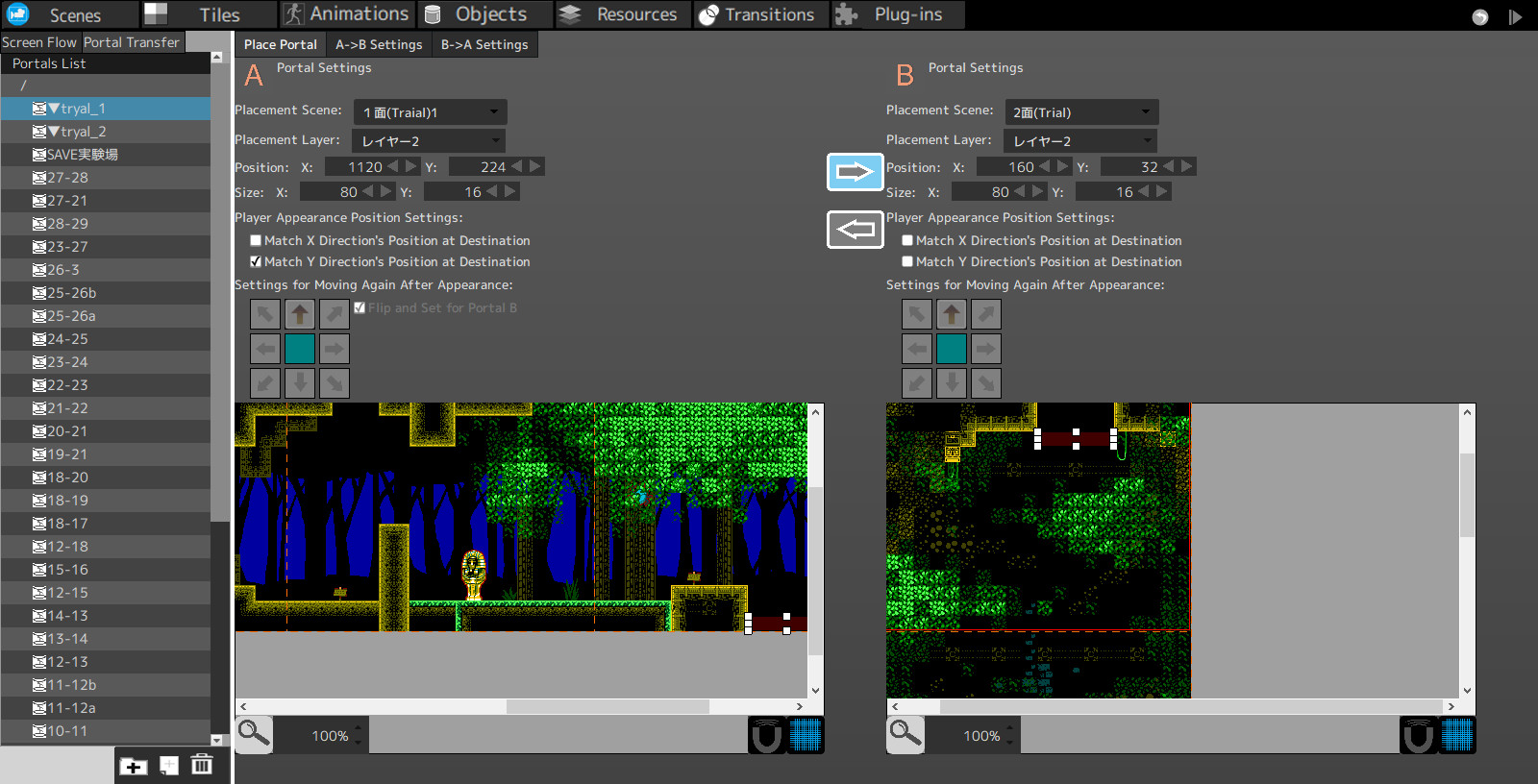
    It's been a long time coming, but I'm now ready to weigh in my thoughts on Pixel Game Maker MV. I've been using this software since early access back in 2018. [h1]TL;DR: [/h1] Pixel Game Maker MV is a great game development engine for those that are not programmers, and want to be able to create either side scrolling or top down action games. It's got enough for a single person development operation to chew on here to create the game you want to create in the way you want it created; bearing in mind that you operate within the program's limits. If programming/scripting is outside your reach (or if it's something you can do), this is a great engine that has the potential to be amazing as long as the developers continue with updates & performance improvements. There are assets and DLC that is available at the time of writing for you to get a jump on a concept quickly, but there are no asset standards (outside of keeping things divisible by 2) to conform with. Read on further for more details. [h1]What is this Pixel Game Maker MV?[/h1] Pixel Game Maker MV is a game engine that uses visual programming to give life to game objects. It specializes in more retro pixel art games that take place either in a side scrolling plane, top down view, or BOTH if you want to make it so. The engine is not based on delta time, but this is the standard for a lot of Japanese game development. The engine's workflow is divided into sections. [b]“Scenes”[/b] are where you'll create the actual game maps and place objects. You set up title screens and menus here as well. [b]“Tiles”[/b] allows you to put together you imported tile sets and get them ready for scenes. You can create “gimmick” tiles that allow you to do effects like instant death, particle generation & more. [b]“Animations”[/b] allow you to put together game animations to be used for objects. The animation system is robust to allow for custom hit box, collision, and wall tile boxes. This is also where you can put together effects and create particle effects inside the engine with a wide variety of options and effects. [b]“Objects”[/b] is the bones and meat of the engine. This is where you put together objects to handle varying game systems such as menus, weapons, pick ups, NPCs, etc. Using the visual programming in tandem with run-time commands, you can build practically anything you want. You can use JavaScript or CoffeeScript to help simplify commands and functions as well. [b]“Resources”[/b] is where your image graphics, audio, game text and more is stored and organized. Importing your assets here is required in order to use them in other spots of the Engine. [b]“Plug-Ins”[/b] allows you to manage plugins created by the development team or by the community. Plug-Ins extend the engine's capabilities via JavaScript similar to that of RPG Maker MV/MZ. [b]“Database”[/b] (in beta at the time of this writing) allows you to set up variable values in tables and rows that can be called by a single run-time command. Personally, I really enjoy the workflow. It's great if you know how to organize your assets and objects in a logical manner. You can even import and export objects, animations, scenes and more; allowing for some collaboration to occur with other users of Pixel Game Maker MV. [h1]What type of games can I create in this?[/h1] The engine has a focus on side scrolling action games and top down view actions games. So, you can create something like classic “Castlevania” games or even older “Legend of Zelda” style games. [h1]What sort of graphics does this support?[/h1] This engine is focused primarily on 2D pixel art graphics. Though, hand drawn graphics can be achieved as long as you stick to smaller game resolutions. Tile sizes supported are 8x8, 10x10, 12x12, 16x16, 20x20, 24x24, 30x30, 32x32, 40x40, 48x48, 60x60, & 64x64. The engine supports 4:3 and 16:9(10) resolutions with the ability to specify a resolution not on the drop down list. Higher project size resolutions do have large performance impacts, but I will touch on this later on. [h1]How do I get started?[/h1] Pixel Game Maker has a brief manual on how the basic functions work. However, the development team and the community have worked together to provide video tutorials through Baz via [url=https://www.youtube.com/channel/UCJugM7dV7E7mKvDPLyLgp_Q]YouTube[/url], and there is a Wiki where more things are being added as time goes on ([url=https://pixel-game-maker-mv.fandom.com/wiki/Pixel_Game_Maker_MV_Wiki] Check out the wiki here![/url]). And if you want more live help, we have a large Discord community you can hop in and get some help (link in the steam forums). [h1]What's performance like with this?[/h1] I'll talk about performance from two avenues; the editor (where you create the games) and the player (what runs said games). The Editor was rough in it's early access phase, which is to be expected. Ever since 1.0 though, the editor has been fine to work with. I haven't had any crashes or freezes since the 1.0 launch. Sometimes loading certain tabs can take a bit if you have a lot of assets and objects, but this can be mitigated by placing an empty folder at the very top of your lists. Is this an area that can be improved? Absolutely; but for where we're currently at, the engine is stable and works quite well. It doesn't have true multi-monitor support at this time, but that wasn't a deal breaker for me (I have 3 monitors and a tablet hooked up to my PC). The Player could use more optimization for lower spec machines like APUs or machines using integrated graphics, but this is still much better than where they started in early access and my GTX 970 rocks games made with this quite well running smoothly at 60 FPS (the engine cap). This is both on an AMD Phenom II x4 and AMD Ryzen 5 3600 processors with the GTX 970. AMD graphics seem to fall behind here, and I'm not sure if this is due to driver support or engine support at this time. This is based off users playing my game demo and reporting lag and slow down issues. Also, if you create games at higher resolutions (say at and above 720p), your game will struggle due to having to draw a large window and handle object processing on screen. So, the higher your project's resolution is, the less objects you can generally have on screen without taking a hit to performance. [h1]What platforms can I export the games to?[/h1] At the time of this writing, game export to Windows platforms is the only export. However, major work has been done to help get games onto the Nintendo Switch and it is almost ready. Export for other systems has been suggested and the development team has taken that feedback in, but have not committed to any hard time line for these features. That concludes my review on Pixel Game Maker MV! I hope you found it educational. If there's anything else people would like me to comment on, feel free to comment on this review! If you wanna try out my game, “Eden Gamma”, the demo is available on Itch.io! (https://abstract-red-studio.itch.io/eden-gamma). Follow me on Twitter for updates on “Eden Gamma”, Pixel Game Maker MV tips and tricks, and for all my music works. https://twitter.com/Abstract_Origin
  • gamedeal user

    Jul 30, 2020

    Before I share my mind, I must mention that I'm not a programmer, I'm a professional animator. You may have seen my work in: [url=https://store.steampowered.com/app/250900/The_Binding_of_Isaac_Rebirth/] "[b]The Binding of Isaac: Rebirth[/b]" [/url] all the Ending Cutscenes animated by me. [u][b]LET'S BEGIN:[/b][/u] I'm very new to PGM and I'm still trying to learn and understand how to use it. Originally I came from Construct Game Engine, so I can't say that PGM is easier to learn because Event-Sheet as visual-scripting is defiantly MUCH easier to understand, follow and organize compare to Nodes-Based which gets really messy with many arrows and boxes all over the place once you add more complicated code. it gets very confusing, very fast. BUT! The idea of State-Machine and built-in functions makes things easier to start with, yet the learning curve isn't that simple. Without watching YouTube tutorials it's very hard to understand by yourself. Luckily there are few dedicated PGM tutorial channels on YouTube that are really good and helpful! I'm not a fan of the built-in tutorials, they confuse me with all the wrong position arrows who point to different places. Honestly, I would get rid of it and just point to Step-by-Step Video Tutorials by PGM (they should definitely make official video tutorials). [u][b]USER INTERFACE:[/b][/u] I never used RPG Maker so I can't compare the UI, for me it's a completely new user experience. Yes, the UI is a bit confusing, I hope that the dev team will redesign it to something that is more user friendly, don't get me wrong it's not too bad, it's just designed in a way that a visual artist (such as myself) can't follow compared to other game engines. The State Machine Nodes, starting clean and it's very easy to make basic things such as move, jump, etc.. Once you get your character moving, jumping or shooting, it will satisfy you and will make you try new things. [u][b]STABILITY:[/b][/u] Don't let the hours confuse you, sometimes I animated characters or drew pixels for hours while PGM is sitting in the background and counting hours... so I'm not the best example, but this is my impression so far. I haven't ran into a crash yet, but maybe because I didn't do anything complex, or... maybe PGM is robust! :) [u][b]GAME ENGINE POWER:[/b][/u] The engine itself is very powerful, fast, smooth and responsive and that's noticeable as soon as you run any sample or your game! from my short time testings it consider I didn't use many layers, complicated code or large resolution, after all it is built for Pixel Graphics and it does the job GREAT! [u][b]COMPILE - BUILT YOUR GAME:[/b][/u] From what I know, so far it's limited to compile only PC .exe files at the moment, I hope we'll see more options to build for Android, and most of all... Game Consoles! [u][b]COMMUNITY:[/b][/u] The community seems to be small but AMAZING, whenever I had a question, I got few answers from the community forums. This is where I encourage people to join and make PGM's community even bigger! [u][b]CONCLUSION + TIPS:[/b][/u] (before you buy) Overall it's fun creating things with PGM (I'm not the best example), but even start moving, jumping, shooting etc.. The more you add to your game and see it evolve the more you'll get into PGM for sure! If you're not a programmer (just like me) and you want to make a game, this is my advice for you: DOWNLOAD the [b]DEMO[/b], play with it, try the samples, follow some Video Tutorials, try to do stuff... If you like this experience, SUPPORT THE DEVS AND BUY PGM! This will help them continue to develop it and improve it. [u][b]SUGGESTIONS:[/b][/u] - (for the Developers, please consider these) [b]1[/b]. If the PGM devs, will add an ALTERNATIVE programming-mode as addition or alternative to the State-Machine nodes it will make a HUGE improvement, for example:  Event Sheets programming similar to what you can see on Construct 2, 3, ClickTeam Fusion and GDevelop... the result will be that: People will FALL IN LOVE with PGM in 2 seconds because it's MUCH easier to learn, use, organize, find your code and manipulate it dynamically compare to nodes... Again, you don't have to REPLACE the nodes, but add an alternative way so the user can CHOOSE which one to use when starting a project. Nobody will use nodes if you'll add 'Event Sheets' (consider you'll make it simple as the others I mention). [b]2[/b]. We need more built-in functions, "actions" we need things like "While this happen, do this" trying to solve everything with the state-machine is not very dynamic or "open" that's why I suggested the event sheet approach, please consider it and in the meanwhile expand more and more built-in functions built in to the engine to make things easier to solve logically and less complicated with zillion of arrows and nodes all over the place. [b]3[/b]. IMPORT: as a professional animator, me and many others are not using Sprite-Sheet as our high priority but we prefer to use PNG-Sequence. Like most game engines, please add import option for PNG Sequence, so we can import raw of animations in once click, for example:  IDLE_001.png, IDLE_002.png, IDLE_003.png - Drag and Drop a directory or file-by-file and BAAAM! it will be ready to use! (good example: Construct, ClickTeam Fusion, Game Maker Studio 2, Godot) These are just a few of my suggestions, I have many more ideas to improve PGM, but I hope you'll consider these 3 for start and I hope to see PGM grow and get better, keep up the great work you're doing Dev Team! :) * Sorry about my bad English, I hope that this review helps both Buyers and the Developers.
  • gamedeal user

    Jul 25, 2018

    Ok, so its buggy, the interface needs a *lot* of work before it will be as user friendly as its more mature RPG Maker sibling, the sample resources included are almost non-existant and the user manual is lacking on detail.... but I kinda expected this when I bought it, and despite its bugs you *can* still use it. Using it reminded me of the early fan made translations before we got an official translation of RPG Maker. Is it worth the money that they are currently asking? Maybe, if you know a bit about how games work, but not if your an absoliute beginner. Will it be worth it if they finish the product to the same quality as RPG Maker? Yes, and if you are an absolute beginner you might want to wait for this to happen before you drop the kind of money they are asking. Due to this (and its obvious Early Access status) I am going to give a tentativly positive review. The product is still under construction and if you buy a product in Early Access and complain about it not being finished you have kinda missed the point.
  • gamedeal user

    Jul 24, 2018

    I know it's early access, but atm i don't recommend it. It crashes way to often even after a simple task of saving the project with verrrry small changes, the interface is extremely ugly, it gives you no real tutorial, little to no default resources for the user to experiment with, not fully translated, and is definitly not user friendly despite claiming to be related to the rpg maker series. I'm sorry to say but at this current moment, don't bother. They have way too much that need fixing and is not worth the price.
  • gamedeal user

    Feb 25, 2019

    I'm going into this review having used PGM a ton earlier in its development, don't let my steam time log fool you. Unfortunately, finally checking out 0.9.3, I see that nothing has changed. The user base's fundamental problems with PGM aren't being addressed, nor does it look like the developers have any intent of doing so.* Originally this review was much longer, so I've tried to condense it, and if I ever finish a video review, I'll link it here. Just read my final thoughts if there's too many words. -UI- The user interface problems are infamous. In addition to being completely unintuitive, it doesn't seem to scale at all, so unless you have the exact monitor specifications the devs do, apparently nothing is ever going to quite fit right. Ui is the number 1 complaint I see. Professional reviews, steam reviews, complaints on message boards, etc. If even half of the most obvious mistakes were fixed, you'd win the endorsement of a lot of people who really want to love this program, myself included. -Animations- [b] This is by far the jankiest, worst designed part of the entire program. [/b] PGM doesn't have a native graphics editor, which I don't mind. What I do mind is [i] literally everything else [/i]. Once you've struggled through importing your spritesheet (its own adventure), you're greeted by the uninterpretable UI for converting your sprite sheet into a library of actions your object can take. What PGM does have is a hit box editor which can be changed frame by frame. PGM also has a system of 4 different hit boxes that each object can have, each of which has its own properties and no explanation besides its name. Good luck. You can drag/resize the hit boxes with your mouse, but the outline of the box is pixel perfect, and if you miss, it will instead grab the sprite and offset the whole image. This is insane. The only real way to do boxes accurately is just to type the box size and coordinates into the table next to the sprite. -Built in character controls- [b] This is easily the best part. [/b] Once that nightmare is complete, you're left with one of the best parts of the program, a character with inherent platforming logic. You inform the program which direction the character is pointing in each action, and it bridges the gap. A tab in the objects profile will let you select the characters horizontal speed, jumping, damage output, health, etc. Once you've informed PGM of the control scheme, you more or less have a functioning character. This is the best part of the program. The program knows you're making a platformer (or top-down), so you don't have to re-invent the wheel every single time. This is what kept me with PGM so long. -Plugins- There is now a grand total of 3 plug-ins that try and gap some of the significant holes the program has. 1) Map auto-tiling, ported from RPG maker 2 & 3) UI for making branching dialogue trees that trigger variables These need to be already integrated into the program. (Or at the very least, the auto-tile does.) -Map making- The tile based scene creation seems to more or less be a port of RPG maker's, but with an obstacle course of ill fitting windows trying to stop you. Side note: Gimmick tiles (tiles that have triggers when touched) just barely work. Do not use them. The built in slopes function seems to function pretty well, but only on side scrollers. Top downs they work... mostly. -Programming logic- People complain about PGM's visual building blocks style, citing that it becomes a big tangled mess of lines and boxes. I think this also applies to regular code, documentation, or lawn mower instructions. If you write it, the way in which you organize it can make all the difference. If you read it, you have to have a basic understand of what you're looking at. I'm an incredibly visual learner, which makes it easy for me to arrange the nodes in a way that makes sense to me. At this point, the programming logic is the only thing that would make me consider staying with PGM. I can't let it get away totally scott-free though. That UI is still haunting you, and I'm often surprised by a function that the program doesn't have built in. (Side note: Why is the easiest thing in the whole program to implement screen shaking?) - Cutscenes, camera control, and other scene specific events - HAhahahahaha good luck - Physics - hahahahaha GOOD LUCK. Just because its there, fairly powerful, and pretty functional, (in the one demo that uses it extensively), it doesn't mean its a beast worth waking up. The physics engine does not like dealing with unusual circumstances, so don't rely on anything physics enabled to be essential to the play experience. Demonstration: go into the motocross demo and see if you can alter [i] any [/i] physics properties of the bike without rendering the demo unplayable. (It might cause the bike to literally explode, if you're lucky). - Final thoughts - I desperately want to recommend Pixel Game Maker MV. I really, really do. But the program wants to be taken seriously, with a price-tag to match. It's not broken, but this is even worse. Everything is technically serviceable, and so it won't be fixed. I could [i] almost [/i] see myself finishing a game on the program. Its fantastic features have pushed me to work around it's not-quite-broken features, and I've learned a lot (particularly about abstract thinking). The fact that parts of the program are still in untranslated Japanese shows where the dev's priorities lay. The program should have gone another two years of closed door development before being released in its early access form. Currently, I'd be willing to pay $15 to buy this program again. That may come off as harsh, but Game Maker Studio, Construct, and many other excellent dev platforms are free. *The devs seem active, and will answer questions sometimes. Its a high priority for them to fix bugs that crash the program, but anything else, (awful UI, waste of time documentation, animation manager) more or less won't be acknowledged, and are relegated to "and lots of other changes coming soon!™" TLDR: Remember Fallout 4 VR on day one? This is the game dev equivalent. It just works.™
  • gamedeal user

    Jul 27, 2018

    Look here kids. Do you want to make your own Castlevania? Do you want to make your own Megaman? Do you want to make your own Ys? Then you are in luck, this IS the perfect tool for you. Easy to live with, able to use RMMV's tilesets, and no need for coding most vital scripts like basic movement, pretty much care free type of animation/screen building/transition setting/object placement. And zero scripting needs of creating text bubbles (Looking at you GMS2, and your godawful way to make a single text string pop up on screen). Also the animation tooling is so powerful, that you can actaully make anime with this, form hue change to blur, form resize to rotation, form transpranet to clocking, sometimes I wonder if Kadokawa's animation depertment use the very same tooling for making their older anime....... Would very recommend this, just mind you there are some very rough edges because this is by far a very early access version, you will have to withstand the poor performence, and some major bugs.
  • gamedeal user

    Feb 4, 2021

    I'm known as StudioDaeera. I'm the creator of Coma State Eden. https://studiodaeera.itch.io/coma-state-eden If you'd like to see what you can make with PGMMV once you know what you're doing, my games are very good examples. Most of it was done without using any syntax. I also created Now You've Made Me Crabby: https://studiodaeera.itch.io/now-youve-made-me-crabby The program does have some annoying limitations, and on several occasions the GUI has bugged on me/been less co-operative, and there's the occasional crash where I lose progress. Ultimately, the program's strengths are quite potent and I would recommend you give it a chance if you're considering game development but aren't interested in (or are terrible at) programming. The program has a really good animation editor, it's probably my favourite part about PGMMV. Pro-tip: If you feel it's too expensive, wait until it goes on sale. They have been quite generous with the sales they've done and you can get yourself a good deal.
  • gamedeal user

    Jan 21, 2019

    I see a lot of potential in this engine, and it could be something really special, but it's not quite there. I was extremely disappointed to see some of the tabs and labels are STILL in Japanese. When the integral part of software is UI based, it's kind of important that people can understand it. Secondly, the UI is quite a mess and is not very pleasant to use. I understand this is early access, so this wasn't the primary problem for me, but I really hope they do work on cleaning it up. If you're supplying a tool that allows people to create games without code, the interface needs to look and feel great, and it just doesn't. Now, if you're coming across from one of their previous products, like RPG Maker, do NOT expect a warm and welcoming process as you're used to. Pixel Game Maker MV is aimed at creating all kinds of games with far more customisation than RPG Maker, so it's obviously going to have a far higher learning curve. I just want you to understand that before thinking you're going to be spitting out a game in a day, because you won't. Another potential pitfall (through no fault of its own) is that there is very limited resources in terms of help and guides for this tool as it is still fairly new. This is another reason it may be better to wait for it to mature a little more. In conclusion, I found it's not worth the asking price in its current state, but with the UI cleaned up and fixed translations, it very well could be. All the features are definitely there. If you're reading these reviews because you're thinking about buying it, my advice would be to keep a close eye on it for a while before making a purchase.
  • gamedeal user

    Dec 26, 2020

    I 1:1 remade Shovel Knight in this.
Load More

preguntas frecuentes

PC Games Cheaper On Gamedeal | Find The Best Deals of Games Here!

Finding the right place to get the best game deals can prove to be quite a hassle when comparing game prices on multiple sites. However, you can skip through all the trouble by letting Gamedeal handle the price comparisons and grab only the best deal prices for you!


We compare game prices on all the trusted storefronts and list game deals starting with the lowest price possible at the moment. Looking for something more specific? Search it on Gamedeal and find all the best deals and cd keys discount codes to make the most out of your bucks. 


Not sure what you looking for? Browse through our massive library of games from different genres to find epic deals for your favorite games from the biggest retailers in the market. Can’t afford the game you are looking for? Make sure to wishlist it and stay up-to-date with all the price changes in the future.


Say Bye to Hefty Game Deals!

Gamedeal is your one-stop shop to find all the best deals from your favorite retailers including Steam, Epic Games, Gamestop, and many more under one roof. Looking for games that cost you nothing? We have got you covered with our free games list that includes free PC and Playstation games.


We help you stay on top of the news with upcoming Steam sales and Gamestop promo codes to ensure you get the game of your choice at the lowest price possible. From old-school classics to modern AAA titles, there is something for everyone to play here.

Más juegos similares

Ver todo
Haga clic para instalar